





MacBook Pro Hard Case: A UK Buyer’s Practical Guide

06/10/2026

12 Mins

58% of British consumers have faced the cost of replacing technology damaged in everyday accidents, but a hard case is only worth buying if it matches your MacBook Pro's exact model identifier and screen size. For a refurbished or older unit, a padded sleeve is often the safer choice, because there's no universal best case.
The popular advice is to snap on a hard shell as soon as you buy a MacBook Pro. That's too simplistic. A case can protect a clean lid from scratches, but it can also trap grit, put pressure on a tired hinge or restrict ventilation. The right choice depends on the laptop's condition, its exact chassis and how you carry it.
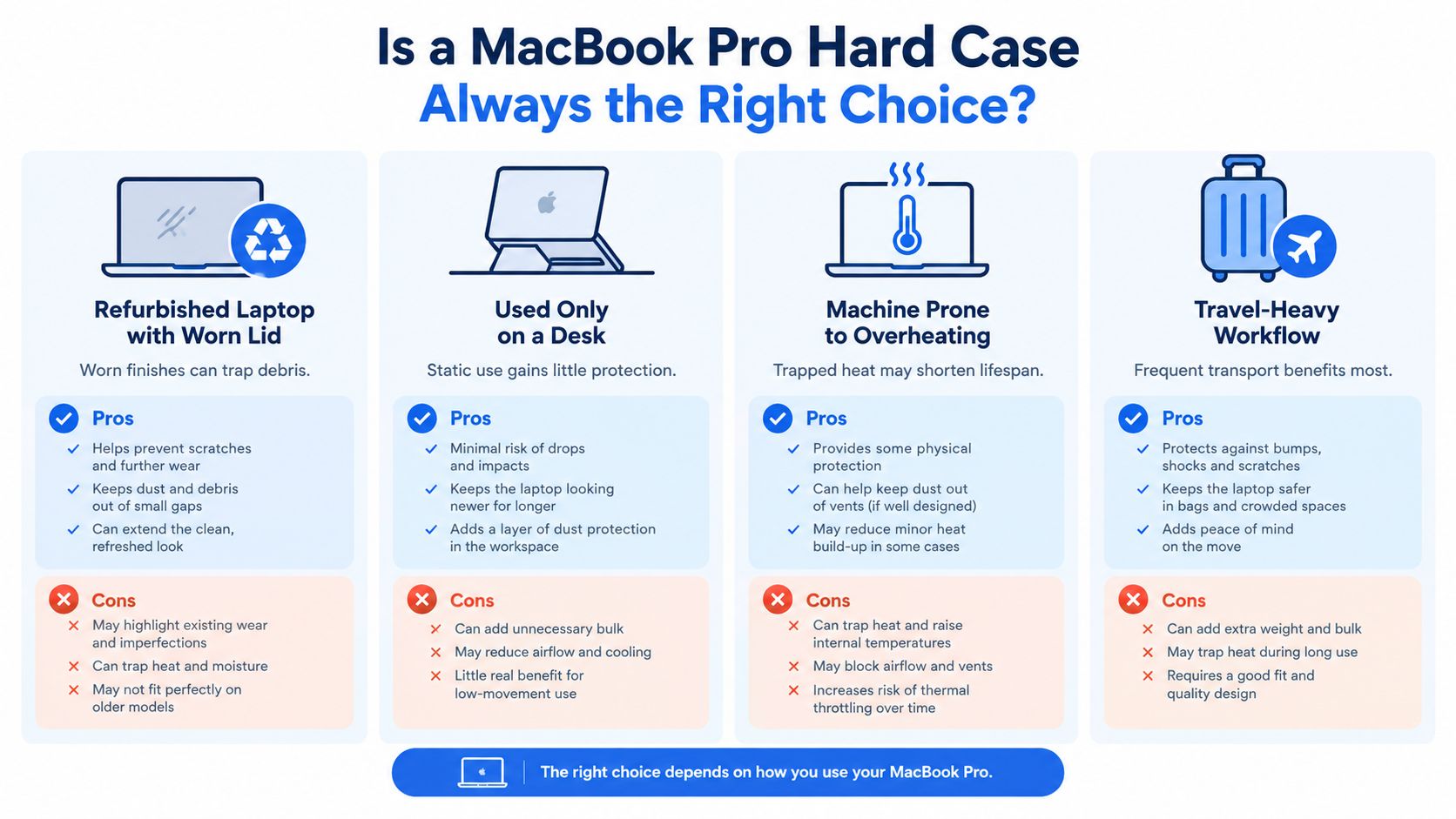
Is a MacBook Pro Hard Case Always the Right Choice
A MacBook Pro hard case isn't automatically a sensible upgrade. Start with the machine, not the colour, material or brand of the accessory. If the shell doesn't match the exact model identifier and screen size, leave it in the packaging and send it back.
Laptop damage is a real concern for UK owners. Research reported in September 2024 found that laptops accounted for 26% of damaged household technology items reported over the previous year, while the average replacement cost for a damaged gadget was £313.20. The research is about consumer technology generally, not MacBook Pro failure rates, but it makes the case for sensible protection. A hard shell can be useful when the computer regularly travels in crowded bags or gets used in environments where knocks are likely. (UK consumer technology damage research)
When a shell becomes the wrong accessory
Be careful with a refurbished MacBook Pro that already has a worn lid, a stiff hinge, a slight frame distortion or loose case clips. A rigid shell can grip an uneven chassis and apply pressure every time the lid opens. It can also hold dust against the aluminium, particularly around the rear hinge and ventilation openings.
A closed-lid desk setup needs less protection than a laptop carried between sites. If the MacBook spends most of its time on a desk, a sleeve for storage or a basic snap-on shell may be enough. If it already travels inside a padded rucksack compartment, adding a permanently attached hard case may offer little extra benefit.
Heat matters too. Apple advises using Mac laptops within acceptable operating temperatures and keeping ventilation unobstructed. A shell that covers or sits too close to intake and exhaust openings is a poor choice for sustained video editing, long exports or other demanding workloads. If you're responsible for several devices, practical guidance on how to secure business laptops is useful, but physical protection still needs to suit each machine.
Practical rule: A hard case is conditional protection. It isn't a compulsory part of buying a refurbished MacBook Pro.
Finding Your Exact MacBook Pro Model First
The phrase “MacBook Pro 14-inch” isn't enough information to buy a case safely. Apple has changed chassis shapes, port layouts, hinge geometry, speaker openings and camera cut-outs across generations. Two machines with similar screen descriptions can need completely different shells.
Use this order of checks before you shop:
- Open the Apple menu and choose About This Mac. Record the model name and year shown there.
- Open System Settings, then General, then About, and note the model information and serial number.
- Check the small model identifier printed on the underside. It begins with the letter A.
- Match that A-number with the case manufacturer's compatibility list, not just its product title.
- Confirm the screen size and inspect the port layout shown in the listing.
- If the seller's description only says “MacBook Pro”, ask for the exact identifier before ordering.
The underside marking can be difficult to read on an older or refurbished laptop. Don't guess from the chip name alone. “M1” or “M2” narrows the search, but it doesn't always prove the physical case design.
A proper listing should tell you which model family it supports and should mention the screen size. If it only says “fits most MacBook Pro models”, treat that as a warning. You can compare your machine with the MacBook Pro range before buying an accessory.
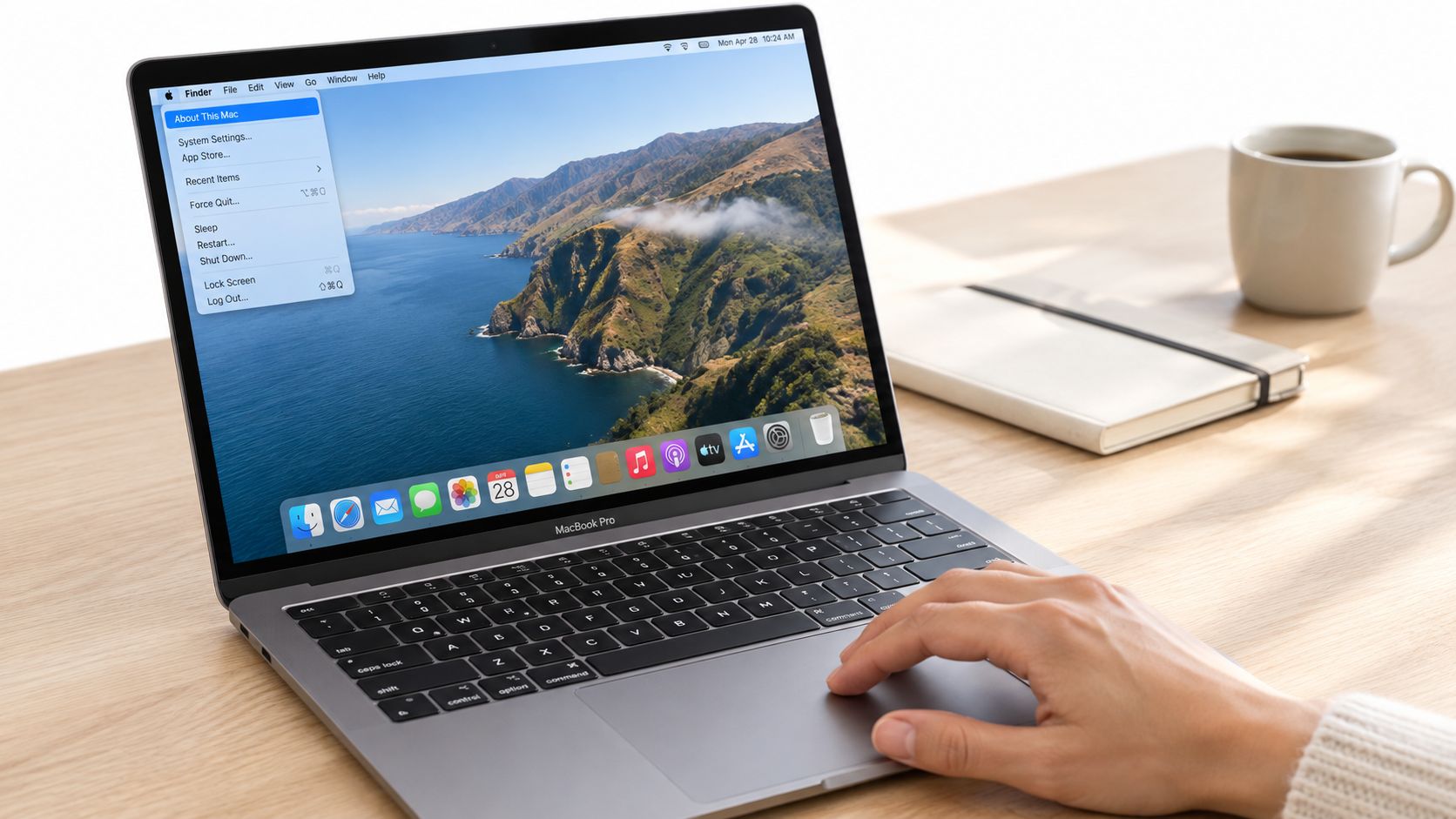
Why model identification protects more than appearance
An incorrect shell can obstruct USB-C or Thunderbolt ports, MagSafe, speakers, hinges or ventilation openings. It may also stop the display closing flush, leaving uneven pressure around the lid.
Apple's current UK specifications show why screen size alone isn't reliable. The 14-inch M5 MacBook Pro measures 31.26 cm wide, 22.12 cm deep and 1.55 cm high, while the 16-inch model measures 35.57 cm wide, 24.81 cm deep and 1.68 cm high. Those are different chassis, not interchangeable case categories. (Apple's UK MacBook Pro specifications)
Sizes and Generations That Affect Case Fit
A 13-inch shell won't correctly fit a 14-inch MacBook Pro. The difference isn't just the visible screen diagonal. The lid, base, corners, feet, hinge line and openings all need to align.
Apple lists the 14-inch M5 chassis at 31.26 × 22.12 × 1.55 cm, with a stated weight of 1.55 kg. By comparison, 13-inch 2020 MacBook Pro models measure approximately 30.41 × 21.24 × 1.56 cm and weigh about 1.4 kg. Even where the depth and height look close, the width and corner shape are different enough to make a 13-inch shell unsuitable for a 14-inch model. (Apple support specifications for Mac notebooks)
The 16-inch M5 Pro model is larger again, measuring 35.57 × 24.81 × 1.68 cm and weighing 2.14 kg. A case for the 14-inch machine cannot stretch safely over it, and a 16-inch shell will move around a smaller laptop.
What the size labels leave out
Older Intel models and Apple silicon models can share broad marketing descriptions while using different physical layouts. A 13-inch model from one generation may have different openings from another 13-inch model. The same issue applies to 14-inch cases across different years.
Thickness is only part of the fit. The shell must follow the lid's curve, clear the hinge and leave the base feet sitting correctly. If it's too tight, the clips can pop off or apply pressure to the aluminium. If it's too loose, the case can move, rub against the finish and collect grit between the shell and laptop.
The useful specification isn't “MacBook Pro case”. It's the exact A-number, screen size and compatible generation.
If you're buying a used machine, record those details before ordering accessories. A product such as a refurbished 13-inch MacBook Pro should still be checked by model identifier, even when the listing clearly states the year and screen size.
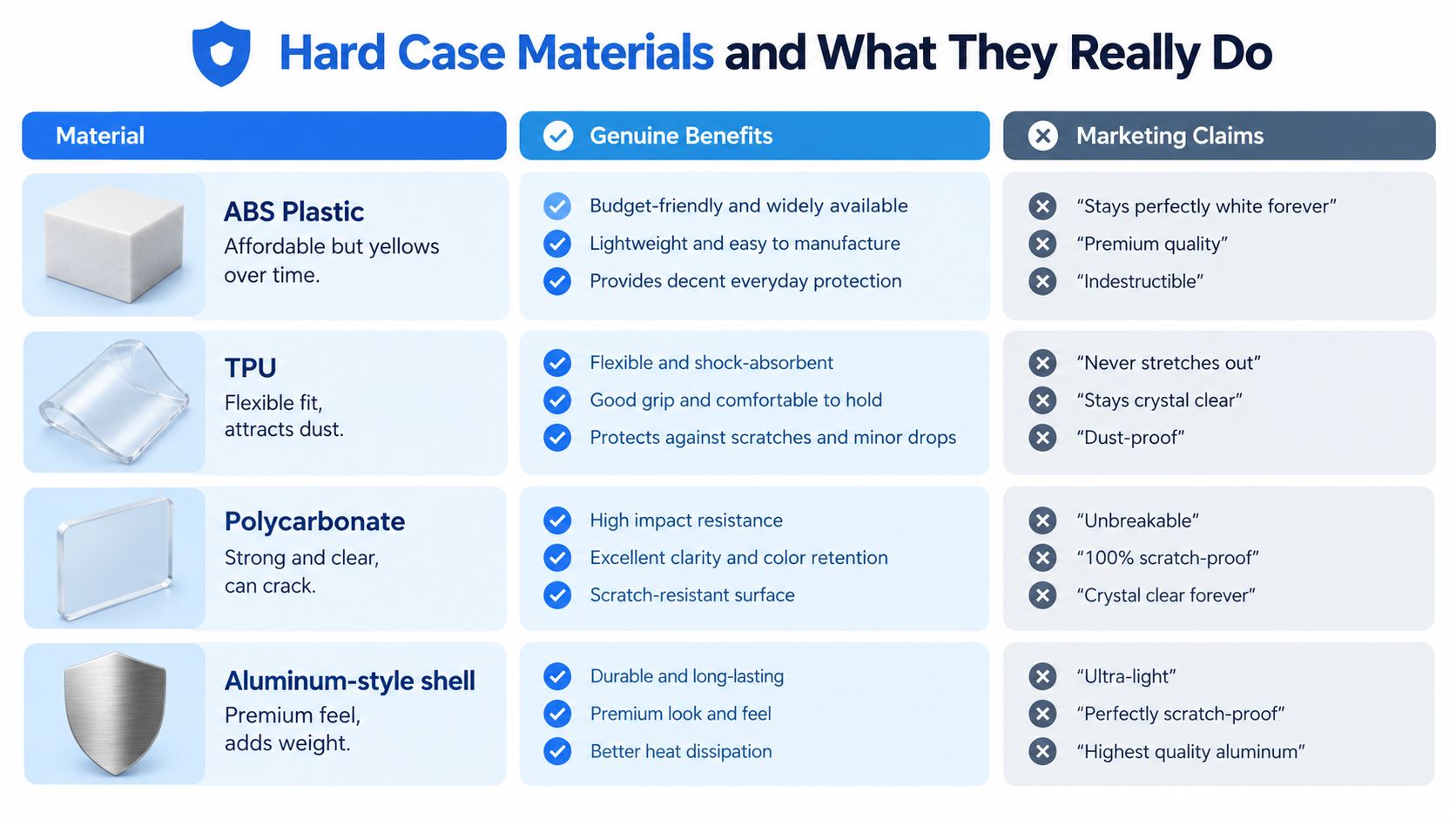
Hard Case Materials and What They Really Do
Case materials are often presented as if each one has a decisive advantage. In practice, the fit and ventilation matter more than a premium-sounding label.
ABS plastic is usually affordable and light. It can protect against everyday scuffs, but cheaper versions may become brittle or discolour with prolonged daylight exposure. It's an acceptable basic cover if the clips are accurate and the laptop only needs cosmetic protection. It won't turn a thin shell into serious impact protection.
Polycarbonate is stiffer and often clearer. A well-made polycarbonate shell can resist scratches better than soft plastic and hold its shape around the lid. The downside is that a close-fitting shell leaves less room for heat to escape from the aluminium chassis, so I wouldn't fit one to a laptop that already runs unusually hot.
Aluminium-style shells look substantial, but appearance can mislead. A rigid metal cover can add weight, dent rather than flex during an impact and rub against the MacBook's anodised finish where the surfaces meet. It can also make a laptop less comfortable to carry.
Silicone or TPU hybrids provide grip and can absorb small knocks. They attract lint, may lift around vents and can become awkward around hinges if the fit is poor. They're better suited to simple protection than to a laptop that needs unrestricted airflow during demanding work.
The hinge is where poor cases cause trouble
The rear hinge is the area I'd inspect most carefully. A shell that clamps tightly at the back can add force to a hinge that is already stiff or uneven. That matters more on a refurbished laptop, where normal wear may not be visible in a product photograph.
Avoid cases with sharp internal edges, badly finished clips or a rear section that presses into the hinge line. Remove the shell if the lid starts creaking, the display no longer opens smoothly or the case develops movement.
Material marketing won't compensate for a bad mould. A simple, correctly fitted shell is safer than an expensive case with restricted ports or poor clearance.
Hard Case vs Sleeve for Refurbished MacBook Pros
For a refurbished or older MacBook Pro, I'd normally choose a padded sleeve first. It cushions the laptop while travelling without remaining attached during use, and it's easier to remove so you can inspect the lid, hinge and ventilation areas.
A hard shell makes sense for a current-generation machine in good condition that travels every day in a busy bag. It helps reduce scratches and scuffs on the lid, particularly when the laptop is carried alongside chargers, notebooks or other equipment. It doesn't replace a padded compartment, and it shouldn't be treated as protection against every drop.
Choose a hard case if
- Your MacBook travels frequently: A correctly fitted shell can reduce everyday exterior scuffs during commuting.
- The hinge and frame are sound: Don’t use a shell to hide stiffness, creaking or distortion.
- You’ll remove and clean it: Dust trapped between two surfaces can mark the finish over time.
- The cut-outs are precise: Every relevant port, speaker opening, foot and vent needs clear access.
Choose a sleeve if
- The laptop is refurbished or visibly worn: A sleeve avoids clamping pressure around an already tired chassis.
- You carry it inside another bag: A padded compartment may provide all the protection you need.
- The computer runs demanding workloads: Removing the sleeve while operating avoids adding a permanent layer around the case.
- The hinge needs monitoring: A sleeve makes it easier to inspect and operate the laptop without accessory pressure.
A common example we see is a buyer choosing a hard shell because the MacBook has a few marks, then discovering that the hinge is already tight. The shell doesn't repair those marks and can make the hinge feel worse. If the computer is mainly desk-based, a removable sleeve or a modest snap-on shell with well-spaced feet is the better compromise.
Our Experience Refurbishing This Model at Used Mobiles 4U
A case recommendation should come after the laptop has been checked, not before. Technicians inspect the lid, corners, palm rest, keyboard, trackpad, display and underside for signs of heavy use. Hinge rub marks, polished palm-rest areas and dents around the corners tell us how the machine has been treated.
One thing we regularly notice is that cosmetic grade and mechanical condition aren't the same thing. A laptop can have visible marks but a healthy hinge, or look clean while showing uneven opening resistance. We check the lid through its full movement, listen for creaks and confirm that it closes evenly without one corner sitting higher than the other.
Battery condition also affects the decision. A protective shell shouldn't conceal swelling, lifting around the trackpad or a base that no longer sits flat. We check charging behaviour, battery reporting, sleep and wake, keyboard response, trackpad operation, display performance, speakers, camera and every port before considering accessories.
Repair or replace logic
Our technicians often see laptops where a replacement part is sensible, such as a damaged key, worn battery or faulty charging component. In other cases, a bent enclosure, serious hinge damage or signs of liquid exposure make repair less sensible than replacing the machine. A hard case must never be used to disguise any of those faults.
A refurbished MacBook that has passed a structured inspection may suit a shell if the owner travels heavily. A laptop with a fragile lid, awkward hinge or thermal concern is better protected by a sleeve and monitored during use. The accessory follows the condition of the computer.
When comparing nearby options, screen size, condition, battery health, storage and warranty matter more than a case included in the box. Our refurbishment process is the right standard to look for from any seller, even if you're buying elsewhere. You want evidence that the laptop was tested, not just wiped and photographed.
Pre-Purchase Checklist Before You Buy a Hard Case
Run these checks before spending money. If a listing fails any of them, don't assume the case will be “close enough”.
- Match the A-number. Read the identifier on the underside and compare it with the manufacturer’s compatibility list. Screen size alone isn’t sufficient.
- Confirm the screen size. Check whether the machine is the 13-inch, 14-inch or 16-inch version, then confirm that the case uses the same measurement.
- Test the hinge first. Open and close the laptop gently. Reject the shell idea if the hinge creaks, catches, feels unusually stiff or allows the display to wobble.
- Inspect the frame. Look for bent corners, lifted sections, cracks, swelling or distortion. A hard case won’t correct structural damage.
- Check every opening. Compare the case cut-outs with USB-C or Thunderbolt ports, MagSafe, HDMI, SD, speakers, hinges and ventilation openings for that generation.
- Check heat during normal work. Run a demanding task you regularly use before fitting the shell. Stop if the laptop becomes unusually hot, throttles or behaves differently after installation.
- Plan cleaning. Use a microfibre cloth and suitable air cleaning around grilles, then remove the case regularly to clear trapped dust and grit.
Don't fit the accessory immediately after delivery and forget about it. Take photographs of the laptop's condition first, keep the packaging and test each port after fitting. If the display doesn't close flush or a cable no longer seats properly, remove the shell and return it.
A seller's inspection checklist can also show how seriously it treats used equipment. This refurbishment check guide gives buyers useful points to compare when assessing a refurbished laptop.
The Verdict on Buying a MacBook Pro Hard Case
A hard case is worth buying when four conditions are met: the A-number matches, the screen size matches, the hinge and frame are healthy, and your travel routine justifies permanent protection. You should also be willing to remove it for cleaning and stop using it if the laptop runs unusually hot.
For a clean, newer M-series MacBook Pro that travels daily, I'd choose a well-fitted polycarbonate shell with open vents, accurate clips and no pressure around the hinge. For an older or refurbished laptop with cosmetic wear, hinge history or uncertain thermal behaviour, I'd choose a padded sleeve instead.
I'd avoid aluminium-style shells unless the appearance matters more to you than weight and surface risk. Silicone can be useful for grip, but it needs careful inspection around vents and hinges. The material is secondary to the mould quality and exact compatibility.
The single best buying decision is the model-fit check. A case that fits the wrong chassis can obstruct ports, rub the finish and stress the hinge, regardless of how premium it looks. Buy from a retailer that publishes exact compatibility information and offers a straightforward return if the case doesn't fit.
UK buyers also retain legal protection if a refurbished MacBook develops an inherent fault. GOV.UK states that consumers can seek repair or replacement when faulty goods are returned within six months, unless the seller can show the fault wasn't present at purchase. There's also a 30-day short-term right to reject faulty goods for a full refund under the Consumer Rights Act 2015. A case may help prevent accidental cosmetic damage, but it doesn't remove the seller's responsibility for charging, display, keyboard or other inherent faults. (GOV.UK returns and refunds guidance)
Keeping a working refurbished computer in service can also support reuse. The University of Exeter's CE-Hub reports 1.6 million tonnes of UK e-waste, or 24 kg per person, in 2019, and says reuse is more favourable than recycling at end of life because it generates fewer emissions. A sleeve or case is useful only when it helps extend the laptop's working life without creating new problems. (University of Exeter CE-Hub guidance on extending electronics life)
If you're buying a MacBook Pro hard case, check the identifier before looking at colour or material. Choose a shell for a healthy, frequently travelled laptop. Choose a sleeve for most refurbished or older machines, especially when the hinge, heat or frame needs careful monitoring.
Written by James Waterston, 24 years in the mobile phone industry from customer service through to Sales Director of a global repair and recycling company. Now running Used Mobiles 4U for over 8 years.
LinkedIn: https://uk.linkedin.com/in/james-waterston-9039a21
Meta description: MacBook Pro hard case advice for UK buyers. Check model fit, materials, hinge safety and when a sleeve is better for refurbished laptops.
Visit Used Mobiles 4 U for professionally tested refurbished MacBooks and phones, with clear grading, secure data wiping and UK support. If you're unsure whether a hard case suits your laptop, check the exact model with the team before ordering an accessory.
Looking for a refurbished phone?
Shop professionally tested refurbished iPhones and Samsung phones with 18 month warranty, 30 day returns and free UK delivery.
Browse Refurbished Phones



