


Keep Phone from Overheating: What Works and When to Worry

13/11/2026

33 Mins

Keep your phone between 0°C and 35°C while you're using it and while it's charging, and stop using or charging it the moment it feels too hot to hold comfortably. That's the operating window manufacturers design for, and it's the one number worth remembering when a handset starts to feel like a hand warmer.
Your phone is on the arm of the sofa, plugged in, screen down, and the back of it is noticeably warm. You've got two choices: leave it, or pick it up and check. Leaving it alone feels easier, then you wonder a fortnight later why the battery drains faster than it used to. Heat is the earliest warning a phone gives you, well before anything fails, and it's the warning people talk themselves out of.
The Short Version
- Stay inside 0°C to 35°C while using and charging, and move the phone into shade when the room itself is warm.
- Never charge a hot phone. Let it come back to room temperature on a hard surface first.
- Keep it out of parked cars, sunny windowsills and radiator shelves. Those spots push a handset past its limits faster than anything else.
- Warmth during charging or gaming is normal. Heat you can't comfortably hold, swelling, hissing or an acrid smell is not.
- If it swells, hisses or smells, unplug it, stop using it and get it checked. Don't charge it again.
Most overheating comes from habits, charging setup and battery wear, so a phone that keeps running hot needs a battery check rather than a stint in the fridge.
Safe Temperature Ranges for Your Phone
Those first four bands come straight from Google's UK safety guidance for the Pixel 6 and Pixel 6 Pro, which sets normal operation and charging at ambient temperatures of 0°C to 35°C, storage at -20°C to 45°C, and warns specifically against anything above 45°C, naming a car dashboard, a radiator and the space behind sun-exposed glass. Apple states the same 0°C to 35°C window for iPhone and notes that heat above it shortens battery life, as Bristol Post reported.
Read those as ambient limits, not targets. A phone sitting in a 23°C room isn't "safe" because it's under 35°C; it is within the range where the hardware can shed its own heat.
What happens when it gets too hot
Gaming, video recording, torch use and AR features all add heat at any room temperature, because the chipset is doing real work. Push the internal temperature far enough and the phone protects itself: performance drops, connectivity weakens, charging stops, the display dims or the handset shuts down. That's a working safety control, not a fault.
Practical check: if the room feels warm to you, the phone is running hotter than the room. Move it before it slows down or shuts off.
Never cool a hot phone in a freezer or under a tap. Condensation and thermal shock do more damage than the heat did.
How to Keep Your Phone From Overheating in Eight Steps
Most overheating I deal with is habit, not hardware. Work through these in order, from the cheapest fix upward.
- Close the heaviest background apps. On Android, Settings > Battery > Battery usage shows what's been running; on iPhone, Settings > Battery lists usage by app. A background process keeps the processor busy and the heat coming.
- Drop the brightness. Android: Settings > Display > Brightness. iPhone: Settings > Display & Brightness. The screen is one of the biggest heat sources during long sessions.
- Take off thick or rugged cases for gaming, long video recording or navigation. They trap heat against the back where the battery sits.
- Turn off hotspot and unused Bluetooth, and don't stream for an hour in a weak signal area. The modem works harder when signal is poor, and that work turns into heat.
- Switch on Battery Saver (Android, Settings > Battery > Battery Saver) or Low Power Mode (iPhone, Settings > Battery) on long days out.
- Clear dust and lint from the charging port and speaker grilles with a dry, soft brush. Never a metal pin, which shorts pins and scratches contacts.
- Move it away from direct sun and heaters, following the ranges above.
- Install system updates. Android: Settings > Software update. iPhone: Settings > General > Software Update. Updates change how heat and charging are managed.
A normal day looks like this: the phone is warm after a long session and back to normal within a few minutes of rest. Warmth on its own is not the warning sign. Heat that arrives when the phone is idle, or that won't clear, is.
Charging Safely Without Creating Dangerous Heat
Heat during charging comes from two things: current going in, and where the phone is sitting while it happens. Reduce both and you remove most of the risk.
UK council fire-safety guidance, such as Tandridge District Council's lithium battery advice, sets out the routine in six moves:
- Use the charger supplied with the phone, or a genuine replacement from a trusted seller. Cheap unbranded units are a common cause of overheating because they don't regulate power properly. If the original is long gone, a genuine Android phone charger is the safe substitute.
- Charge on a hard, flat, non-flammable surface. Never a bed, sofa, carpet or under bedding.
- Keep it uncovered so heat can escape. A closed case and a pillow is the worst combination in the house.
- Charge while you're awake and nearby, not overnight while you sleep and not while you're out.
- Unplug it once it's full. Sitting at 100% on a charger just adds heat and cycles.
- Stop immediately if it becomes unusually hot, swells, leaks, smells acrid, hisses or shows casing damage.
Four UK situations worth fixing
Charging under bedding overnight. The single most common one I hear about. If you need the phone charged by morning, charge it in the evening on a bedside table, face up, case off. Your sleep doesn't need to be part of the charging circuit.
Navigation in a hot car while charging. Sun through the windscreen plus charging current plus GPS is three heat sources at once. Mount it out of direct sun, keep a vent nearby, and if the screen dims or the charge stops, that's the phone protecting itself.
Fast charging in a heatwave. Speed isn't the villain. Supervision is missing. Fast charging in a cool room, on a hard surface, with the phone out of the sun, is fine.
A warm handset pushed into a backpack next to a power bank. No airflow, no supervision, two batteries sharing a small space. Charge at your desk instead, then pack it.
The habit data explains why this keeps coming up. A 2024 Allianz survey found that 78% of surveyed UK adults regularly charged lithium-battery products overnight (Allianz). And the consequences are not theoretical: UK fire brigade figures for 2025 recorded 1,760 lithium-ion battery fires, around 4.8 a day, with 45% involving phones, tablets and power banks, as QBE Europe's summary sets out. Ordinary phone use doesn't commonly start fires. Unsupervised charging on soft furnishings does.
Normal Warmth, Warning Signs and What to Do If It Is Hot
Some warmth is normal. Lithium-ion phones warm up while charging and under load, and that's the chemistry doing its job. The assumption worth challenging is that cooling alone solves a phone that keeps overheating. If it reheats on the same tasks every evening, cooling is a painkiller, not a cure.
Suffolk Fire and Rescue Service draws the line clearly: a phone battery may become slightly warm during use or charging, but an extremely hot battery may be defective and could start a fire, so you should stop charging and using it rather than trying to cool it in a fridge or freezer (Suffolk Fire and Rescue Service).
Matching the symptom to the verdict
Check battery health before you guess. On iPhone it's Settings > Battery > Battery Health, and on Android it's in the battery section of Settings or the manufacturer's diagnostic app. A reading that's fallen well below where it started, paired with repeated heat, points at the cell rather than at your apps. Our guide to a phone battery health check walks through the readings.
What to do when it's already hot
- Unplug the charger.
- Stop using it and close running apps.
- Take the case off so heat can leave.
- Move it to a cool, dry, shaded spot on a hard surface, away from bedding, cushions and sun.
- Let it cool naturally at room temperature. No fridge, no freezer, no water.
- Wait until it feels normal to the touch before using or charging it again.
- Restart it and watch through ten minutes of light use.
- If it swells, smells, hisses or stays hot, don't charge it again. Keep it away from anything flammable and get it checked by the manufacturer, a qualified repairer or your retailer.
That sequence matches what Buckinghamshire Fire & Rescue Service advises for a hot device: unplug it, remove a thick case, move it out of sunlight and let it cool naturally (Buckinghamshire Fire & Rescue Service). Electrical Safety First is blunter still, saying you should stop using and unplug a phone that's too hot to handle (Electrical Safety First).
"Too hot to handle" is a better threshold than any number on a screen, because it's measured on your hand rather than in a settings menu.
Back up your data before any repair, reset or battery replacement. Repairs can wipe the device, and a swollen battery is not the moment to discover you never turned on iCloud or Google backup.
Our Experience Refurbishing This Model at Used Mobiles 4 U
On our bench, heat complaints rarely come down to one clear fault. It's usually a mix of battery age, a case that's been through two summers of navigation and dust packed into the port, all nudging the same handset in the same direction.
One thing we regularly notice is that a phone with a lower battery health reading runs warmer on identical tasks. The cell works harder to deliver the same power, and that extra effort shows up as heat through the back. It's why every phone we sell is professionally checked for performance, battery health and functionality before it's listed, and why anything that doesn't meet our functional, battery or condition standards gets repaired, retested or pulled from sale.
What We Commonly See
- Warmth after a long session under load, which settles within minutes at rest. Normal, no action needed.
- A hot phone that shuts itself down during charging or gaming. Usually a battery replacement case rather than a board fault.
- A rugged case in daily use trapping heat against the back, especially with wireless charging.
- Dust and lint in the charging port, which restricts contact and makes charging run hotter than it should.
Our technicians check battery health, port condition, how the handset behaves under sustained load, the software version and any sign of swelling before anything is graded. Cosmetic grade describes visible wear only. It tells you nothing about how the phone handles heat, which is why we keep appearance and function as two separate checks.
Parts-wise, we usually replace the battery and clean or replace the charging port. Replacing a mainboard because of heat is rare and, in most cases, not worth the money on a handset of that age. Signs of heavy use we look for include heat concentrated at the back, faster drain on the same tasks and a port that looks grey with compacted lint.
In our experience, a newer phone with a healthy battery feels cooler under the same load than an older one with a worn cell. When you're choosing between two nearby models, battery health matters more than the name on the box. Every refurbishment follows the same process, and you can read about it in our refurbishment process.
Repair or Replace an Overheating Phone
My verdict is simple. Replace the phone if it swells, smells or gets dangerously hot. Consider a battery replacement if it's only warm under heavy use and the battery is clearly the cause.
Repair makes sense when the phone still receives software updates, the fault traces to a worn battery or a dusty port, and the quote is sensible against the handset's value. Get the quote before you commit, because repair costs vary by model and parts availability.
Replace it when:
- There's any swelling, smoke or heat that returns after a fix. That handset comes out of service, not back into a pocket.
- Software support has ended, so you're carrying a device that won't get safety or battery-management updates.
- Battery health is below what you'd accept on a phone you rely on daily.
Official updates can reduce risk. Government product-safety reports on the Google Pixel 4a and Pixel 6a identified a fire risk and stated that software updates lowered it by reducing battery capacity and charging speed (GOV.UK product safety report). That's a good reason to check a second-hand phone's model, software version and recall status before you buy. It's also why a swollen or very hot handset should be retired rather than patched with an unofficial battery or charger.
A common example we see is an older phone that heats up every evening during charging. Nine times out of ten, a battery check settles it, and the phone carries on for another couple of years. Our comparison of iPhone repairs versus refurbished iPhones, the costs explained is useful if you're weighing the two.
Refurbished suits buyers who want a checked, SIM-free handset with clear grading and predictable cooling under normal use. Avoid anything with unknown battery history or visible swelling, however cheap it looks. Every phone we sell carries at least 85% battery health, and the 18-month device warranty with 12-month battery cover terms are listed on each product page, so read them before you buy. If you'd rather start with a Like New handset, the iPhone 15 Plus – Pink – 128GB – Like New is fully tested, SIM-free, supplied with 85%+ battery health, an 18-month warranty and 30-day returns.
Written by James Waterston, 24 years in the mobile phone industry from customer service through to Sales Director of a global repair and recycling company, now running Used Mobiles 4 U for over 8 years. Connect on LinkedIn.
If you'd rather replace a phone that keeps running hot than keep nursing it, every handset we sell leaves us with at least 85% battery health, an 18-month device warranty and 12-month battery cover, and each one is checked for performance and heat under load before it's listed. Our graded, SIM-free stock covers recent iPhones, Samsung Galaxy and Motorola models, so you can compare condition, storage and live price side by side. Visit Used Mobiles 4 U to find a cooler phone.
Keep your phone between 0°C and 35°C while you're using it and while it's charging, and stop using or charging it the moment it feels too hot to hold comfortably. That's the operating window manufacturers design for, and it's the one number worth remembering when a handset starts to feel like a hand warmer.
Your phone is on the arm of the sofa, plugged in, screen down, and the back of it is noticeably warm. You've got two choices: leave it, or pick it up and check. It is tempting to leave it, then wonder a fortnight later why the battery drains faster than it used to. Heat is the earliest warning a phone gives you, well before anything fails, and it's the warning people talk themselves out of.
The Short Version
- Stay inside 0°C to 35°C while using and charging, and move the phone into shade when the room itself is warm.
- Never charge a hot phone. Let it come back to room temperature on a hard surface first.
- Keep it out of parked cars, sunny windowsills and radiator shelves. Those spots push a handset past its limits faster than anything else.
- Warmth during charging or gaming is normal. Heat you can't comfortably hold, swelling, hissing or an acrid smell is not.
- If it swells, hisses or smells, unplug it, stop using it and get it checked. Don't charge it again.
Most overheating comes from habits, charging setup and battery wear, so a phone that keeps running hot needs a battery check rather than a stint in the fridge.
Safe Temperature Ranges for Your Phone
Those first four bands come straight from Google's UK safety guidance for the Pixel 6 and Pixel 6 Pro, which sets normal operation and charging at ambient temperatures of 0°C to 35°C, storage at -20°C to 45°C, and warns specifically against anything above 45°C, naming a car dashboard, a radiator and the space behind sun-exposed glass. Apple states the same 0°C to 35°C window for iPhone and notes that heat above it shortens battery life, as Bristol Post reported.
Read those as ambient limits, not targets. A phone sitting in a 23°C room isn't "safe" because it's under 35°C; it's within the range where the hardware can shed its own heat.
What happens when it gets too hot
Gaming, video recording, torch use and AR features all add heat at any room temperature, because the chipset is doing real work. Push the internal temperature far enough and the phone protects itself: performance drops, connectivity weakens, charging stops, the display dims or the handset shuts down. That's a working safety control, not a fault.
Practical check: if the room feels warm to you, the phone is running hotter than the room. Move it before it slows down or shuts off.
Never cool a hot phone in a freezer or under a tap. Condensation and thermal shock do more damage than the heat did.
How to Keep Your Phone From Overheating in Eight Steps
Most overheating I deal with is habit, not hardware. Work through these in order, from the cheapest fix upward.
- Close the heaviest background apps. On Android, Settings > Battery > Battery usage shows what's been running; on iPhone, Settings > Battery lists usage by app. A background process keeps the processor busy and the heat coming.
- Drop the brightness. Android: Settings > Display > Brightness. iPhone: Settings > Display & Brightness. The screen is one of the biggest heat sources during long sessions.
- Take off thick or rugged cases for gaming, long video recording or navigation. They trap heat against the back where the battery sits.
- Turn off hotspot and unused Bluetooth, and don't stream for an hour in a weak signal area. The modem works harder when signal is poor, and that work turns into heat.
- Switch on Battery Saver (Android, Settings > Battery > Battery Saver) or Low Power Mode (iPhone, Settings > Battery) on long days out.
- Clear dust and lint from the charging port and speaker grilles with a dry, soft brush. Never a metal pin, which shorts pins and scratches contacts.
- Move it away from direct sun and heaters, following the ranges above.
- Install system updates. Android: Settings > Software update. iPhone: Settings > General > Software Update. Updates change how heat and charging are managed.
A normal day looks like this: the phone is warm after a long session and back to normal within a few minutes of rest. Warmth on its own is not the warning sign. Heat that arrives when the phone is idle, or that won't clear, is.
Charging Safely Without Creating Dangerous Heat
Heat during charging comes from two things: current going in, and where the phone is sitting while it happens. Reduce both and you remove most of the risk.
UK council fire-safety guidance, such as Tandridge District Council's lithium battery advice, sets out the routine in six moves:
- Use the charger supplied with the phone, or a genuine replacement from a trusted seller. Cheap unbranded units are a common cause of overheating because they don't regulate power properly. If the original is long gone, a genuine Android phone charger is the safe substitute.
- Charge on a hard, flat, non-flammable surface. Never a bed, sofa, carpet or under bedding.
- Keep it uncovered so heat can escape. A closed case and a pillow is the worst combination in the house.
- Charge while you're awake and nearby, not overnight while you sleep and not while you're out.
- Unplug it once it's full. Sitting at 100% on a charger just adds heat and cycles.
- Stop immediately if it becomes unusually hot, swells, leaks, smells acrid, hisses or shows casing damage.
Four UK situations worth fixing
Charging under bedding overnight. The single most common one I hear about. If you need the phone charged by morning, charge it in the evening on a bedside table, face up, case off. Your sleep doesn't need to be part of the charging circuit.
Navigation in a hot car while charging. Sun through the windscreen plus charging current plus GPS is three heat sources at once. Mount it out of direct sun, keep a vent nearby, and if the screen dims or the charge stops, that's the phone protecting itself.
Fast charging in a heatwave. Speed isn't the villain. Supervision is missing. Fast charging in a cool room, on a hard surface, with the phone out of the sun, is fine.
A warm handset pushed into a backpack next to a power bank. No airflow, no supervision, two batteries sharing a small space. Charge at your desk instead, then pack it.
The habit data explains why this keeps coming up. A 2024 Allianz survey found that 78% of surveyed UK adults regularly charged lithium-battery products overnight (Allianz). And the consequences are not theoretical: UK fire brigade figures for 2025 recorded 1,760 lithium-ion battery fires, around 4.8 a day, with 45% involving phones, tablets and power banks, as QBE Europe's summary sets out. Ordinary phone use doesn't commonly start fires. Unsupervised charging on soft furnishings does.
Normal Warmth, Warning Signs and What to Do If It Is Hot
Some warmth is normal. Lithium-ion phones warm up while charging and under load, and that's the chemistry doing its job. The assumption worth challenging is that cooling alone solves a phone that keeps overheating. If it reheats on the same tasks every evening, cooling is a painkiller, not a cure.
Suffolk Fire and Rescue Service draws the line clearly: a phone battery may become slightly warm during use or charging, but an extremely hot battery may be defective and could start a fire, so you should stop charging and using it rather than trying to cool it in a fridge or freezer (Suffolk Fire and Rescue Service).
Matching the symptom to the verdict
Check battery health before you guess. On iPhone it's Settings > Battery > Battery Health, and on Android it's in the battery section of Settings or the manufacturer's diagnostic app. A reading that's fallen well below where it started, paired with repeated heat, points at the cell rather than at your apps. Our guide to a phone battery health check walks through the readings.
What to do when it's already hot
- Unplug the charger.
- Stop using it and close running apps.
- Take the case off so heat can leave.
- Move it to a cool, dry, shaded spot on a hard surface, away from bedding, cushions and sun.
- Let it cool naturally at room temperature. No fridge, no freezer, no water.
- Wait until it feels normal to the touch before using or charging it again.
- Restart it and watch through ten minutes of light use.
- If it swells, smells, hisses or stays hot, don't charge it again. Keep it away from anything flammable and get it checked by the manufacturer, a qualified repairer or your retailer.
That sequence matches what Buckinghamshire Fire & Rescue Service advises for a hot device: unplug it, remove a thick case, move it out of sunlight and let it cool naturally (Buckinghamshire Fire & Rescue Service). Electrical Safety First is blunter still, saying you should stop using and unplug a phone that's too hot to handle (Electrical Safety First).
"Too hot to handle" is a better threshold than any number on a screen, because it's measured on your hand rather than in a settings menu.
Back up your data before any repair, reset or battery replacement. Repairs can wipe the device, and a swollen battery is not the moment to discover you never turned on iCloud or Google backup.
Our Experience Refurbishing This Model at Used Mobiles 4 U
On our bench, heat complaints rarely come down to one clear fault. It's usually a mix of battery age, a case that's been through two summers of navigation and dust packed into the port, all nudging the same handset in the same direction.
One thing we regularly notice is that a phone with a lower battery health reading runs warmer on identical tasks. The cell works harder to deliver the same power, and that extra effort shows up as heat through the back. It's why every phone we sell is professionally checked for performance, battery health and functionality before it's listed, and why anything that doesn't meet our functional, battery or condition standards gets repaired, retested or pulled from sale.
What We Commonly See
- Warmth after a long session under load, which settles within minutes at rest. Normal, no action needed.
- A hot phone that shuts itself down during charging or gaming. Usually a battery replacement case rather than a board fault.
- A rugged case in daily use trapping heat against the back, especially with wireless charging.
- Dust and lint in the charging port, which restricts contact and makes charging run hotter than it should.
Our technicians check battery health, port condition, how the handset behaves under sustained load, the software version and any sign of swelling before anything is graded. Cosmetic grade describes visible wear only. It tells you nothing about how the phone handles heat, which is why we keep appearance and function as two separate checks.
Parts-wise, we usually replace the battery and clean or replace the charging port. Replacing a mainboard because of heat is rare and, in most cases, not worth the money on a handset of that age. Signs of heavy use we look for include heat concentrated at the back, faster drain on the same tasks and a port that looks grey with compacted lint.
In our experience, a newer phone with a healthy battery feels cooler under the same load than an older one with a worn cell. When you're choosing between two nearby models, battery health matters more than the name on the box. Every refurbishment follows the same process, and you can read about it in our refurbishment process.
Repair or Replace an Overheating Phone
My verdict is simple. Replace the phone if it swells, smells or gets dangerously hot. Consider a battery replacement if it's only warm under heavy use and the battery is clearly the cause.
Repair makes sense when the phone still receives software updates, the fault traces to a worn battery or a dusty port, and the quote is sensible against the handset's value. Get the quote before you commit, because repair costs vary by model and parts availability.
Replace it when:
- There's any swelling, smoke or heat that returns after a fix. That handset comes out of service, not back into a pocket.
- Software support has ended, so you're carrying a device that won't get safety or battery-management updates.
- Battery health is below what you'd accept on a phone you rely on daily.
Official updates can reduce risk. Government product-safety reports on the Google Pixel 4a and Pixel 6a identified a fire risk and stated that software updates lowered it by reducing battery capacity and charging speed (GOV.UK product safety report). That's a good reason to check a second-hand phone's model, software version and recall status before you buy. It's also why a swollen or very hot handset should be retired rather than patched with an unofficial battery or charger.
A common example we see is an older phone that heats up every evening during charging. Nine times out of ten, a battery check settles it, and the phone carries on for another couple of years. Our comparison of iPhone repairs versus refurbished iPhones, the costs explained is useful if you're weighing the two.
Refurbished suits buyers who want a checked, SIM-free handset with clear grading and predictable cooling under normal use. Avoid anything with unknown battery history or visible swelling, however cheap it looks. Every phone we sell carries at least 85% battery health, and the 18-month device warranty with 12-month battery cover terms are listed on each product page, so read them before you buy. If you'd rather start with a Like New handset, the iPhone 15 Plus – Pink – 128GB – Like New is fully tested, SIM-free, supplied with 85%+ battery health, an 18-month warranty and 30-day returns.
Written by James Waterston, 24 years in the mobile phone industry from customer service through to Sales Director of a global repair and recycling company, now running Used Mobiles 4 U for over 8 years. Connect on LinkedIn.
If you'd rather replace a phone that keeps running hot than keep nursing it, every handset we sell leaves us with at least 85% battery health, an 18-month device warranty and 12-month battery cover, and each one is checked for performance and heat under load before it's listed. Our graded, SIM-free stock covers recent iPhones, Samsung Galaxy and Motorola models, so you can compare condition, storage and live price side by side. Visit Used Mobiles 4 U to find a cooler phone.
Keep your phone between 0°C and 35°C while you're using it and while it's charging, and stop using or charging it the moment it feels too hot to hold comfortably. That's the operating window manufacturers design for, and it's the one number worth remembering when a handset starts to feel like a hand warmer.
Your phone is on the arm of the sofa, plugged in, screen down, and the back of it is noticeably warm. You've got two choices: leave it, or pick it up and check. It's easy to leave it, then wonder a fortnight later why the battery drains faster than it used to. Heat is the earliest warning a phone gives you, well before anything fails, and it's the warning people talk themselves out of.
The Short Version
- Stay inside 0°C to 35°C while using and charging, and move the phone into shade when the room itself is warm.
- Never charge a hot phone. Let it come back to room temperature on a hard surface first.
- Keep it out of parked cars, sunny windowsills and radiator shelves. Those spots push a handset past its limits faster than anything else.
- Warmth during charging or gaming is normal. Heat you can't comfortably hold, swelling, hissing or an acrid smell is not.
- If it swells, hisses or smells, unplug it, stop using it and get it checked. Don't charge it again.
Most overheating comes from habits, charging setup and battery wear, so a phone that keeps running hot needs a battery check rather than a stint in the fridge.
Safe Temperature Ranges for Your Phone
Those first four bands come straight from Google's UK safety guidance for the Pixel 6 and Pixel 6 Pro, which sets normal operation and charging at ambient temperatures of 0°C to 35°C, storage at -20°C to 45°C, and warns specifically against anything above 45°C, naming a car dashboard, a radiator and the space behind sun-exposed glass. Apple states the same 0°C to 35°C window for iPhone and notes that heat above it shortens battery life, as Bristol Post reported.
Read those as ambient limits, not targets. A phone sitting in a 23°C room isn't "safe" because it's under 35°C; it's within the range where the hardware can shed its own heat.
What happens when it gets too hot
Gaming, video recording, torch use and AR features all add heat at any room temperature, because the chipset is doing real work. Push the internal temperature far enough and the phone protects itself: performance drops, connectivity weakens, charging stops, the display dims or the handset shuts down. That's a working safety control, not a fault.
Practical check: if the room feels warm to you, the phone is running hotter than the room. Move it before it slows down or shuts off.
Never cool a hot phone in a freezer or under a tap. Condensation and thermal shock do more damage than the heat did.
How to Keep Your Phone From Overheating in Eight Steps
Most overheating I deal with is habit, not hardware. Work through these in order, from the cheapest fix upward.
- Close the heaviest background apps. On Android, Settings > Battery > Battery usage shows what's been running; on iPhone, Settings > Battery lists usage by app. A background process keeps the processor busy and the heat coming.
- Drop the brightness. Android: Settings > Display > Brightness. iPhone: Settings > Display & Brightness. The screen is one of the biggest heat sources during long sessions.
- Take off thick or rugged cases for gaming, long video recording or navigation. They trap heat against the back where the battery sits.
- Turn off hotspot and unused Bluetooth, and don't stream for an hour in a weak signal area. The modem works harder when signal is poor, and that work turns into heat.
- Switch on Battery Saver (Android, Settings > Battery > Battery Saver) or Low Power Mode (iPhone, Settings > Battery) on long days out.
- Clear dust and lint from the charging port and speaker grilles with a dry, soft brush. Never a metal pin, which shorts pins and scratches contacts.
- Move it away from direct sun and heaters, following the ranges above.
- Install system updates. Android: Settings > Software update. iPhone: Settings > General > Software Update. Updates change how heat and charging are managed.
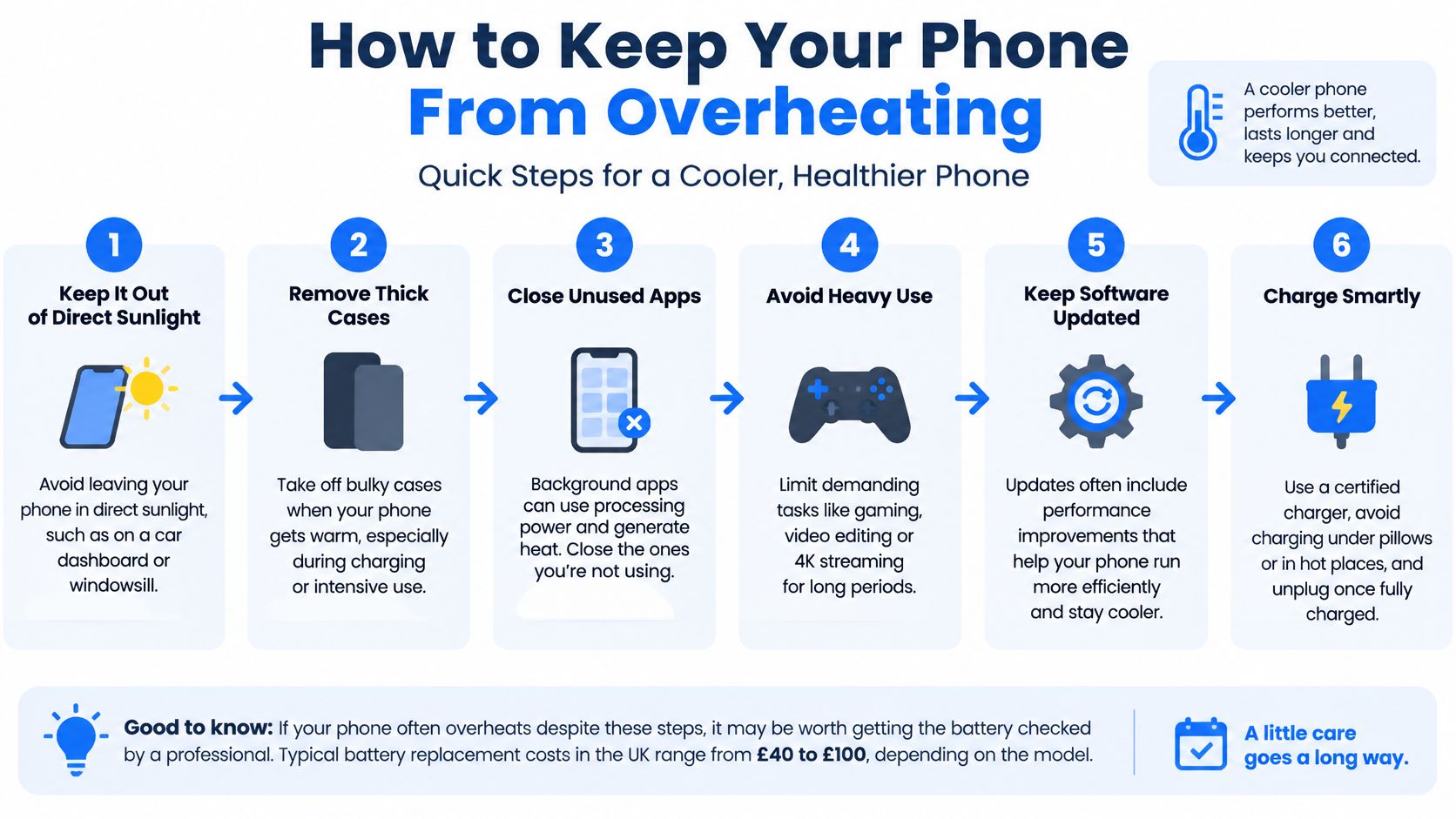
A normal day looks like this: the phone is warm after a long session and back to normal within a few minutes of rest. Warmth on its own is not the warning sign. Heat that arrives when the phone is idle, or that won't clear, is.
Charging Safely Without Creating Dangerous Heat
Heat during charging comes from two things: current going in, and where the phone is sitting while it happens. Reduce both and you remove most of the risk.
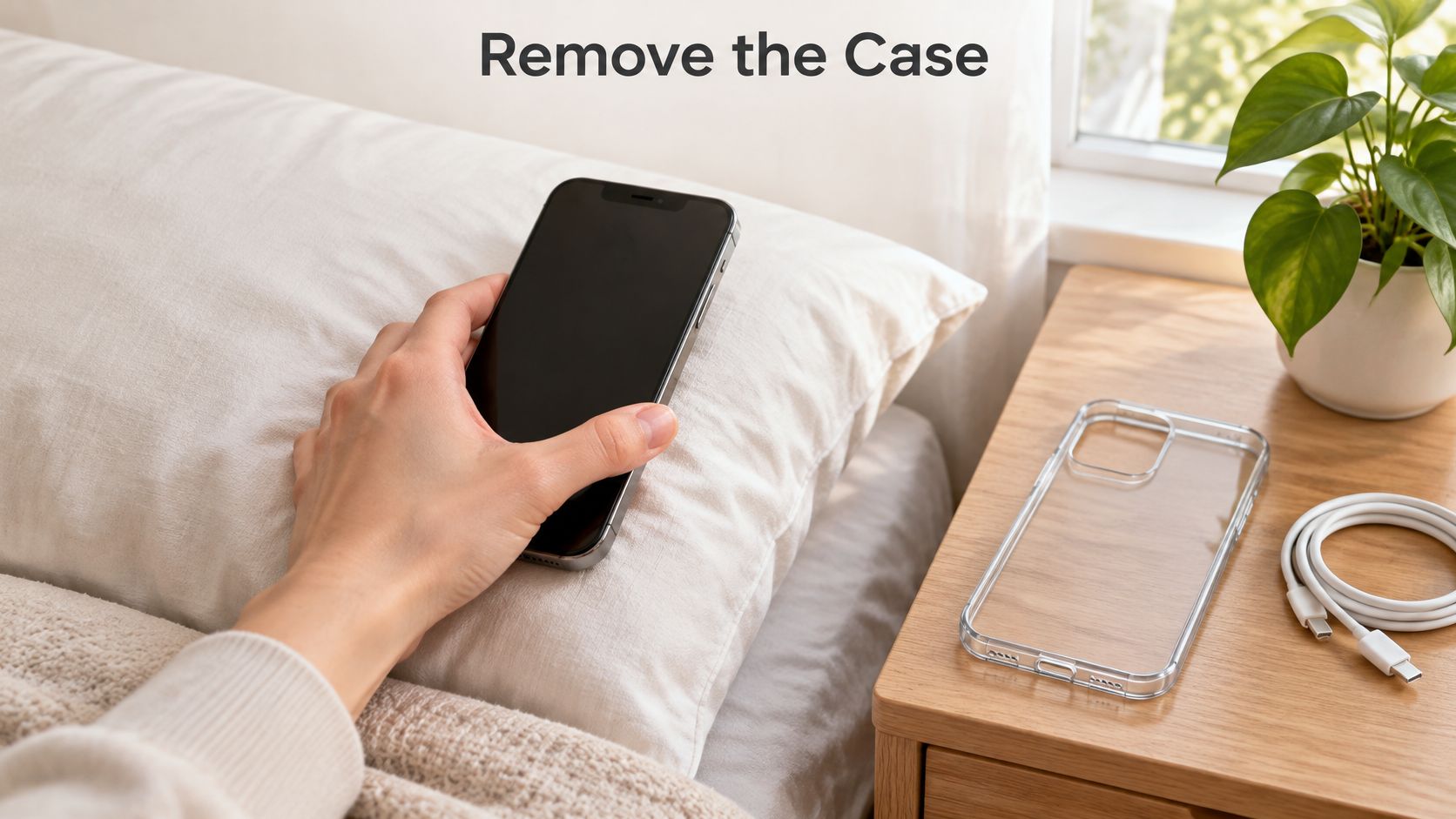
UK council fire-safety guidance, such as Tandridge District Council's lithium battery advice, sets out the routine in six moves:
- Use the charger supplied with the phone, or a genuine replacement from a trusted seller. Cheap unbranded units are a common cause of overheating because they don't regulate power properly. If the original is long gone, a genuine Android phone charger is the safe substitute.
- Charge on a hard, flat, non-flammable surface. Never a bed, sofa, carpet or under bedding.
- Keep it uncovered so heat can escape. A closed case and a pillow is the worst combination in the house.
- Charge while you're awake and nearby, not overnight while you sleep and not while you're out.
- Unplug it once it's full. Sitting at 100% on a charger just adds heat and cycles.
- Stop immediately if it becomes unusually hot, swells, leaks, smells acrid, hisses or shows casing damage.
Four UK situations worth fixing
Charging under bedding overnight. The single most common one I hear about. If you need the phone charged by morning, charge it in the evening on a bedside table, face up, case off. Your sleep doesn't need to be part of the charging circuit.
Navigation in a hot car while charging. Sun through the windscreen plus charging current plus GPS is three heat sources at once. Mount it out of direct sun, keep a vent nearby, and if the screen dims or the charge stops, that's the phone protecting itself.
Fast charging in a heatwave. Speed isn't the villain. Supervision is missing. Fast charging in a cool room, on a hard surface, with the phone out of the sun, is fine.
A warm handset pushed into a backpack next to a power bank. No airflow, no supervision, two batteries sharing a small space. Charge at your desk instead, then pack it.
The habit data explains why this keeps coming up. A 2024 Allianz survey found that 78% of surveyed UK adults regularly charged lithium-battery products overnight (Allianz). And the consequences are not theoretical: UK fire brigade figures for 2025 recorded 1,760 lithium-ion battery fires, around 4.8 a day, with 45% involving phones, tablets and power banks, as QBE Europe's summary sets out. Ordinary phone use doesn't commonly start fires. Unsupervised charging on soft furnishings does.
Normal Warmth, Warning Signs and What to Do If It Is Hot
Some warmth is normal. Lithium-ion phones warm up while charging and under load, and that's the chemistry doing its job. The assumption worth challenging is that cooling alone solves a phone that keeps overheating. If it reheats on the same tasks every evening, cooling is a painkiller, not a cure.
Suffolk Fire and Rescue Service draws the line clearly: a phone battery may become slightly warm during use or charging, but an extremely hot battery may be defective and could start a fire, so you should stop charging and using it rather than trying to cool it in a fridge or freezer (Suffolk Fire and Rescue Service).
Matching the symptom to the verdict
Check battery health before you guess. On iPhone it's Settings > Battery > Battery Health, and on Android it's in the battery section of Settings or the manufacturer's diagnostic app. A reading that's fallen well below where it started, paired with repeated heat, points at the cell rather than at your apps. Our guide to a phone battery health check walks through the readings.
What to do when it's already hot
- Unplug the charger.
- Stop using it and close running apps.
- Take the case off so heat can leave.
- Move it to a cool, dry, shaded spot on a hard surface, away from bedding, cushions and sun.
- Let it cool naturally at room temperature. No fridge, no freezer, no water.
- Wait until it feels normal to the touch before using or charging it again.
- Restart it and watch through ten minutes of light use.
- If it swells, smells, hisses or stays hot, don't charge it again. Keep it away from anything flammable and get it checked by the manufacturer, a qualified repairer or your retailer.
That sequence matches what Buckinghamshire Fire & Rescue Service advises for a hot device: unplug it, remove a thick case, move it out of sunlight and let it cool naturally (Buckinghamshire Fire & Rescue Service). Electrical Safety First is blunter still, saying you should stop using and unplug a phone that's too hot to handle (Electrical Safety First).
"Too hot to handle" is a better threshold than any number on a screen, because it's measured on your hand rather than in a settings menu.
Back up your data before any repair, reset or battery replacement. Repairs can wipe the device, and a swollen battery is not the moment to discover you never turned on iCloud or Google backup.
Our Experience Refurbishing This Model at Used Mobiles 4 U
On our bench, heat complaints rarely come down to one clear fault. It's usually a mix of battery age, a case that's been through two summers of navigation and dust packed into the port, all nudging the same handset in the same direction.
One thing we regularly notice is that a phone with a lower battery health reading runs warmer on identical tasks. The cell works harder to deliver the same power, and that extra effort shows up as heat through the back. It's why every phone we sell is professionally checked for performance, battery health and functionality before it's listed, and why anything that doesn't meet our functional, battery or condition standards gets repaired, retested or pulled from sale.
What We Commonly See
- Warmth after a long session under load, which settles within minutes at rest. Normal, no action needed.
- A hot phone that shuts itself down during charging or gaming. Usually a battery replacement case rather than a board fault.
- A rugged case in daily use trapping heat against the back, especially with wireless charging.
- Dust and lint in the charging port, which restricts contact and makes charging run hotter than it should.
Our technicians check battery health, port condition, how the handset behaves under sustained load, the software version and any sign of swelling before anything is graded. Cosmetic grade describes visible wear only. It tells you nothing about how the phone handles heat, which is why we keep appearance and function as two separate checks.
Parts-wise, we usually replace the battery and clean or replace the charging port. Replacing a mainboard because of heat is rare and, in most cases, not worth the money on a handset of that age. Signs of heavy use we look for include heat concentrated at the back, faster drain on the same tasks and a port that looks grey with compacted lint.
In our experience, a newer phone with a healthy battery feels cooler under the same load than an older one with a worn cell. When you're choosing between two nearby models, battery health matters more than the name on the box. Every refurbishment follows the same process, and you can read about it in our refurbishment process.
Repair or Replace an Overheating Phone
My verdict is simple. Replace the phone if it swells, smells or gets dangerously hot. Consider a battery replacement if it's only warm under heavy use and the battery is clearly the cause.
Repair makes sense when the phone still receives software updates, the fault traces to a worn battery or a dusty port, and the quote is sensible against the handset's value. Get the quote before you commit, because repair costs vary by model and parts availability.
Replace it when:
- There's any swelling, smoke or heat that returns after a fix. That handset comes out of service, not back into a pocket.
- Software support has ended, so you're carrying a device that won't get safety or battery-management updates.
- Battery health is below what you'd accept on a phone you rely on daily.
Official updates can reduce risk. Government product-safety reports on the Google Pixel 4a and Pixel 6a identified a fire risk and stated that software updates lowered it by reducing battery capacity and charging speed (GOV.UK product safety report). That's a good reason to check a second-hand phone's model, software version and recall status before you buy. It's also why a swollen or very hot handset should be retired rather than patched with an unofficial battery or charger.
A common example we see is an older phone that heats up every evening during charging. Nine times out of ten, a battery check settles it, and the phone carries on for another couple of years. Our comparison of iPhone repairs versus refurbished iPhones, the costs explained is useful if you're weighing the two.
Refurbished suits buyers who want a checked, SIM-free handset with clear grading and predictable cooling under normal use. Avoid anything with unknown battery history or visible swelling, however cheap it looks. Every phone we sell carries at least 85% battery health, and the 18-month device warranty with 12-month battery cover terms are listed on each product page, so read them before you buy. If you'd rather start with a Like New handset, the iPhone 15 Plus – Pink – 128GB – Like New is fully tested, SIM-free, supplied with 85%+ battery health, an 18-month warranty and 30-day returns.
Written by James Waterston, 24 years in the mobile phone industry from customer service through to Sales Director of a global repair and recycling company, now running Used Mobiles 4 U for over 8 years. Connect on LinkedIn.
If you'd rather replace a phone that keeps running hot than keep nursing it, every handset we sell leaves us with at least 85% battery health, an 18-month device warranty and 12-month battery cover, and each one is checked for performance and heat under load before it's listed. Our graded, SIM-free stock covers recent iPhones, Samsung Galaxy and Motorola models, so you can compare condition, storage and live price side by side. Visit Used Mobiles 4 U to find a cooler phone.
Looking for a refurbished phone?
Shop professionally tested refurbished iPhones and Samsung phones with 18 month warranty, 30 day returns and free UK delivery.
Browse Refurbished Phones