





MacBook Pro Laptop Charger: UK Buying Guide

29/09/2026

11 Mins
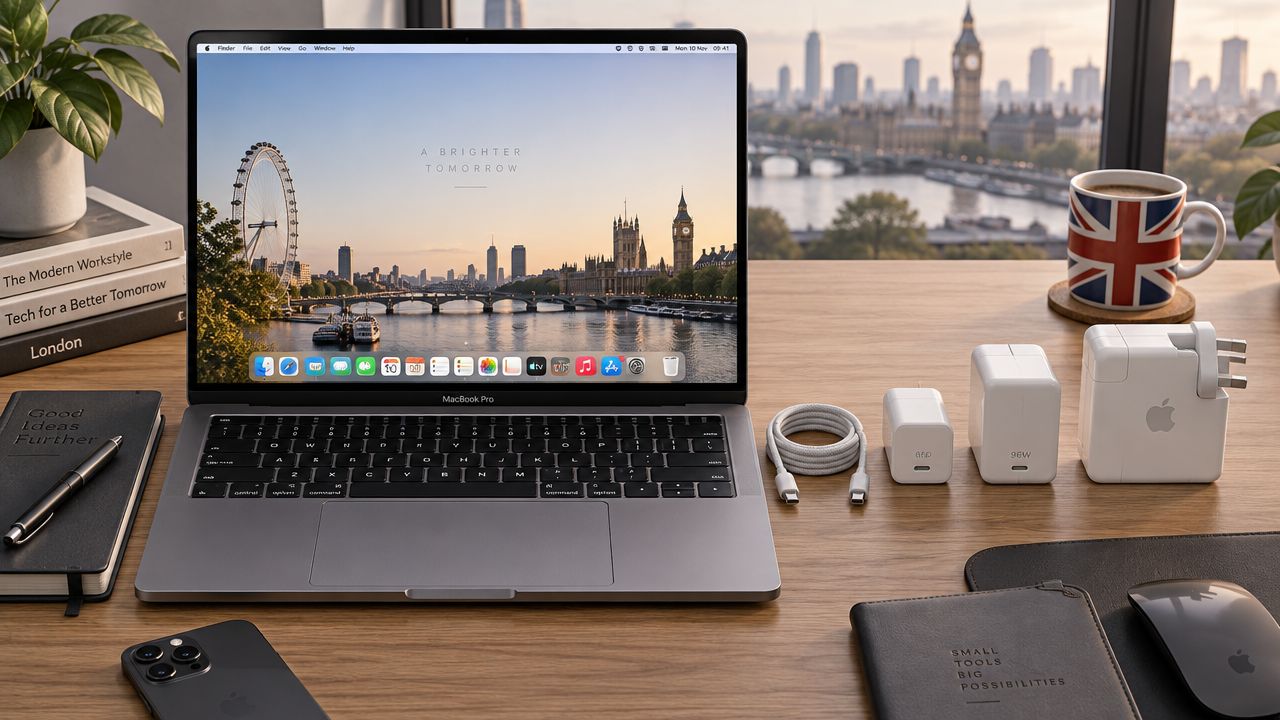
A 14-inch MacBook Pro may need 67W, 70W, 96W or 140W, while a 16-inch model introduced from 2021 is built around 140W. Any suitable USB-C or MagSafe 3 charger will safely charge a modern MacBook Pro, but matching wattage to the screen size and chip is what delivers full-speed fast charging.
You've probably landed here because a MacBook Pro has arrived without its brick, your old charger has failed, or a phone charger is keeping the battery level stubbornly low. The reassuring part is that you don't need Apple's original adapter to charge a MacBook Pro introduced in 2016 or later. You do need the right power rating, cable and connector combination if you want sensible charging performance.
Finding the Right MacBook Pro Laptop Charger
A modern MacBook Pro won't be damaged by using a charger with a higher wattage than it needs. The laptop negotiates the power it draws, rather than accepting every watt the adapter can theoretically provide. The expensive mistake is usually the opposite one, using an underpowered charger and assuming the laptop is charging normally.
Apple confirms that MacBook Pro models introduced in 2016 or later can charge over USB-C. That makes USB-C Power Delivery a practical replacement route for many refurbished machines, including models that originally came with a different Apple adapter. You can browse refurbished MacBook Pro stock while checking the exact model details before ordering a charger.
Start with the model, not the plug
Check the screen size, introduction year and chip configuration. A 14-inch MacBook Pro isn't automatically matched to one wattage. Apple's UK guidance lists 67W, 70W, 96W and 140W adapters across 14-inch models introduced from 2021 onwards, depending on configuration. The 16-inch models have a different power requirement, with 140W the important figure for later machines.
Then inspect the cable. A USB-C plug can fit several devices while still failing to carry the power needed for fast charging. MagSafe 3 requires a USB-C to MagSafe 3 cable, while charging directly through USB-C requires a suitable USB-C cable and a compatible Power Delivery adapter.
Practical rule: a bigger wattage rating is normally harmless. A smaller one may leave the MacBook drawing power slowly, holding its battery level, or losing charge while you work.
What under-specifying feels like
The hidden cost isn't usually a dramatic fault. It's a laptop that says it's plugged in but takes far longer to charge, especially while exporting video, using external displays or running demanding applications. A low-rated brick can be perfectly safe and still be a poor everyday choice.
Apple's UK support guidance is the best place to verify the adapter pairing for a particular MacBook Pro generation. Take a photo of the model information from macOS or the underside of the laptop before buying. That small check is cheaper than ordering the wrong cable and adapter combination.
The Short Version
Use this as a buying check rather than a universal charger rule. The correct choice depends on the MacBook Pro's screen size, year and chip, not just the fact that the connector fits.
- 14-inch models introduced in 2021 or later: Apple lists 67W, 70W, 96W and 140W adapters for different configurations. The Apple UK support guidance explains the model-specific pairings.
- 14-inch fast charging: Apple says a 96W adapter can reach up to **50% charge in around 30 minutes** on a 14-inch MacBook Pro introduced in 2021 or later, with a USB-C to MagSafe 3 cable. The Apple UK 96W adapter guidance is useful when checking that combination.
- 16-inch models introduced in 2021 or later: **140W** is the practical target for full-speed charging. Apple’s [140W USB-C Power Adapter information](https://www.apple.com/uk/shop/product/mw2m3b/a/140w-usb-c-power-adapter) sets out the relevant power class.
- USB-C charging: MacBook Pro models introduced in 2016 or later can charge through USB-C, provided the adapter and cable meet the laptop’s needs.
- MagSafe 3 charging: use a USB-C to MagSafe 3 cable with the adapter. The magnetic connection is convenient, but the adapter still controls the available power.
- Newer 16-inch fast charging: Apple says 16-inch models fast-charge with a 140W adapter and USB-C to MagSafe 3 cable. On 2023 models and later, Apple also identifies a 240W USB-C charge cable as an option with a suitable power source, as explained in [Apple’s fast-charge support page](https://support.apple.com/en-us/102378).
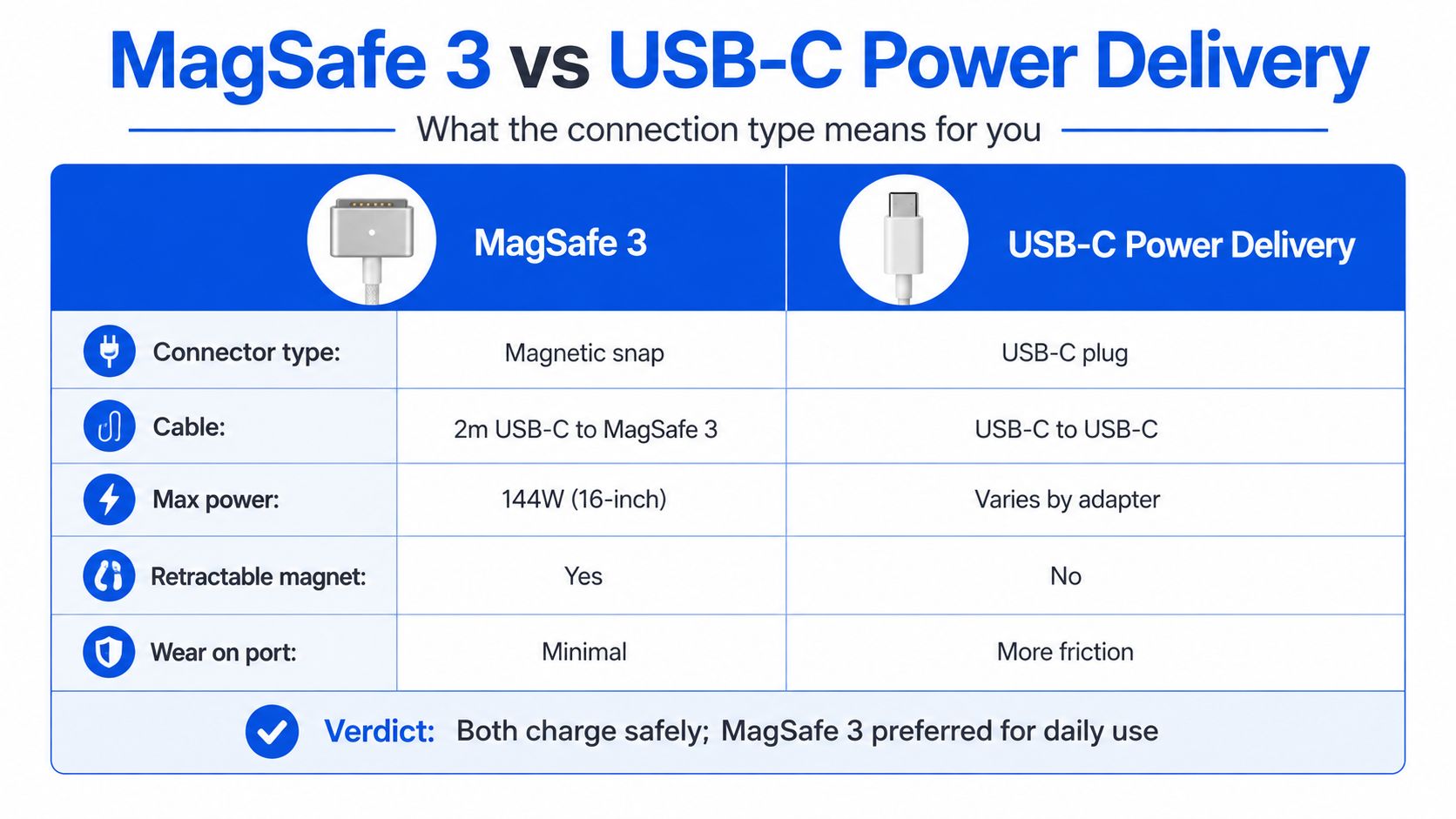
A 67W adapter isn't automatically useless. It may charge a lower-demand 14-inch model well enough for light work, but it isn't the sensible purchase if your priority is the fastest possible refill. The key distinction is between safe charging and full-speed charging.
MagSafe 3 Versus USB-C Power Delivery
The two connection methods can charge the same MacBook Pro, but they suit different working habits.
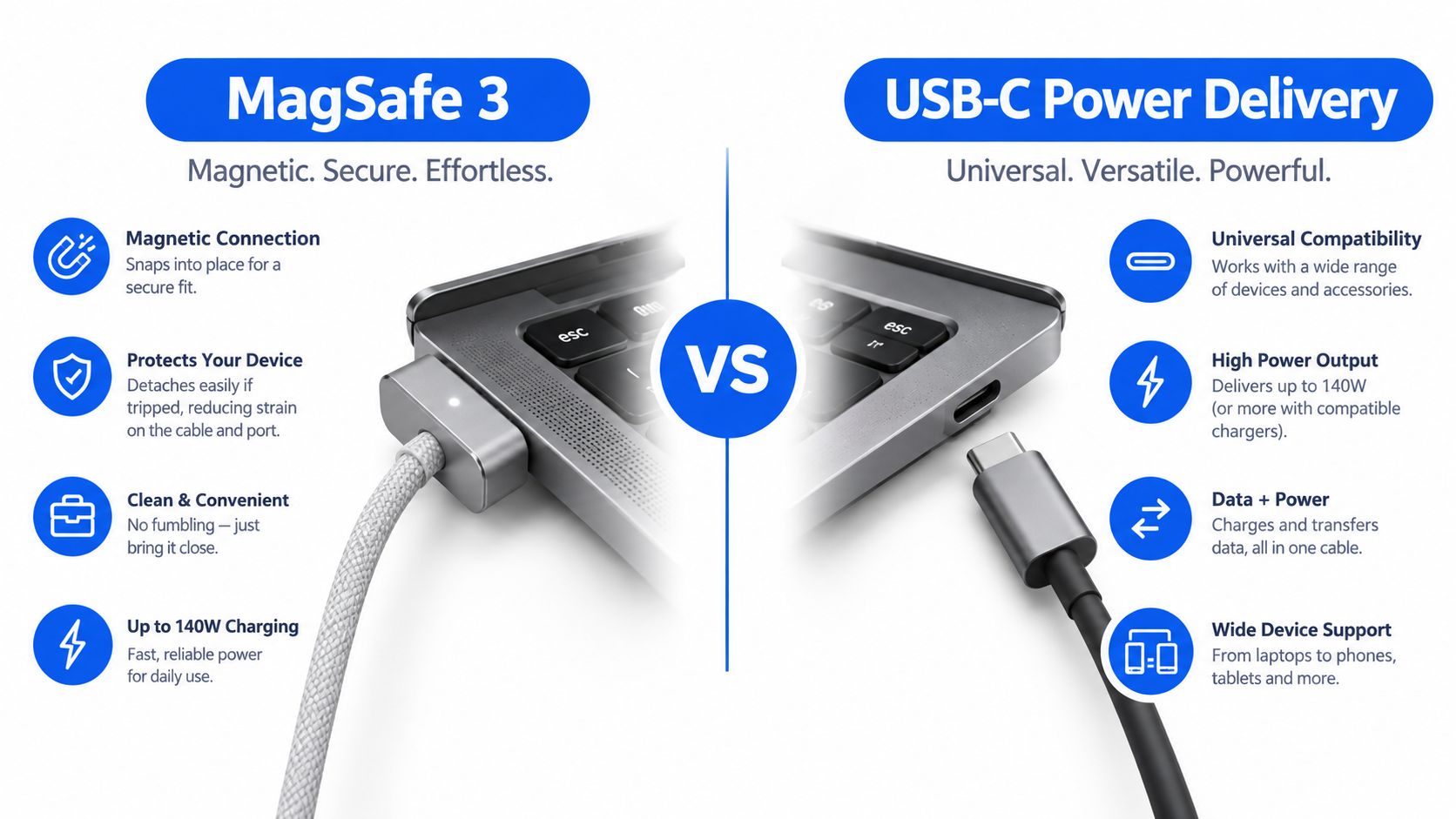
MagSafe 3 uses a magnetic connector that releases if someone catches the cable. That makes it a comfortable choice on a desk, particularly if the laptop sits beside a chair, near children or in a busy workspace. It also leaves the USB-C ports available for a monitor, dock, storage drive or other accessory.
The cable still connects to the power brick through USB-C. That matters because the brick isn't locked to the MacBook. You can use a suitable USB-C cable with the same adapter for another device, assuming the power requirements and cable ratings are appropriate.
When USB-C makes more sense
USB-C charging is more flexible for travel. A capable multi-port GaN charger can power a MacBook Pro, phone and tablet from one compact unit, rather than leaving you with a separate brick for every device. That convenience is especially useful when a refurbished laptop arrives without its original Apple adapter.
USB-C also gives you a practical fallback if the MagSafe cable is damaged or missing. The limitation is that the cable must support the required power, and not every USB-C charger reaches the level needed for fast charging on a larger MacBook Pro. Apple's MacBook Pro technical specifications identify a 140W or higher USB PD power source for fast-charge capability on relevant models.
Daily desk use versus travel
Choose MagSafe 3 for a fixed desk where port access and easy release matter. Choose USB-C when you want one charger shared across several devices, or when you're replacing a missing adapter for an older USB-C MacBook Pro.
Neither connector is safer when the adapter is suitable. The practical difference is how the cable behaves, how many ports remain free and whether your travel kit can replace several separate chargers.
Our Experience Refurbishing This Model at Used Mobiles 4U
MacBook Pro chargers are often missing from trade-ins, and the replacements that arrive with devices aren't always sensible matches. One thing we regularly notice is a perfectly functional laptop paired with a frayed cable, a low-powered phone adapter or a brick that charges the machine only when it's asleep.
Our technicians check the charging port, cable seating, battery response and power behaviour during device testing. We look for intermittent charging, visible damage around the USB-C and MagSafe connections, unusual heat and a battery that continues to fall while the laptop is connected. We don't treat a charging icon alone as proof that the setup is doing its job.
What the bench tells us
Battery health gives useful context, but it isn't the only consideration. A MacBook can show reasonable battery condition while still having a damaged cable, a worn port or an adapter that can't provide enough power for the workload. We also inspect the casing around the charging area for marks that suggest the laptop has been repeatedly dragged across a desk while connected.
Common faults include bent or loose connectors, exposed cable sheathing and charging that cuts in and out when the cable moves. Those are repair or replacement decisions, not reasons to blame the laptop immediately. If the adapter is underpowered but undamaged, we normally treat it as a performance mismatch rather than a failed component.
A charger that works at the counter isn’t necessarily the charger we’d recommend for a customer who uses the MacBook under heavy load.
Repair or replace
We replace a cable when the insulation is splitting, the connector is loose or charging stops with small movements. We advise replacing the adapter when it produces inconsistent power, shows physical damage or does not meet the model's power needs. A higher-rated replacement can be the more sensible route if it serves the laptop and other devices, rather than buying another weak brick that will soon be sidelined.
For older models, the answer can be more modest. A 13-inch MacBook Pro may not benefit from the same high-wattage setup as a later 16-inch model, so we match the replacement to the actual machine rather than automatically recommending the largest adapter.
A common example we see is a refurbished MacBook Pro arriving with no original brick but with a clean chassis, healthy ports and a battery that responds normally. In that situation, the missing accessory doesn't make the laptop faulty. The buyer needs clear guidance, which is why a listing such as this refurbished 13-inch MacBook Pro should be considered alongside the cost and specification of the charger you'll use.
What Buyers Usually Ask Us
Can I use a 140W charger on an older MacBook Pro?
Yes, provided the charger and cable are sound and compatible with the connection. The MacBook controls the amount of power it draws, so a 140W adapter doesn't force 140W into a machine that needs less. The sensible check is whether the cable supports the connection and whether the adapter is from a reputable manufacturer.
A lower-rated charger is the more common source of frustration. It may charge slowly, pause charging during demanding work or maintain the battery without increasing it quickly. That doesn't necessarily mean the battery has failed.
Will a third-party charger damage the battery?
A third-party adapter isn't automatically unsafe. Look for a recognised USB Power Delivery charger, clear output information and an undamaged cable. Avoid mystery bricks with poor labelling, damaged casings or loose plugs, because a low price doesn't tell you whether the internal power control is trustworthy.
Apple's own support documentation confirms that recent MacBook Pro models can use USB-C charging, so an Apple logo isn't the only requirement. The adapter still needs to match the laptop's power expectations, particularly if you want fast charging on a 14-inch or 16-inch machine.
Why does it say not charging?
Start with the simple checks. Try another compatible cable, inspect the port for debris, test another socket and see whether the message changes when the laptop is asleep or under load. If the battery falls while connected, the charger may be underpowered, the cable may be faulty or the laptop may need a deeper inspection.
Don't confuse a charging limit or battery management behaviour with a dead charger. Check the battery status in macOS, then compare the adapter's output with the model guidance. Our Mac and phone FAQs cover wider checks for used devices and accessories.
What else should I carry?
If you work away from home, organise the charger and cable in a separate pocket so the connector doesn't bend against other equipment. People who carry a laptop alongside paperwork may also find guidance on top work tote bags with compartments useful for keeping cables away from keys and loose chargers.
Building a Cost-Efficient and Low-Waste Charging Setup
Buying the biggest Apple adapter for every location isn't always the most sensible setup. Newer MacBook Pro models sold in the UK are now reported to arrive without a charger in the box, with the USB-C to MagSafe 3 cable included and the adapter sold separately. That shifts the decision to the buyer, particularly when purchasing refurbished equipment.
A good multi-port GaN charger can replace several single-device bricks, provided its available output suits the MacBook Pro when other devices are connected. Read the per-port output rather than relying on the total headline wattage. A charger may advertise a high combined figure while allocating less power once a phone or tablet is plugged in.
Keep the right charger for the right job
An older lower-wattage adapter can still have a useful role. Keep it in a travel bag for light work, use it beside the sofa or reserve it as a backup. It may charge more slowly, but reusing a working adapter avoids unnecessary replacement and gives you a fallback when the main charger is in another room.
For a travel kit, a durable cable and one well-chosen multi-port brick often make more sense than carrying separate adapters. A practical work bag for comfort and style can also help protect that setup, but the bag won't compensate for a cable that is already splitting or an adapter that is below the laptop's needs.
Reuse before disposal
Chargers and cables fall within the UK's WEEE waste rules. Don't put a broken or unsafe charger in the household bin. Take it to an appropriate electrical recycling point, retailer collection scheme or local recycling facility, and keep working accessories in circulation where they remain safe.
When comparing replacement accessories, the Used Mobiles 4 U accessories category is a useful place to check what's available alongside refurbished devices. The same principle applies to other electronics. For example, the Lenovo Smart Tab M10 with Alexa dock is listed without a charger, so the accessory requirement should be checked before purchase rather than assumed.
Final Verdict and Next Steps
Buy a new macbook pro laptop charger if your current adapter is damaged, clearly underpowered for your workload or missing altogether. For a later 16-inch MacBook Pro, aim for 140W if you want full-speed charging. For a 14-inch model, check whether your configuration is paired with 67W, 70W, 96W or 140W, and choose the cable as carefully as the brick.
Match the charger to your routine
- Students and light users: keep a sound existing charger if it raises the battery reliably and your work isn’t demanding. Upgrade when slow charging becomes inconvenient rather than buying purely for the logo.
- Professionals: choose the correct high-wattage adapter and a suitable MagSafe 3 or USB-C cable if you regularly work while plugged in or need fast top-ups.
- Frequent travellers: consider a quality multi-port USB-C setup so one adapter can cover the laptop and smaller devices, while keeping a compatible spare cable.
Repair a damaged cable or replace a faulty adapter. Replace the laptop only when charging problems sit alongside battery, port or wider hardware faults that make repair poor value. A safe working charger should be reused, and a broken one should go through electrical recycling.
Used Mobiles 4 U supplies tested, data-wiped refurbished electronics with clear grading, battery checks and UK customer support. The right charger won't turn an unsuitable MacBook into a good purchase, so check the model, condition, battery health and accessory requirement together before committing.
Used Mobiles 4 U offers tested refurbished MacBook Pro laptops and accessories, with clear grading and UK support to help you choose a compatible charging setup. Visit Used Mobiles 4 U to check current stock or arrange a replacement device when your existing MacBook is no longer worth repairing.
Written by James Waterston, 24 years in the mobile phone industry from customer service through to Sales Director of a global repair and recycling company. Now running Used Mobiles 4U for over 8 years.
LinkedIn profile for James Waterston
Choose the right MacBook Pro laptop charger for UK refurbished models. Compare 67W, 96W and 140W needs, cables, MagSafe 3, USB-C and low-waste buying.
Looking for a refurbished phone?
Shop professionally tested refurbished iPhones and Samsung phones with 18 month warranty, 30 day returns and free UK delivery.
Browse Refurbished Phones



