





How to Check a Refurbished iPhone Has Genuine Parts

11/09/2026

7 Mins
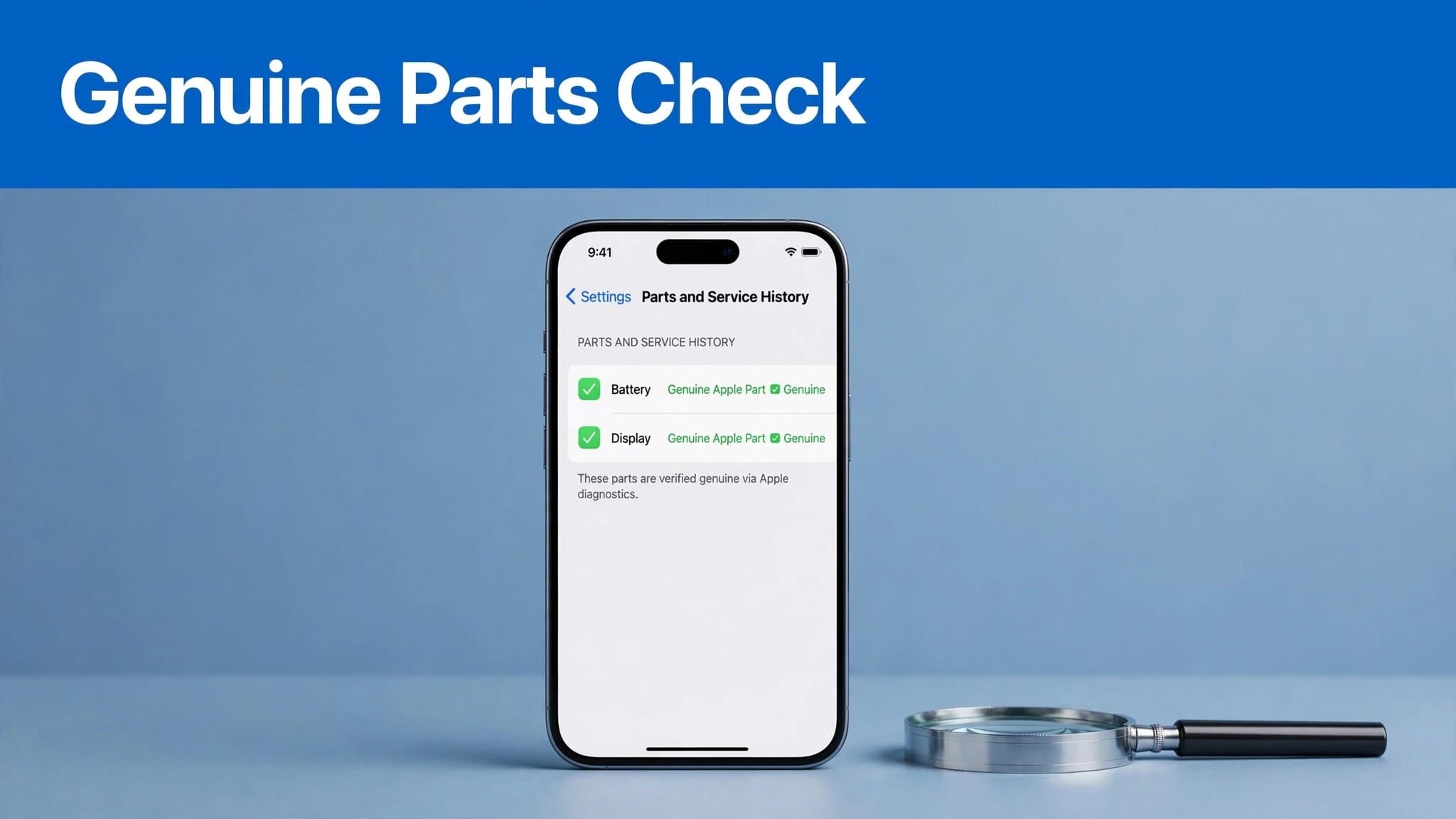
You can check a refurbished iPhone’s repair record on the phone itself, then compare it with the seller’s written parts policy. When checking for refurbished iPhone genuine parts, Apple’s Parts and Service History is the clearest evidence available.
Replacement parts aren’t automatically a reason to reject a device. Compare the seller’s explanation, the model number and the on-device evidence, then check the phone works properly before your return period ends. The record can show whether iOS identifies genuine Apple parts or compatible parts, but it doesn’t prove the condition of the whole phone.
The Short Version
- Open Settings > General > About and look for Parts and Service History.
- A “Genuine” status is useful evidence of genuine Apple parts, but it doesn’t confirm the whole device. Compatible parts may still be fitted elsewhere.
- “Used” can describe a genuine Apple part previously fitted to another iPhone.
- “Unknown Part” needs an explanation from the seller before you buy.
- Check battery health, Face ID, cameras, charging and the display yourself.
- A clear battery minimum, warranty and returns policy matter as much as cosmetic grade.
How to check refurbished iPhone genuine parts
Parts and Service History appears on compatible iPhones running iOS 15.2 or later. For refurbished iPhones, it offers useful evidence about replaced components. Apple explains the available statuses in its Parts and Service History guidance.
Battery history is available on iPhone XR, iPhone XS and later. Display history is available on iPhone 11 and later, apart from second and third-generation iPhone SE models. Camera history starts with iPhone 12 models.
Check the phone before transferring your data
If you are collecting in person, confirm the model number matches the listing before testing the phone:
- Open Settings > General > About.
- Scroll to Parts and Service History.
- Note any battery, display or camera entry.
- Open Settings > Battery > Battery Health & Charging.
- Test the display, including True Tone, Face ID, cameras, speakers, microphones, buttons and charging.
- Check Carrier Lock in About. “No SIM restrictions” confirms the iPhone is unlocked.
For an online order, complete these checks as soon as it arrives. Do not wipe your old iPhone before selling until the replacement passes them.
Use the status as evidence, not a verdict
“Genuine” means the iPhone recognises the component as genuine Apple parts. On iPhone 15 and later using iOS 18 or later, “Used” can mean a genuine Apple part previously installed in another iPhone.
Compatible parts can still be suitable replacements, but the record may not identify them clearly. Ask whether the repair used genuine Apple parts, compatible parts or a genuine reclaimed component, and request its provenance. Apple Authorized Service Providers and Independent Repair Providers may have carried out the work, so ask the seller who completed the repair. The record also cannot provide a complete diagnosis of deeper faults, such as a damaged logic board.
“Finish Repair” means a repair still needs to be completed with Apple’s Repair Assistant calibration process. Ask the seller to complete it before dispatch, especially if the status suggests an unverified part.
An Unknown Part message does not prove the component is cheap or counterfeit. It can also point to an incomplete repair, a previously used part, or a part that is not working as expected.
What an Unknown Part message can mean
Apple says an Unknown Part notice on a pre-owned iPhone may appear when a part is non-genuine, has been used in another iPhone, cannot be verified, or was not installed correctly. A status message can reflect verification limits, so it doesn’t prove whether a component uses genuine Apple parts or compatible parts.
Compare the on-device Parts and Service History with the seller’s explanation, including work carried out by Independent Repair Providers. If a repair remains unfinished, ask whether Repair Assistant completed the calibration process. It may affect the phone’s trade-in value, but isn’t by itself a diagnosis of a logic board fault.
Battery warnings need closer attention
An unverified part can make the battery health reading inaccurate. Therefore, a percentage alone cannot prove whether the battery uses genuine Apple parts or compatible parts.
At Used Mobiles 4U, we set a minimum 85% battery health standard before resale. That is more useful than vague wording such as “battery tested”. Ask what the seller accepts, whether the battery was replaced, and what their refurbished iPhone warranty covers if battery performance is poor.
Apple’s battery-part guidance also explains why verification matters when reading those settings.
Test the screen and camera in normal use
Do not assume a screen replacement using aftermarket components will always stop Face ID or remove True Tone. The actual result depends on the part and repair quality, so test the features rather than relying on assumptions.
Raise brightness and inspect a white screen for tinting, flicker, lines and dark patches. Then check edge touch response, front and rear camera focus, flash and video sound. A cheap screen can look acceptable indoors yet reveal poor brightness or uneven colour outside.
What We See on the Bench at Used Mobiles 4U
A clean casing can hide a tired battery, weak charging port or poorly fitted display. Our technicians check whether components described as genuine Apple parts or compatible parts perform properly, rather than relying on cosmetic grade. A Grade A finish does not answer the question, “what does refurbished Grade A mean?” It only describes appearance.
Battery health is not the whole story
One thing we regularly notice is that iPhones can show a reasonable maximum capacity yet still struggle with heat, sudden drops in charge or inconsistent charging. We test stability as well as the number in Settings. Heat or sudden drops can sometimes suggest a deeper logic board fault.
For many people asking how long a used iPhone will last, its battery condition and remaining software support matter more than small marks on the frame. A phone with 85% health can still be a sensible purchase if it charges reliably and suits your daily use.
Functional checks catch the costly faults
Whether a phone was repaired by an Independent Repair Provider or elsewhere, our practical checks remain the same. We test Face ID, cameras, touch response, speakers and microphones. We also check Wi-Fi, mobile signal, wired charging and wireless charging, then securely data-wipe every device.
If you are deciding whether to repair or replace an old iPhone, compare the cost and condition honestly. A single screen fault may justify repair. Repeated battery, charging, camera or logic board issues often make replacement the calmer option.
What to ask before buying
When comparing refurbished iPhones or checking second-hand iPhones, ask direct questions and keep the answers in writing:
- Which parts, if any, were replaced, and are they genuine Apple parts, compatible parts or something else?
- Does the on-device Parts and Service History match the seller’s written answer?
- Who completed the repair, Apple, an authorised provider or Independent Repair Providers?
- Has any required “Finish Repair” status been completed in Repair Assistant?
- Does the seller guarantee a minimum battery-health percentage, and has a battery replacement been carried out?
- Is the iPhone tested, unlocked, free from Activation Lock and described with the correct model number?
- Has any significant repair affected the logic board?
- What does the warranty cover, and how long does the returns window last?
- Does the cosmetic grade use a clear grading system for marks only, or does it also cover functionality and cosmetic condition?
Terms such as “genuine reclaimed” and “genuine service pack” need clear provenance. Do not treat either phrase as proof without repair documentation and an on-device check.
Our Best Refurbished iPhones UK guide can help you compare condition, storage, warranty and battery expectations before you choose.
Common questions
Is a refurbished iPhone as good as new?
It can be excellent for daily use when its parts history, testing and seller description are consistent, including genuine Apple parts. Expect possible cosmetic wear and a battery that may not be at 100%, then judge it on testing, stated condition, warranty and price.
Can you use an iPhone with an Unknown Part warning?
You may be able to use it normally, but the warning deserves investigation. Battery-health information may be unreliable with an unverified battery, and the seller should explain any status before purchase.
Should you sell your old iPhone first?
Keep it until you have checked the replacement and moved your data. Once satisfied, use Sell Your Old Phone and remove your Apple ID before handing it over.
A safer way to buy refurbished
A refurbished iPhone is easiest to trust when its Parts and Service History, battery evidence and real-world tests agree with the seller’s description. Transparent repair information should indicate whether it has genuine Apple parts or compatible parts, while battery evidence and functional checks support the same picture without promising perfection.
Choose a retailer that states its battery standard, checks core functions, offers UK support and gives you time to inspect the device. When you are ready to compare available stock, Browse Refurbished iPhones.
Written by James Waterston, 24 years in the mobile phone industry from customer service through to Sales Director of a global repair and recycling company. Now running Used Mobiles 4U for over 8 years. LinkedIn
Looking for a refurbished phone?
Shop professionally tested refurbished iPhones and Samsung phones with 18 month warranty, 30 day returns and free UK delivery.
Browse Refurbished Phones



