





Refurbished Lenovo Laptop Computers: A UK Buyer’s Guide

28/10/2026

12 Mins

A spotless Lenovo can be a worse buy than a scratched one if its operating system no longer has normal support: Microsoft confirms Windows 10 support ended on 14 October 2025. Refurbished Lenovo laptop computers are worth buying when the exact hardware supports Windows 11, the battery suits your day and the seller documents what's been tested. Cosmetic condition comes after those checks.
The Short Version for UK Buyers
- Start with the exact machine. A properly tested refurbished Lenovo can be a very good-value office, study or home computer. The Lenovo badge alone isn't a specification.
- Confirm supported Windows compatibility. Ask for the full processor model and official eligibility, not just confirmation that Windows is installed.
- Choose useful memory and storage. For a practical office baseline, the ThinkPad buying specification recommends 16 GB RAM, a 256–512 GB SSD and an 8th-generation-or-newer Intel processor. Treat these as buying targets, not proof that every configuration qualifies.
- Get a battery figure. Ask for measured full-charge capacity, battery condition and any replacement history. A promise that the laptop holds charge isn't enough.
- Read the written cover. Establish who handles faults, whether battery wear is excluded and what happens if the charger fails.
- Separate appearance from ability. Excellent, Good and Fair describe cosmetic condition under the seller's grading system. They don't identify the processor, remaining battery capacity or software support.
- Don't buy by family name alone. ThinkPad and IdeaPad ranges span different generations and configurations. A newer modest specification can be a more sensible purchase than an older premium badge.
- Compare complete listings. Use our refurbished laptop buying guide and range to shortlist machines, then request missing details before paying.
- Spend on the right compromises. A marked lid is usually easier to live with than inadequate memory, an unsuitable battery or uncertain repair options.
What Refurbished Means and How Grades Work
A used laptop is rather like a car sold after a quick wash: it might be excellent, but its appearance tells you little about the checks behind it. A refurbished laptop should have been inspected, repaired where necessary and prepared to a documented standard.
That doesn't mean every component is new. Keeping a healthy original screen or SSD is sensible; replacing parts because they've been used isn't the purpose of refurbishment.

What a proper refurbishment should include
- Intake and identity checks. Record the serial number and machine type, then check for firmware passwords, management restrictions and physical damage.
- Hardware diagnostics. Test memory, storage, display and connections. A laptop reaching the desktop doesn't prove its ports or memory are sound.
- Battery assessment. Record capacity and charging behaviour, and inspect for swelling or damage.
- Secure preparation. Remove the previous owner's data using an appropriate verified wiping process, then install and activate the operating system.
- Cosmetic grading. Describe marks on the lid, base, keyboard and screen separately from technical findings.
- Final quality control. Retest the prepared machine, confirm the correct charger and pack it securely.
Open-box normally describes a product's sale or packaging history, rather than a particular refurbishment process. Certified refurbished is meaningful only when the seller identifies who certified it and what standard was met.
Why a Fair grade can still make sense
A Fair laptop with a scratched lid can be mechanically sound. An Excellent laptop can look almost untouched while having a tired battery. Neither label should substitute for test results.
Practical rule: Buy the documented condition of the components, then decide how much you're willing to pay for tidier cosmetics.
Ask what was replaced, whether replacement parts were new or previously used, and whether the seller can provide a written test summary. Useful entries include battery capacity, drive health and the data-wiping method.
Also establish the returns window and who handles a fault claim. A clear answer in plain English tells you more than an impressive grade label with no explanation.
Which Lenovo Lineups Suit Which Jobs
ThinkPad doesn't mean newer. A business laptop can have an excellent keyboard and useful connections while still being the wrong age or configuration for your intended software.
The T470 illustrates that distinction. It can be an appealing office machine on physical design alone, but the processor fitted to the individual unit matters more than its reputation.
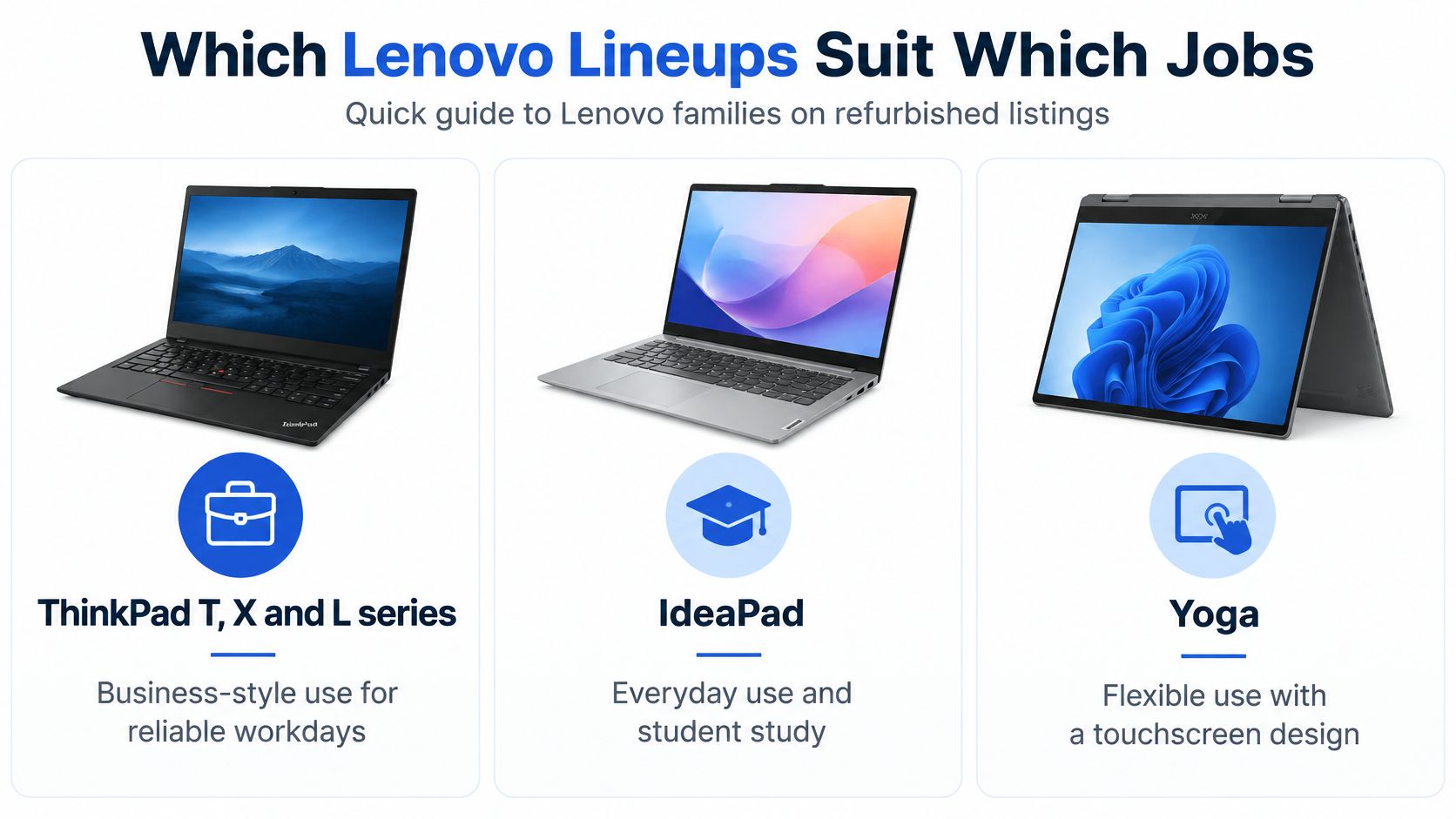
Lenovo families and what to check first
These are shopping categories, not guarantees. Check the maintenance documentation for the precise model before assuming that memory is replaceable, a touchscreen is fitted or a particular connection is present.
For an older T470 listing, inspect the full display and processor description rather than assuming all examples match. An anti-glare screen and physical HDMI connection can be useful for office work, but neither compensates for unsupported software.
Choose a ThinkPad T series if
- Typing is the main job. You'll spend much of the day writing documents, answering emails or working in spreadsheets.
- Connections matter. You want to connect existing office equipment without carrying an assortment of adaptors.
- Maintenance matters more than appearance. You'll verify parts availability and upgrade options before buying.
Choose an IdeaPad if
- Your work is straightforward. Browsing, coursework and household administration are the main tasks.
- The newer configuration is better value. You can get suitable supported hardware without paying for business features you won't use.
- You're happy with its upgrade limits. The installed memory and storage already suit your needs.
For most home buyers, I'd start with a newer, well-specified IdeaPad, then compare it against a similarly priced T series. Our Lenovo IdeaPad category is a starting point, but check each description rather than interpreting the category name as a complete specification.
Choose Yoga only when you'll genuinely use its flexible design. Extra hinges and touch functionality are additional things to inspect, not automatic improvements.
CPU, RAM and SSD Specs That Decide Everyday Use
Processor generation is a screening check, not just a speed comparison. Microsoft's Windows 11 requirements include a compatible 64-bit processor, 4 GB RAM, 64 GB storage, TPM 2.0 and UEFI firmware with Secure Boot capability.
Those are installation requirements, not comfortable buying targets. Ask the seller to confirm the exact processor against Microsoft's supported list and run PC Health Check; a generation label alone isn't a complete eligibility test.
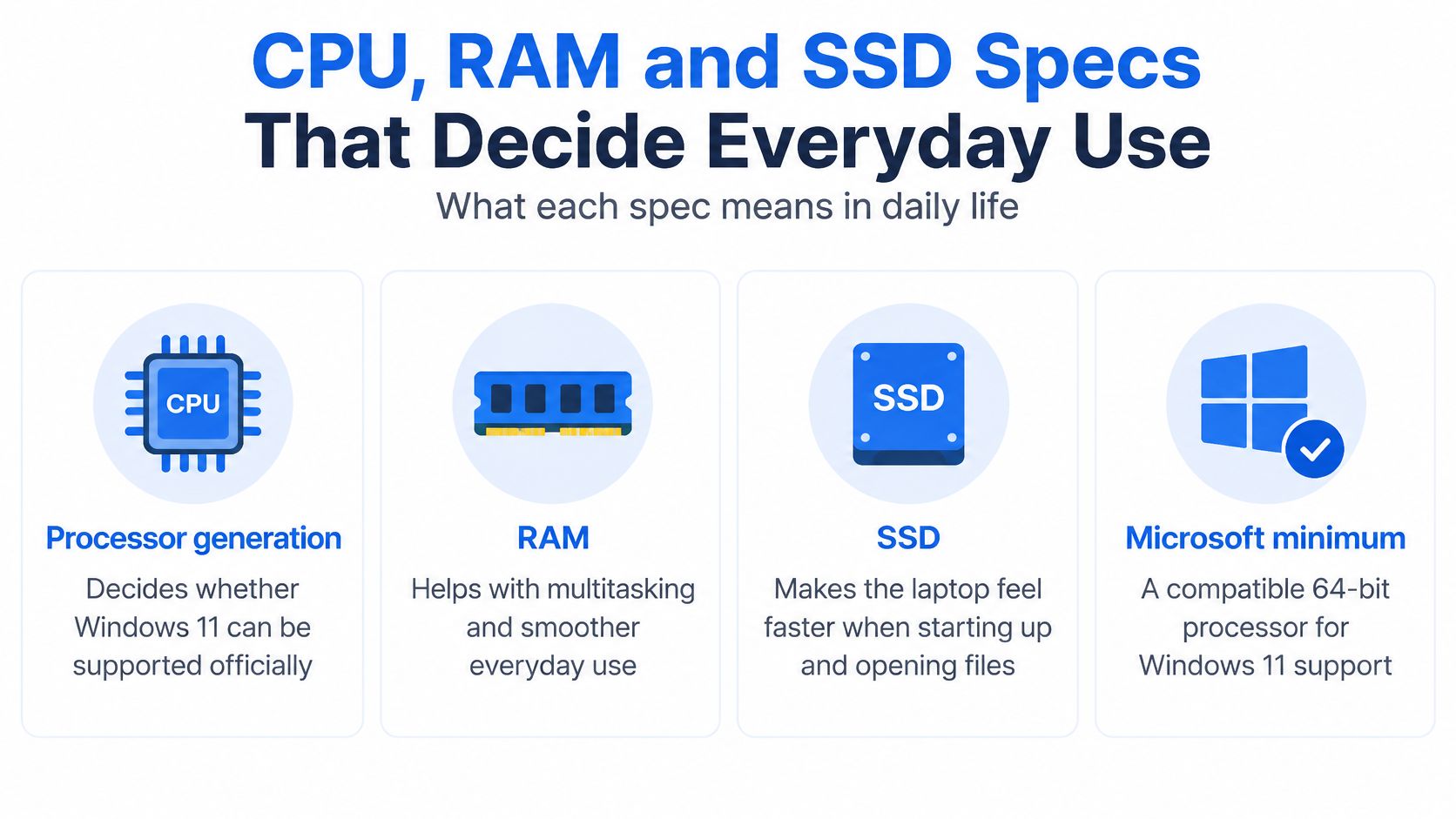
Spec targets by use case
These are recommended shopping targets, not promises that a machine will suit every application.
RAM is working space. If you keep a video call, browser tabs and documents open together, extra memory helps avoid constant swapping between memory and storage.
An SSD improves responsiveness, particularly when starting Windows, opening applications and installing updates. It won't turn a weak processor into a capable editing workstation, though. For large local photo collections or project files, compare laptops with larger SSD storage rather than buying unnecessary processor power.
How to check a Lenovo specification in quick steps
- Find the identity label. Look underneath the base or, on applicable models, inside the removable battery bay.
- Record the machine type and serial number. Use Lenovo's support lookup to identify the original configuration.
- Open Settings > System > About. Compare the processor, installed RAM and system type with the advertisement.
- Check supported Windows eligibility. Use PC Health Check and confirm firmware requirements.
- Inspect the installed drive. Confirm SSD capacity and type, not merely the factory specification.
- Check the upgrade route. Establish whether memory is soldered, whether slots are available and which storage formats fit.
Factory records won't necessarily reflect later upgrades. The installed hardware must match what you're paying for.
These checks don't require a reset. If further troubleshooting involves reinstalling Windows or changing a drive, back up your files first.
Battery Health, Repairs and Daily Use
A battery can charge normally and still have little useful capacity left. Age and use reduce how much energy it stores, so an apparently healthy laptop may be frustrating away from a socket.
Ask for design capacity and current full-charge capacity, not just a photograph showing a full battery icon. Runtime also changes with screen brightness, video calls, background tasks and power settings.
Read the battery report
Open Command Prompt, enter powercfg /batteryreport, then open the report at the saved location Windows displays. Compare design capacity with full-charge capacity and review the recent usage history.
A capacity figure is more informative than a vague promise of good battery life, but it still isn't a runtime guarantee. Choose according to your actual day: desk use beside a socket is different from lectures or train journeys.
Our minimum 85% battery-health standard applies to eligible refurbished phones, not automatically to laptops. Ask for the individual Lenovo's result rather than transferring a phone policy to a different product.
Check whether replacement is practical
Lenovo's battery and replacement guidance identifies some components as Customer Replaceable Units and states that batteries not specified by Lenovo, or batteries that have been disassembled or modified, aren't covered by its warranty.
- For a sound machine: Get a quote for an approved, compatible battery and fitting where needed.
- For damaged charging hardware: Diagnose the charger, socket and charging circuit before ordering a battery.
- For swelling or case separation: Stop using the laptop and arrange professional assessment.
- For several major faults: Compare the complete repair quote with a supported replacement, not just the cheapest individual part.
For a view of the repair categories involved, Lenovo laptop repair help from CTF from CTF Mobile Phones & Computer Repairs can help you frame the questions. It isn't evidence of UK pricing or a repair guarantee.
Test everyday peripherals too. Our Bluetooth headphones connection guide can help distinguish pairing problems from a genuine wireless fault.
Warranty Cover and What to Get in Writing
A seller's warranty sits alongside your UK statutory consumer rights; it doesn't replace them. Citizens Advice's warranty guidance recommends checking the cover period and available remedy, and keeping proof of purchase and details of the fault.
Don't assume the original Lenovo warranty still applies. A refurbished laptop may rely on retailer cover, remaining manufacturer cover or a combination, and the paperwork should identify which.
Warranty points to confirm before you pay
A warranty isn't sufficient on its own. Ask whether return postage is covered, whether inspection is required and what happens to your files during a repair.
Backups remain your responsibility unless the seller explicitly agrees otherwise. A hardware repair may require drive replacement or reinstallation, so don't treat warranty service as data recovery.
Battery cover needs its own answer
Lenovo's optional sealed-battery service can extend battery cover to up to three years, with replacement available if the battery degrades after the first year. That's an optional service, not an automatic entitlement attached to every refurbished Lenovo.
Ask whether any manufacturer service transfers to the machine you're buying, and verify its status using the serial number. Don't accept a general statement about Lenovo cover as confirmation.
Before payment, ask our team to confirm the specific laptop's warranty terms in writing. Keep that answer with the listing and order confirmation, especially where the battery or accessories have different conditions.
Our Experience Refurbishing This Model at Used Mobiles 4U
Lenovo is a manufacturer rather than a single model, so there isn't one honest set of bench findings that covers every ThinkPad, IdeaPad and Yoga. Our advice is to demand unit-specific checks, rather than assume that refurbishment experience with phones proves the condition of a particular laptop.
For an older business ThinkPad, we'd investigate the battery early. A machine can remain perfectly adequate for documents while no longer being practical for someone who needs to work unplugged.
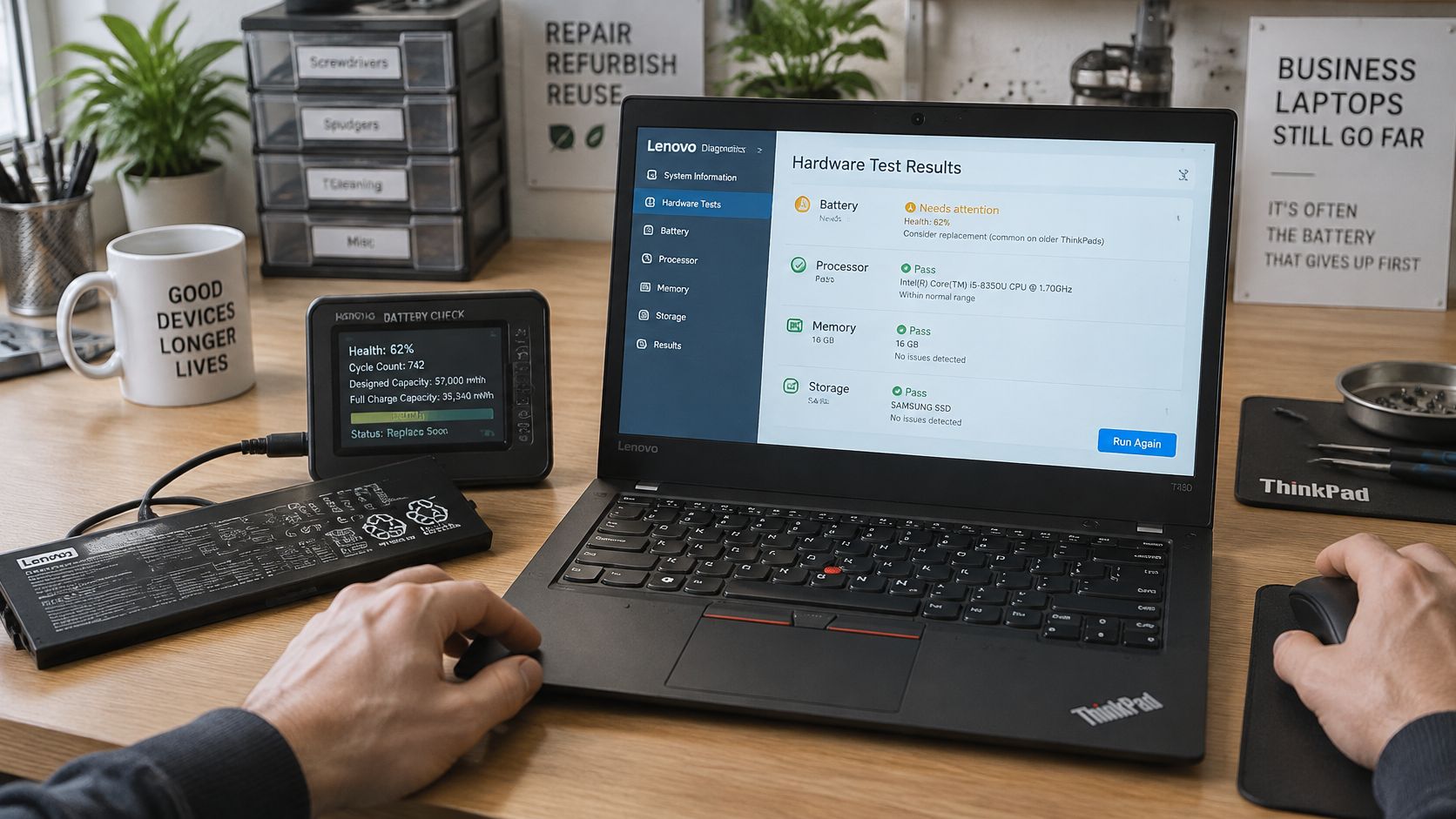
What a useful bench assessment looks like
The inspection should cover the battery report, SSD health and memory configuration before moving to the keyboard, trackpad and hinges. Test each port with a working peripheral rather than relying on visual inspection.
Webcam, microphone, Wi-Fi and charger checks matter because they affect ordinary working days. Windows activation, firmware access and removal of previous organisational management are equally important; a tidy desktop doesn't prove the machine is ready for resale.
Shiny keycaps and worn palm rests indicate use, not necessarily failure. Loose port housings, damaged hinge mounts and intermittent charging deserve closer investigation because they can lead to functional repairs.
Keyboard replacement, battery replacement and charging repairs are different jobs. Parts availability, labour and access must be checked for the exact machine before deciding that a repair is economical.
A worn finish is a buying compromise. A fault that hasn't been diagnosed is an unknown expense.
A realistic repair decision
Say a student buys a cheap older laptop and discovers it barely lasts through a lecture. If the screen, storage, supported software and charging system are sound, a compatible replacement battery may be the sensible fix.
If the same machine also has unstable charging and damaged hinges, we'd price the complete repair before spending anything. Replacing the battery alone could leave the student with an unreliable computer.
An older T series may offer more accessible maintenance than a slimmer alternative, but that needs checking in its service manual. A newer X series may be a better travel choice if portability matters more than expansion.
What We Commonly See
These are inspection priorities, not claimed fault rates for our Lenovo stock.
- Battery uncertainty: A capacity report resolves more than a full-charge screenshot.
- Heavy-use clues: Polished keys deserve a typing test, not automatic rejection.
- Connection concerns: A loose charging connection needs diagnosis before sale.
- Grade differences: Surface marks shouldn't be confused with hinge or chassis damage.
- Repair decisions: Fix an isolated, understood fault; reconsider a machine with several unresolved problems.
Whether to Buy, Repair or Walk Away
Buy a refurbished Lenovo when its supported hardware, measured condition and written cover fit your use. That makes it a sensible option for students, home workers, households replacing an ageing computer and small businesses buying straightforward office machines.
Avoid buying a bargain office laptop for demanding gaming or creative work without checking the application's requirements, including graphics. Also walk away when a seller won't identify the processor, disclose battery condition or explain the warranty.
A Fair grade needn't be a reason to reject a machine. It also isn't permission to expect less accurate specifications or accept unexplained faults.
Choose a newer-generation T or X model if
- Long-term supported use matters most. Prefer the newer eligible configuration over an older premium badge.
- You depend on the laptop daily. Prioritise documented condition and practical support over the lowest purchase price.
- You carry it regularly. Compare weight, charger size and battery performance alongside the keyboard and screen.
Choose an older L model only if
- Eligibility is confirmed. The exact installed hardware meets your software requirements.
- The saving survives inspection. Battery or storage work won't erase the price advantage.
- Its limitations fit your routine. You understand the installed memory, upgrade route and physical condition.
Repair an existing laptop when the fault is isolated, the rest of the machine is sound and the resulting computer still meets your needs. Replace it when several expensive faults coincide or when repairing it won't resolve the underlying software or performance limitation.
For refurbished Lenovo laptop computers, I'd favour a newer supported generation with an ordinary cosmetic grade over a pristine older machine with unanswered questions. Ask our UK team for the battery figure, exact specification and written cover before ordering, and ask about selling your existing technology if you're upgrading.
Meta description: Buying refurbished Lenovo laptop computers? Check Windows 11 support, battery health, repair options and UK warranty terms before choosing your next laptop.
Written by James Waterston. 24 years in the mobile phone industry from customer service through to Sales Director of a global repair and recycling company. Now running Used Mobiles 4U for over 8 years. Connect with James Waterston on LinkedIn.
Used Mobiles 4 U offers professionally tested, clearly graded refurbished electronics, including selected Lenovo laptops, with UK customer support. Visit Used Mobiles 4 U to compare current listings, then ask us to confirm the exact processor, battery condition and warranty terms for the machine you're considering.
Looking for a refurbished phone?
Shop professionally tested refurbished iPhones and Samsung phones with 18 month warranty, 30 day returns and free UK delivery.
Browse Refurbished Phones



