





Refurbished MacBook Pro M1: The Practical Verdict

08/10/2026

10 Mins

Could a laptop still be a sensible buy in 2026 if Apple has already discontinued it? A refurbished MacBook Pro M1 can be, but only when its battery, memory, storage, warranty and future software risk are checked rather than judged from the M1 badge alone.
Is a Refurbished MacBook Pro M1 Worth Buying in 2026?
For many UK buyers, a refurbished MacBook Pro M1 remains worth buying in 2026. It suits students, office users, developers and creative professionals who want quiet, dependable performance without paying new-device pricing. The safest purchase is a professionally tested model with clearly disclosed battery condition, enough storage for your workload and a warranty that explains what happens if an integrated component fails.
Apple announced the 13-inch MacBook Pro with the M1 chip on 10 November 2020, opened pre-orders that day and began shipping it on 17 November 2020. The model was discontinued on 6 June 2022, so remaining UK stock comes from a finite production period. Those dates and the original specifications are recorded in Macworld's launch coverage of the M1 MacBook Pro.
Practical verdict
- Buy it for: web work, Microsoft Office, study, coding, photo editing and sensible 4K media work.
- Check first: maximum battery capacity, cycle count, RAM, SSD size, cosmetic grade and warranty exclusions.
- Think twice if: you need the longest possible macOS lifespan, extensive virtual machines or sustained high-end video and 3D work.
The M1's performance is only half the decision. A fast laptop with tired battery cells, an 8GB memory ceiling or weak post-sale protection can cost more to own than a better-configured refurbished machine.
Our Experience Refurbishing This Model at Used Mobiles 4U
One thing we regularly notice across the refurbishment bench is how much condition varies between individual M1 MacBook Pros. Two machines can share the same model number while looking very different internally. One may have been used lightly at a desk, while another has spent years travelling in a bag, charging repeatedly and running demanding applications.
Our technicians check battery maximum capacity, cycle count and the macOS service recommendation before a device is graded. We also test every keyboard key, the trackpad, display, webcam, speakers, Wi-Fi, charging behaviour and each port. Hinge tension and charging-port wear deserve attention because they can reveal heavy daily use that a quick cosmetic inspection misses.

What the grade doesn’t tell you
A clean lid doesn't guarantee a healthy battery. We often see excellent cosmetic grades paired with noticeably reduced battery capacity, while a machine with small marks may have better internal health. Parts may be replaced when they fail testing, but integrated memory cannot be upgraded later, so configuration matters before purchase.
We also secure-wipe the machine and confirm that it isn't tied to a previous owner's account. A refurbished laptop should arrive ready for its next user, not requiring the buyer to solve an Activation Lock or hidden setup problem. Our refurbishment process explains the checks that sit behind a graded device.
Technician's rule: Treat battery condition and configuration as part of the product, not as minor details beneath the cosmetic grade.
The 2020 model launched with an 8-core CPU, an 8-core GPU, 8GB of unified memory and a Touch Bar. Apple positioned the M1 as a major move away from Intel processors towards its own Apple Silicon architecture, so it remains an important transition model rather than just an old Intel replacement. That efficiency is why it can still feel preferable to an older Intel MacBook Pro, even when the Intel machine looks cheaper.
What Buyers Usually Ask Us Before Buying a Refurbished MacBook Pro M1
- Is 8GB enough? For browsing, documents, study and light coding, it can be adequate. It becomes restrictive with containers, virtual machines, large creative projects or many professional applications open together. Because unified memory is integrated, you can’t add more later.
- Does battery health matter after purchase? Yes. A used MacBook may still work perfectly but need charging much more often than it did when new. Ask for maximum capacity, cycle count and any macOS service recommendation before paying.
- How long will Apple support it? No retailer can promise Apple’s future macOS timetable. One retailer guide predicts roughly four to five more years of major macOS support and two to three additional years of security updates, but that remains a prediction, not an Apple guarantee. [MacFinder’s M1 MacBook Pro guide](https://macfinder.co.uk/product-category/macbook-pro/m1-macbook-pro/) provides that estimate.
- What should I expect from Used Mobiles 4U? We don’t sell new devices. We supply tested refurbished MacBooks with clear condition grading, warranty cover and UK-based support, subject to the terms shown with the specific listing.
A common example we see is a buyer focusing on the lowest advertised price, then discovering that the machine has less memory and weaker battery condition than a slightly better listing. The cheaper checkout figure isn't always the cheaper ownership decision.
Performance and Battery Expectations for the M1 MacBook Pro
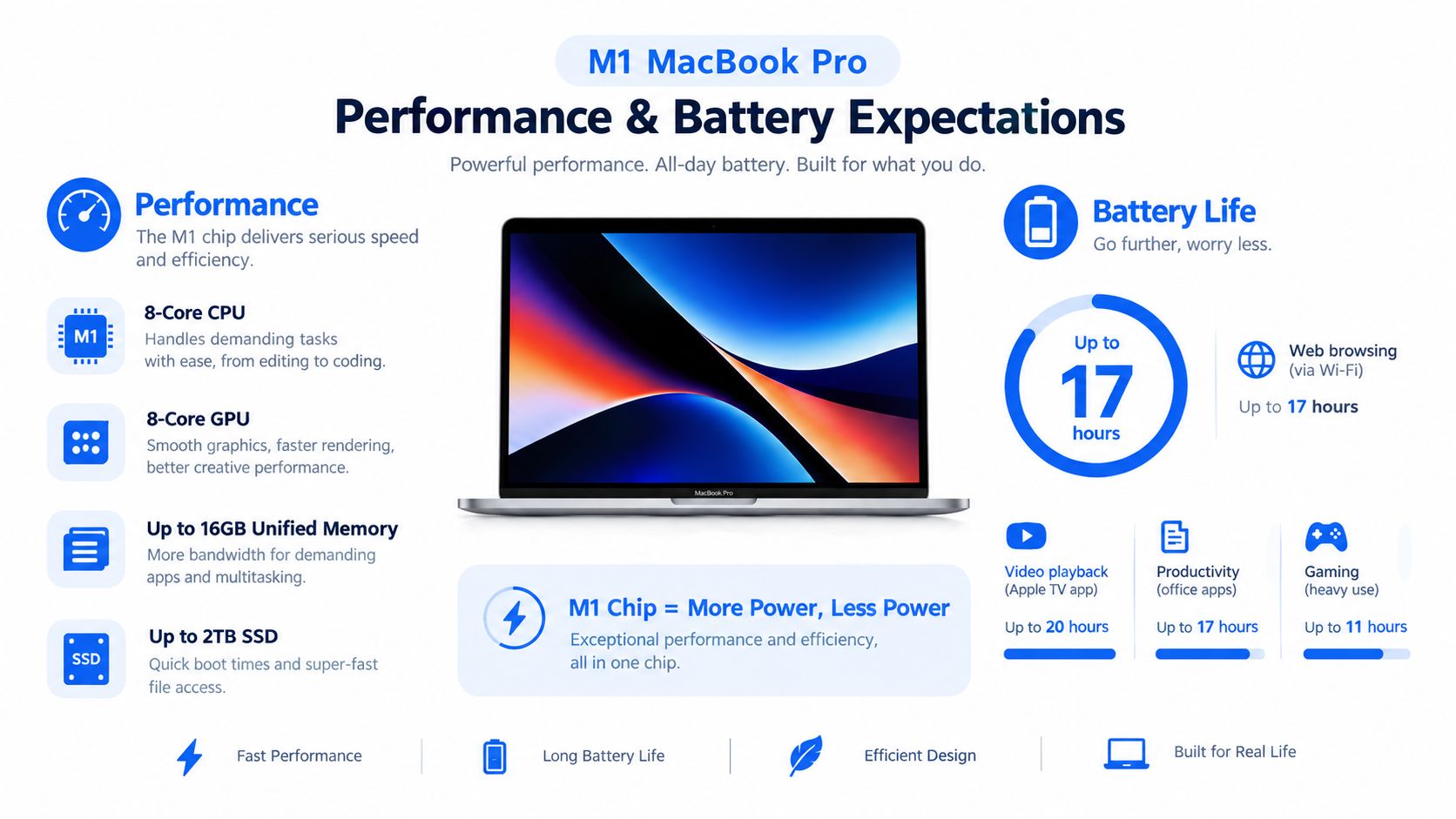
The M1 MacBook Pro still has enough performance for normal professional work. Independent UK testing recorded a Geekbench 5 multicore score of 7,771, with graphics results of approximately 80 frames per second in the demanding 1400p Aztec test and about 180 frames per second in the lighter 1080p Car Chase test, as shown in PCMag UK's M1 MacBook Pro testing.
Those figures help explain why the laptop remains useful for software development, photo editing and 4K media work. The M1 combines CPU cores, GPU cores and memory access in one system-on-chip, which reduces the data movement found in designs using separate components. Benchmarks still don't reveal battery wear, SSD health, thermal history or whether every port works.
Battery claims versus a used machine
Apple rates the 58.2-watt-hour lithium-polymer battery for up to 17 hours of wireless web use and 20 hours of Apple TV video playback. Those are controlled estimates using a defined configuration, brightness level and software setup, not a guarantee for a refurbished laptop. Video calls, external drives, browser tabs and battery age can all reduce runtime. Apple's figures and testing conditions are detailed in its UK MacBook Pro technical specifications.
In practice, buyers should treat the original rating as an upper-bound benchmark. Check maximum capacity and cycle count, then decide whether the laptop will spend most of its time beside a charger or in a lecture hall. For practical battery-care guidance after purchase, trust Computer Daddy for battery care.
Memory is the decision you can’t undo
The base 8GB configuration is fine for straightforward work, but it can't be upgraded after purchase. Prioritise a 16GB model when you use containers, large Lightroom libraries, multiple development tools or demanding creative applications. Storage matters for the same reason. An SSD that looks generous at checkout can become cramped once applications, project files and backups accumulate.
Our 10-step refurbishment check is useful because performance testing should sit alongside battery diagnostics, storage-health checks and physical port testing.
Pricing, Costs and What Configurations to Prioritise
The original UK pricing gives buyers a useful reference point. At launch, the 256GB model cost £1,299, while the 512GB version cost £1,499, a £200 difference, or approximately 15.4% over the entry configuration. Macworld's launch details confirm those figures and the model's discontinuation on 6 June 2022.
That isn't a current used price. It shows how Apple valued additional storage when the machine was new. Present value depends on RAM, SSD capacity, battery health, cosmetic grade, warranty and available UK stock. A refurbished listing should be compared with other machines in the same condition, not against a headline figure for a different specification.
Where the ownership cost appears
A low purchase price can hide future spending. UK repair guidance places general laptop repairs between £50 and £400, motherboard work around £200 to £400, and common laptop battery replacement between £60 and £150, depending on provider and parts. A separate UK guide estimates an M-series MacBook battery at approximately £180 to £240, showing why generic laptop repair ranges shouldn't be treated as a Mac-specific quote. These ranges are discussed in Mendo Rend's UK repair-cost guide.
- 16GB RAM: the sensible priority for heavier multitasking because the memory is integrated.
- 512GB storage: preferable if your work involves photos, video, development environments or local files.
- Battery evidence: ask for maximum capacity, cycle count and service status, not merely “tested”.
- Warranty detail: check whether battery wear, accidental damage and other integrated components are covered.
The UK Government's reuse context also matters. Its IT Reuse for Good charter states that approximately 1.5 million people in the UK lack access to a basic laptop, tablet or smartphone, while UK homes contain an estimated 880 million unused electrical items. Reusing a professionally tested laptop can preserve an existing computer's useful life instead of creating demand for an immediate replacement.
UK Consumer Rights, Returns and Warranty Protection
Buying refurbished doesn't remove your statutory rights. For online purchases, UK Government guidance gives consumers a 14-day cancellation period after receiving goods, followed by another 14 days to send them back. The trader will normally refund the purchase within 14 days of receiving the returned item, as explained in GOV.UK consumer returns guidance.
That cancellation right is separate from protection against faults. If the MacBook isn't as described, isn't fit for its intended purpose or develops a problem, consumer law can provide remedies even when a retailer also offers a commercial warranty. GOV.UK states that when faulty goods are returned within six months, the seller generally has to repair or replace them unless it can show the fault wasn't present when sold.
What to test immediately
- Start-up and account status: confirm the machine activates normally and isn’t linked to another person’s Apple account.
- Input and display: test every keyboard key, the trackpad, brightness, camera and speakers.
- Connectivity: check Wi-Fi, charging, external displays and every available port.
- Battery behaviour: record maximum capacity and watch for unexpected shutdowns or rapid loss.
Keep the order confirmation, photographs and messages if something isn't right. A retailer's returns window can't remove statutory rights, while a warranty is additional protection rather than a replacement for the Consumer Rights Act. If a repair or return becomes necessary, use the retailer's warranty claims and repairs guidance and describe the fault clearly.
Who Should Buy or Avoid a Refurbished MacBook Pro M1
A fast refurbished laptop isn't automatically a good deal. The key question is whether the remaining support horizon matches how long you expect to keep it and whether your software will continue to run safely and reliably. Major macOS upgrades, security updates, browser compatibility and application support don't always end at the same time.
One retailer predicts roughly four to five more years of macOS support and two to three additional years of security updates, but that isn't an Apple promise. The M1 may remain functional after official support ends, yet “still turns on” isn't the same as being secure, compatible with banking or education software, and easy to resell.
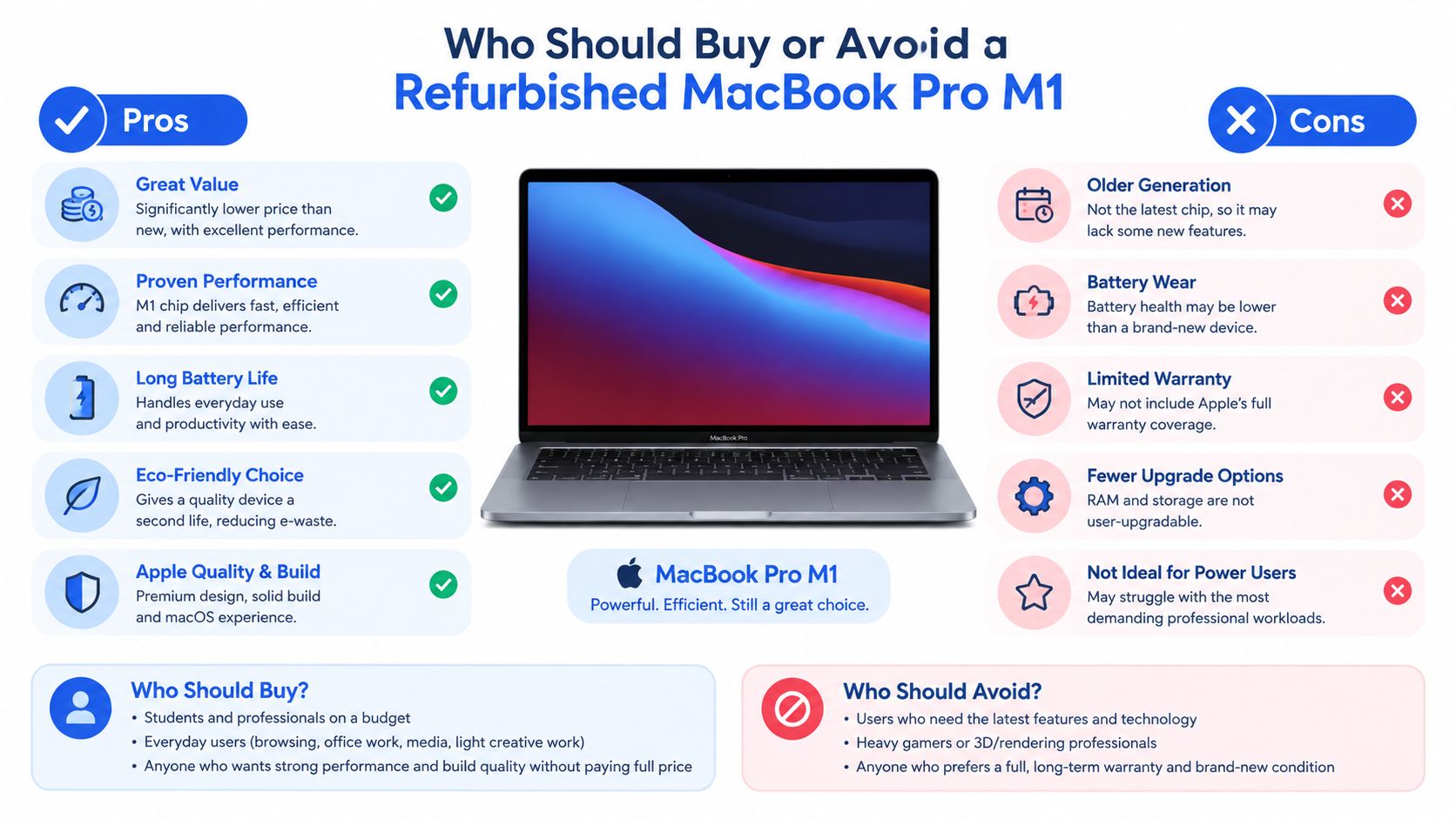
Choose the refurbished MacBook Pro M1 if
- Your work is mainstream: study, office software, browsing, coding, photo editing and moderate media work suit its capability.
- You value efficiency: it generally makes more sense than an older Intel machine when both sit at a similar refurbished price.
- You can buy the right configuration: verified battery condition and 16GB memory are more important than a perfect-looking lid.
Avoid it if
- You need a long, low-risk support runway: choose a newer Apple Silicon model if your organisation expects to keep the laptop for many years.
- You run sustained heavy workloads: large virtual machines, demanding native Apple Silicon applications, extensive 3D work and high-end video production may justify a newer Pro-class chip.
- You found only an 8GB bargain: the discount may not compensate for the integrated memory limitation.
A common comparison is a discounted M1 against an older Intel MacBook Pro. The M1 will often deliver the more pleasant daily experience through quieter operation and better efficiency, but support risk still needs pricing into the decision. If a battery or board repair would consume a large part of the machine's value, replacing it may be more sensible than repairing it.
Quick Comparison Choosing Between Common Refurbished Options
Choose the refurbished MacBook Pro M1 if
- You need sustained everyday performance: its active cooling and M1 architecture make it a practical choice for coding, office work, photo editing and moderate video tasks.
- You want a compact professional laptop: it offers more headroom than a basic ultraportable for workloads that run for longer periods.
- You have checked lifecycle risk: buy only when the price, battery evidence and warranty make sense for your expected ownership period.
Choose a refurbished MacBook Air if
- Portability comes first: the Air is the better fit for buyers who carry their laptop constantly.
- Your workload is light: browsing, documents, email and study don’t require the Pro model’s sustained cooling advantage.
- You want a lower upfront cost: accepting less sustained performance can be sensible when your applications rarely push the machine.
Our wider guide to the best refurbished laptops can help if you're comparing several Apple and Windows options. The clear recommendation is to buy the M1 Pro when you need its performance and find a properly tested 16GB configuration at a price that reflects its support uncertainty. Avoid it when the listing hides battery condition, offers only 8GB for demanding work or leaves you exposed to an expensive repair with little protection.
Used Mobiles 4 U supplies professionally tested, clearly graded refurbished MacBook Pro laptops with UK support, secure data wiping and product-specific warranty and returns information. Visit Used Mobiles 4 U to check current M1 stock, compare configurations and choose a replacement device with its battery condition and protection made clear.
Written by James Waterston
24 years in the mobile phone industry from customer service through to Sales Director of a global repair and recycling company. Now running Used Mobiles 4U for over 8 years.
LinkedIn
Meta description: Refurbished MacBook Pro M1 advice for UK buyers, covering battery health, support risk, repair costs, configurations, returns and value.
Looking for a refurbished phone?
Shop professionally tested refurbished iPhones and Samsung phones with 18 month warranty, 30 day returns and free UK delivery.
Browse Refurbished Phones



