

Why Phone Apps Keep Crashing and How to Fix Them

25/11/2026

14 Mins

Your phone is probably not the problem. Recurring crashes almost always trace back to one badly behaved app, a release that's gone stale, a drive that's nearly full or a cache that's gone corrupt, and the cheapest fix is usually the correct one. What makes phone apps keep crashing feel like a hardware fault is timing. Failures often cluster after an update or after storage fills up, which is exactly when people start blaming the handset. Sort the cause first, then clear only the level of data that cause justifies. That keeps logins, drafts and offline files intact, and it stops unnecessary replacement purchases.
The Short Version
Sort the cause before you spend anything. Every crash sits in one of four categories, and the symptom alone will not tell you which, which is why people wipe phones and buy replacements for faults a free fix would have cured. Read the pattern first, then act.
- One app fails while everything else runs. That points at the app itself, whether the fault is a broken release, a damaged cache or a server change it has not caught up with.
- The failures began straight after an update. That points at the update. Work out whether it was the app or the operating system that changed, because the fix differs.
- The phone is nearly full and slow everywhere. That points at storage. A drive down to its last few gigabytes makes the handset close apps on its own.
- Several unrelated apps all fail. That points at the handset. It is the only one of the four that can end in a repair or replacement bill, and the only one Safe Mode exists to confirm.
You're not an outlier, and this is recurring rather than a one-off. In 2024, 43% of UK and US consumers surveyed by Quantum Metric said they had experienced app crashes (Quantum Metric's mobile performance benchmark). The sharper UK figure is the repeat rate: in a 2025 survey of 2,000 UK smartphone users, 40% said an app crashes at least once a month, including 49% of Generation Z and 51% of Millennials against 26% of Baby Boomers, with an average of 19 minutes spent getting the app working again (Amplitude's UK tech frustration survey).
One thing to do in the next ten minutes: write down which app crashes, when it happens, and whether it began straight after an update. That note picks your category, and your category decides every step below, including how much of the app's stored data you can justifiably clear.
How to Stop Apps Crashing, Quick Steps
Work down this list in order. Each step is free, and each one rules out a bigger cause than the last, so you never end up wiping a phone to fix something a restart would have cured.
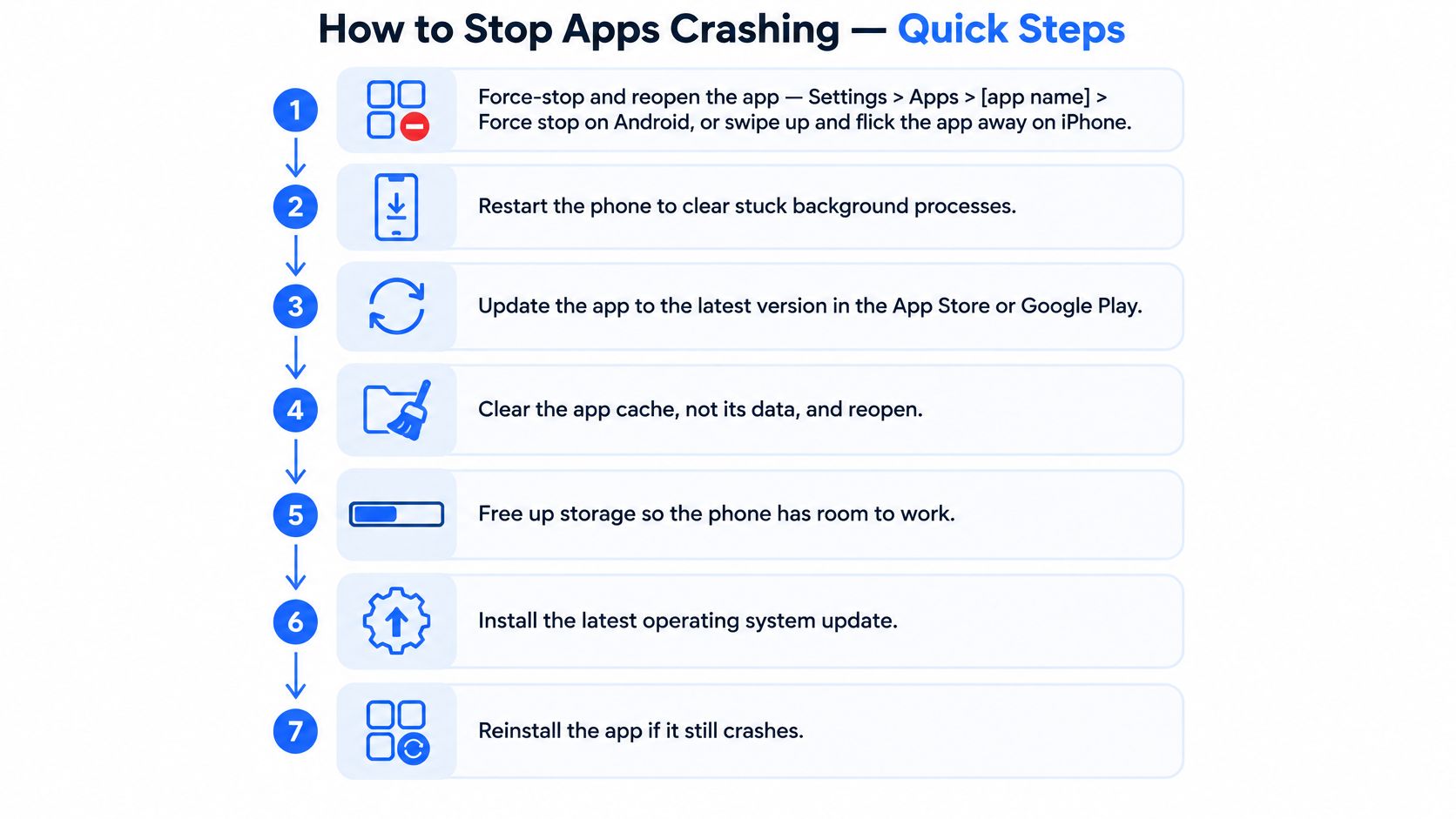
- Force-stop and reopen the app. Android: Settings > Apps > [app name] > Force stop. iPhone: swipe up from the bottom of the screen and flick the app away. This kills a frozen process and costs you nothing, which is why it goes first.
- Restart the phone fully. Power off, wait a few seconds, power back on. Background processes build up over days, and a restart returns memory to the state the app expects.
- Update the app. Google Play: profile icon > Manage apps and device > Updates. App Store: your account icon > Update All. A release weeks behind the server is a common reason one app misbehaves while the rest are fine.
- Update the operating system. Android: Settings > System > System update, though the menu name varies by manufacturer, so try About phone if you can't find it. iPhone: Settings > General > Software Update. Test again afterwards, because if the crashes started with an OS update rather than ended with one, you've found the culprit.
- Check free storage. Android: Settings > Storage. iPhone: Settings > General > iPhone Storage. Google's own guidance is that an Android phone can begin having problems once less than 10% of its storage remains available, showing up as apps freezing, closing unexpectedly or failing to update (Google's storage guidance). Clear out large videos, offline downloads and apps you open twice a year.
- Test on Wi-Fi, then on mobile data. If the app only fails on one connection, you have a network or service problem, not a phone one.
- Clear the cache only. Android: Settings > Apps > [app name] > Storage > Clear cache. Hold off on Clear data, and don't reinstall yet if you can avoid it. Take a backup first, because the next decision in this article removes things you can't get back.
A healthy app opens, completes a full task and is still running after a restart. If it only survives a fresh launch and dies on the second attempt, treat it as faulty and move on to the diagnosis.
Working Out Whether the App or the Phone Is at Fault
The pattern matters more than the app's name. When one app falls over and everything else on the phone behaves, you're dealing with that app: its local data, its release or a permission it lost in the last update. When several unrelated apps fail in the same week, stop looking at the app and start looking at storage, the system build and the battery.
The Safe Mode test that settles most arguments
Safe Mode boots Android with third-party apps disabled, which is the cleanest split between an app fault and a phone fault. Google's guidance is that if the crashing or freezing stops while the phone is running in Safe Mode, an installed app is likely responsible, and the way to find it is to remove recently downloaded apps one at a time, restarting after each removal (Google's Safe Mode guidance).
A freeze and a crash aren't the same failure. A screen that locks up for a few seconds and then recovers usually points at memory pressure or a slow background job. An app that vanishes straight back to the home screen has crashed outright, and that's more often a bad release or corrupted local data.
Change one thing at a time
Reinstalling the same app four times in a row teaches you nothing. Record a baseline first: model, RAM and storage, OS build, app build, network type, free space, how warm the phone is and what you did immediately before the crash. Then change a single variable and try again.
Bench rule: three repeat attempts minimum before you call anything a reproducible fault, and the same account tested on a second device before you blame the handset.
Averages hide the full picture. One historical mobile telemetry dataset put the crash rate at 1.6% on iOS 7.1 against 0.7% on Android 4.0 and later, which is exactly why you compare a phone against itself on a different OS build rather than against a vague average (MCV on the platform crash gap). If you want to document this properly, crash triage for mobile QA teams covers how to capture a stack trace, group repeat offenders and separate a device-level fault from a defect in the release. For the checks we run when nothing on the phone explains it, our device issues and troubleshooting guide sets out the order we work in.
Cache, Data and Reinstalls Compared Before You Clear Anything
Every clearing action sits in the same settings menu, and they are far from equal. Google's own Android sequence treats cache and data clearing as the last resort, after a restart, system updates, app updates and a force stop (Google's Android troubleshooting steps). That ordering is the key lesson: the destructive options exist for when the cheap ones have already failed.
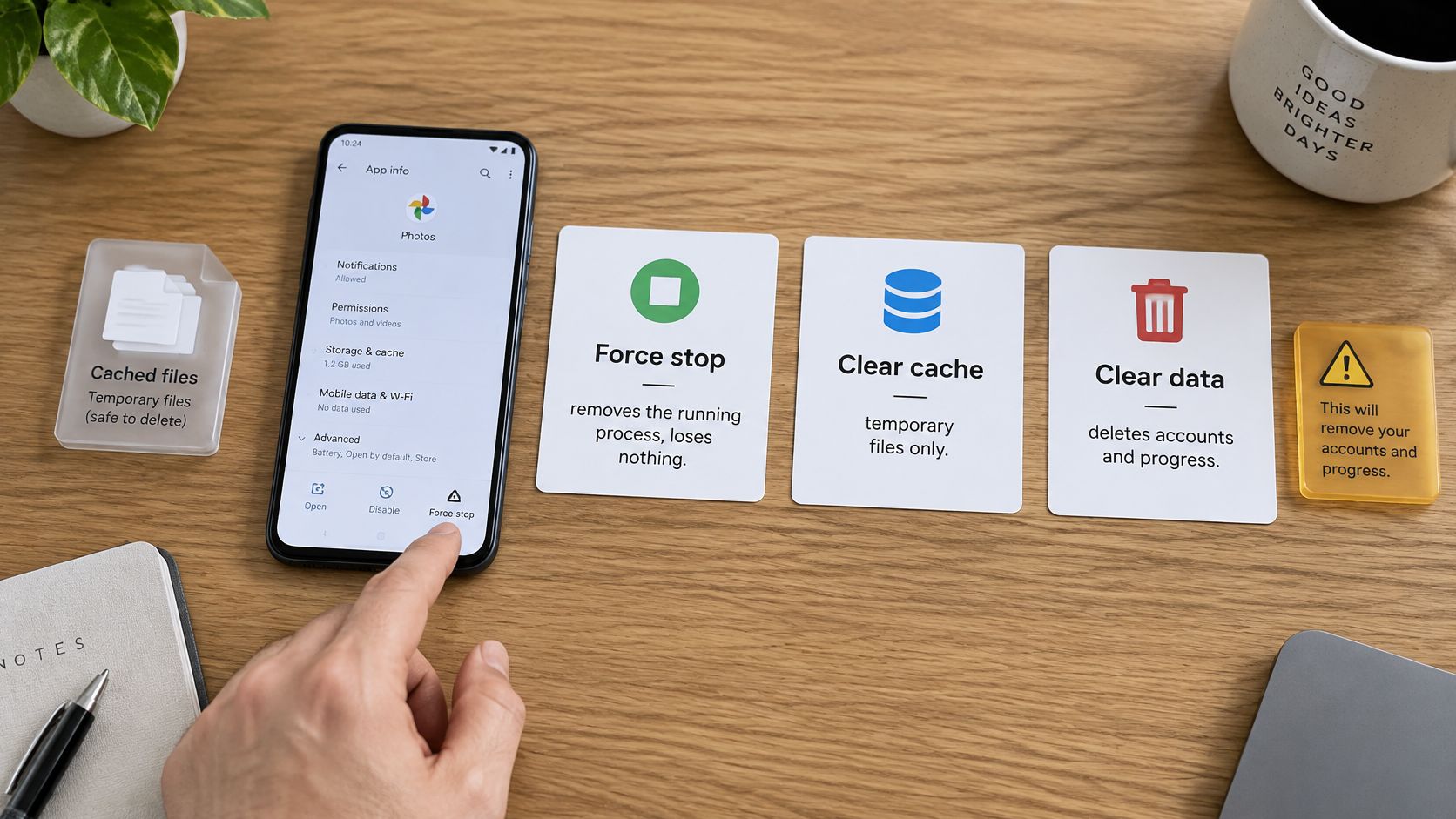
A cache holds temporary working files the app rebuilds by itself on the next launch. App data is what the app has stored for you: your login, a saved draft, a downloaded boarding pass, your offline maps. Removing the first costs nothing. Removing the second returns the app to the day you installed it, which is why Android hides "Clear storage" behind a confirmation dialog.
Match the action to the symptom instead of working down the list on principle. A frozen app needs a force stop, nothing more. Crashes that began straight after an update usually point to stale cached files, so clear the cache first. Clearing storage earns its place only when crashes survive that step, and only after a backup, because it takes your sign-ins and offline files with it. Reach for a reinstall when the installation itself looks corrupted, meaning the app crashes the instant it opens even on a fresh cache. A factory reset fits one pattern: several unrelated apps failing at once after everything else has been ruled out.
There is no clear-cache button on iOS. Offloading an app keeps its documents and settings and removes the app itself, which is the closest equivalent. Deleting removes both, so offload first and delete only if offloading changes nothing. Our guide to what a full iPhone is really telling you covers the storage side separately from crashes.
Before any of this, take a backup: iCloud or Finder for an iPhone, Google backup plus a copy of your photos for Android. If you're heading for a factory reset, sign out of the Apple ID or Google account first so activation lock doesn't block the next owner of the phone.
When the App Has Outgrown Your Phone
An app can outgrow a phone even when the handset itself is sound. Start with the app's store listing and check the minimum operating system it needs, plus the date it was last updated. If the required version is newer than the one your phone can run, cache clearing and factory resets will not solve it. The missing piece is operating system support.
Recent reviews are useful before you blame the handset. If many people report the same crash on the same day, the fault sits with the publisher, and a patch is usually a few days away. Use the store's report route or the publisher's support page, and use the web version of the service while you wait, since most banks and retailers run one. Testing the same app on a second device or a family member's phone helps separate a bad release from a handset-specific problem.
Support windows, and what your consumer rights cover
Short support windows can cause real problems. Which? has reported typical minimum software support periods ranging from about two years on some Motorola models to seven years on Google and newer Samsung devices. UK consumer guidance also notes that an app which crashes, freezes or doesn't work as advertised may justify asking the provider for a repair or replacement, and that updates can introduce compatibility problems (consumer guidance on faulty apps and downloads).
If the app needs an operating system your phone can't install, the phone needs replacing.
That decision deserves a moment of caution. A charger, case or quick repair will not add an operating system version the hardware cannot install, so pay for those only when a separate fault is clear. If the phone is otherwise reliable, check its update position before committing to another handset. Our refurbished iPhone update support guide for 2026 sets out how long each model is likely to keep receiving iOS updates, which helps avoid buying a phone that will hit the same wall again.
If a phone bought from us keeps failing after these steps, contact us with the dates, screenshots and everything you've already tried before paying anyone for a repair.
Our Experience Refurbishing This Model at Used Mobiles 4U
Full storage sits behind most of the "faulty phone" handsets that reach a workbench. Photos, offline maps and cached video fill a 32GB or 64GB device until the system starts closing apps to protect itself, and the owner reads that as a hardware fault. The second common cause is an app that has jumped ahead of the operating system. The app updates, the handset can't, and the crashes begin the same week.
Every phone we take in goes through Mobicode testing, with more than 50 device checks available across the testing process, so a software fault and a hardware fault get separated before anything is listed. Every phone is professionally checked for performance, battery health and functionality, and we recheck the iPhone and Samsung stock we hold to confirm good condition and up-to-date security. Handsets that miss the standard are repaired and retested or removed from sale.
Cosmetic grading and functional testing stay separate: one describes how a phone looks, the other how it works. The buyers questions below explain which of the two matters for stability.
What technicians check first:
- Free storage against total capacity, not just the headline gigabyte figure
- The OS build the phone is running versus what it can support
- Battery health, and whether the phone shuts down under a sustained load
- The app's update history and whether a clean install runs on a wiped device
- Heat marks near the camera and a worn charging port, both signs of heavy daily use
A phone that powers off under light load is losing power, and no cache clear fixes that. A model one generation newer usually brings a longer support window and more memory headroom, which is the difference that matters when an app doubles in size between versions.
What Buyers Usually Ask Us
Do refurbished phones crash more than new ones?
The handset label matters less than the software state underneath it. A refurbished phone runs the same app builds as a new one of the same model, so crashes usually come from free storage, OS support length, battery condition or one faulty app. Sort those before treating the phone as the problem.
What does a grade tell me?
Grading describes how a phone looks. Functional testing covers how it works. They are separate checks because a scuffed frame can sit beside reliable app performance, while a clean finish can hide weak battery health. Read the cosmetic grade for appearance, then read the testing notes for the things that affect daily use. If the description only gives one of those, ask for the other before paying.
What if the crashing app turns out to be a hardware fault?
Contact us inside the warranty and returns window rather than paying a repairer first, and keep your record of what you tried. The useful detail is what failed, when it failed and whether it followed a pattern across apps. That saves time because the handset can be checked against the symptom instead of being judged from one vague complaint. Battery health is one variable buyers can largely rule out on arrival, since every phone we sell has a minimum of 85% battery health.
Is a cheap older refurbished model a false economy if I live in banking apps?
Ask which operating system version it runs and how long the maker still supports it. Banking apps often expect a current platform, so a supported handset matters more than the badge on the back or a low price. If the phone is close to the end of updates, the saving can disappear the first time a security requirement blocks the app.
Should I sell a phone that crashes one app?
Back up, wipe your data, sign out of the accounts and say so in the listing. One unreliable app is a fault to disclose, not a reason to hide the phone's history. Clear wording protects you from a dispute and lets the buyer decide whether the price reflects the risk. A vague listing usually turns into the same argument later, with more effort for both sides.
A buyer may assume a refurbished Samsung is faulty after two apps crash following an update, when reinstalling those apps and freeing space settles it. Storage headroom is worth having from day one. The iPhone 11 in red with 128GB in Like New condition gives apps far more room to work than a 32GB handset.
Decide Whether to Repair or Replace Your Phone
Keep the phone. If your crashes are confined to one or two apps and stop after the steps above, you don't have a hardware fault, and a replacement buys you the same experience with a lighter wallet. Storage pressure is one of the most common reasons people seek help, with software issues and a near-full drive ranking among the significant causes in 2025 repair data (device repair experts' 2025 findings). A handset that crashes a single banking app after an update but runs everything else cleanly is showing an app fault, and swapping phones changes nothing because the same app will crash again on the new one.
In my view, these are the faults that justify moving on:
- Several unrelated apps crash on a current OS after storage is cleared and the phone has been reset
- The phone overheats or shuts down under light use, which points at the battery or the board
- The phone no longer receives OS updates and the apps you depend on need a newer version
- The repair is priced close to a tested replacement, which is usually the moment to stop spending on the old one
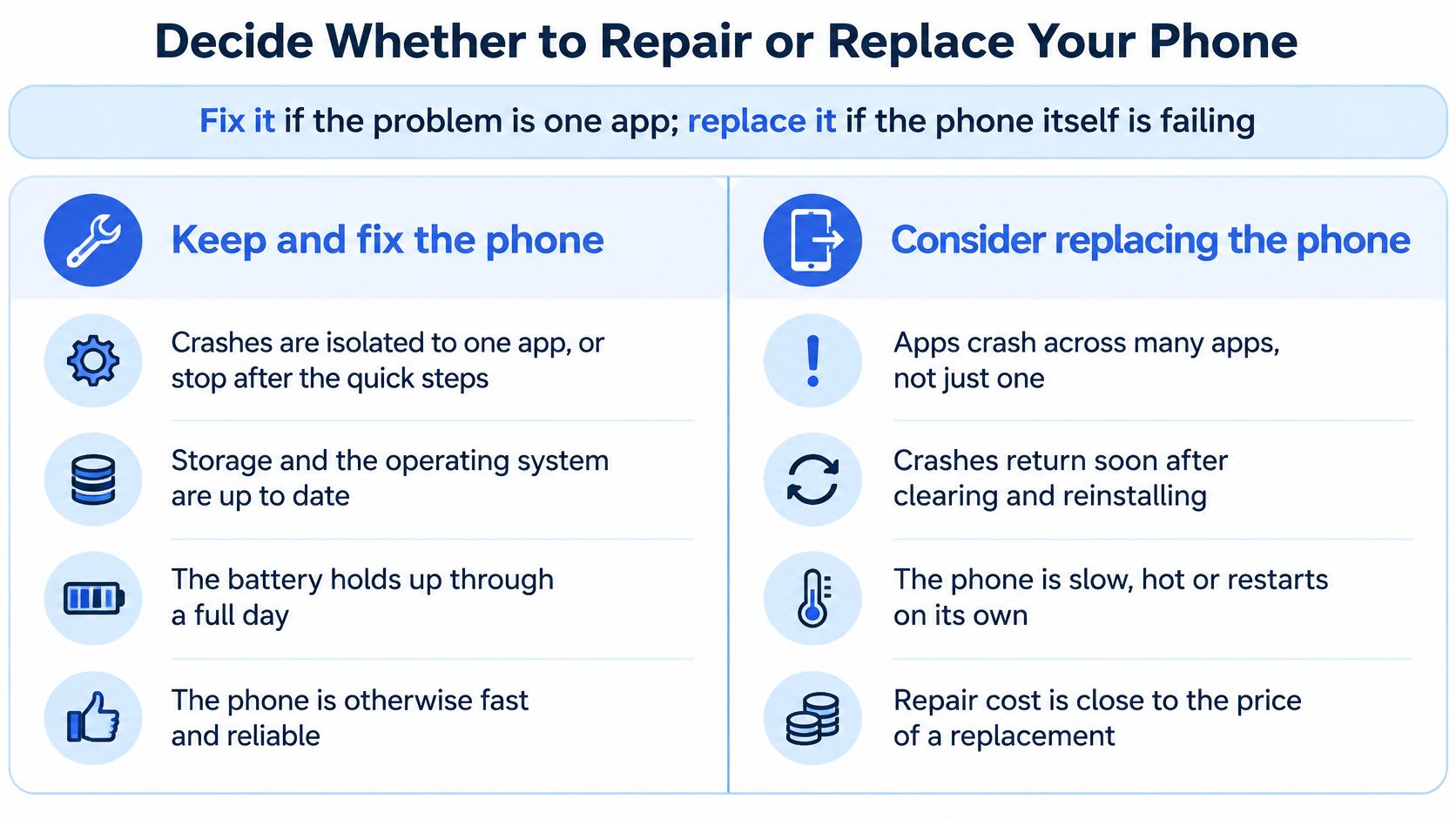
This suits anyone whose phone works well apart from one or two apps. It doesn't suit anyone still running an unsupported handset for banking, where security updates matter more than the cosmetics. A repair earns its keep while the quote stays well under the cost of a tested, graded replacement; once that gap closes, further spending on the old handset buys very little. If you're unsure which side of the line your phone sits on, our breakdown of iPhone repairs against refurbished iPhones and the costs explained puts the two side by side.
At the budget end, the Motorola E6S in Meteor Grey with 32GB is a straightforward Android handset with microSD expansion, and the 32GB figure is the detail to weigh against your app list, because internal storage is what fills first.
The rule I'd give a friend: if one app fails, fix the app. If the phone fails across the board, test the phone. Only replace what you've proven faulty.
Every phone we sell at Used Mobiles 4 U is SIM-free, professionally tested, data-wiped and supplied with a minimum of 85% battery health, so you start with storage and power on your side rather than against you. If you're weighing a repair against a replacement, send us the symptoms and the steps you've already tried, and we'll tell you whether the phone is the problem. Browse the current stock when you're ready and compare models by storage, colour, grade and live price.
Looking for a refurbished phone?
Shop professionally tested refurbished iPhones and Samsung phones with 18 month warranty, 30 day returns and free UK delivery.
Browse Refurbished Phones