


How to Factory Reset Samsung Phone Before You Sell It

15/11/2026

10 Mins
Most guides stop once you tap Factory data reset. Skipping the accounts leaves the next owner locked on the setup screen by Factory Reset Protection. A proper how to factory reset Samsung phone has three parts: a backup you have checked, Google and Samsung accounts removed, and the reset last.
Allow 10 to 15 minutes for the reset. Done as a handover, the whole job takes about an hour.
Quick Answer
A factory reset clears the Samsung, and it cannot be undone. Photos, messages, apps and settings go with it, usually through Settings > General management > Reset > Factory data reset.
Google and Samsung accounts are a separate job. Remove both before you erase the phone, or Factory Reset Protection can stop the next owner at the setup screen.
Trade-in desks, private resale and a Galaxy handed to a child all hit that same lock if the accounts stay on the device. Ofcom's latest Communications Market Report counted 123 million UK mobile subscriptions at the end of 2025, up 4% year on year, and found that 78% of UK children aged 8 to 17 own a mobile phone.
Take the SIM and microSD card out when the handset is changing hands. Reset from Settings if the phone still boots. Recovery mode is for a dead or frozen handset. Keep it charged, allow 10 to 15 minutes for the erase, and leave time afterwards to check the setup screen is clear.
Prepare Your Samsung Phone Before You Reset It
"Backup completed" is not the test. Being able to log in somewhere else and see your photos is the test. A backup you haven't opened is a promise, not a copy, and once you tap Reset there's no way back.
Samsung UK's guide to backing up and restoring Galaxy data recommends a Samsung account, Google account or Smart Switch, but notes the data available varies by operating system version and phone model. Its Smart Switch guidance goes further: hidden files and Secure Folder content are not transferred. That's the gap. Phone-to-phone transfers look complete and still leave things behind.
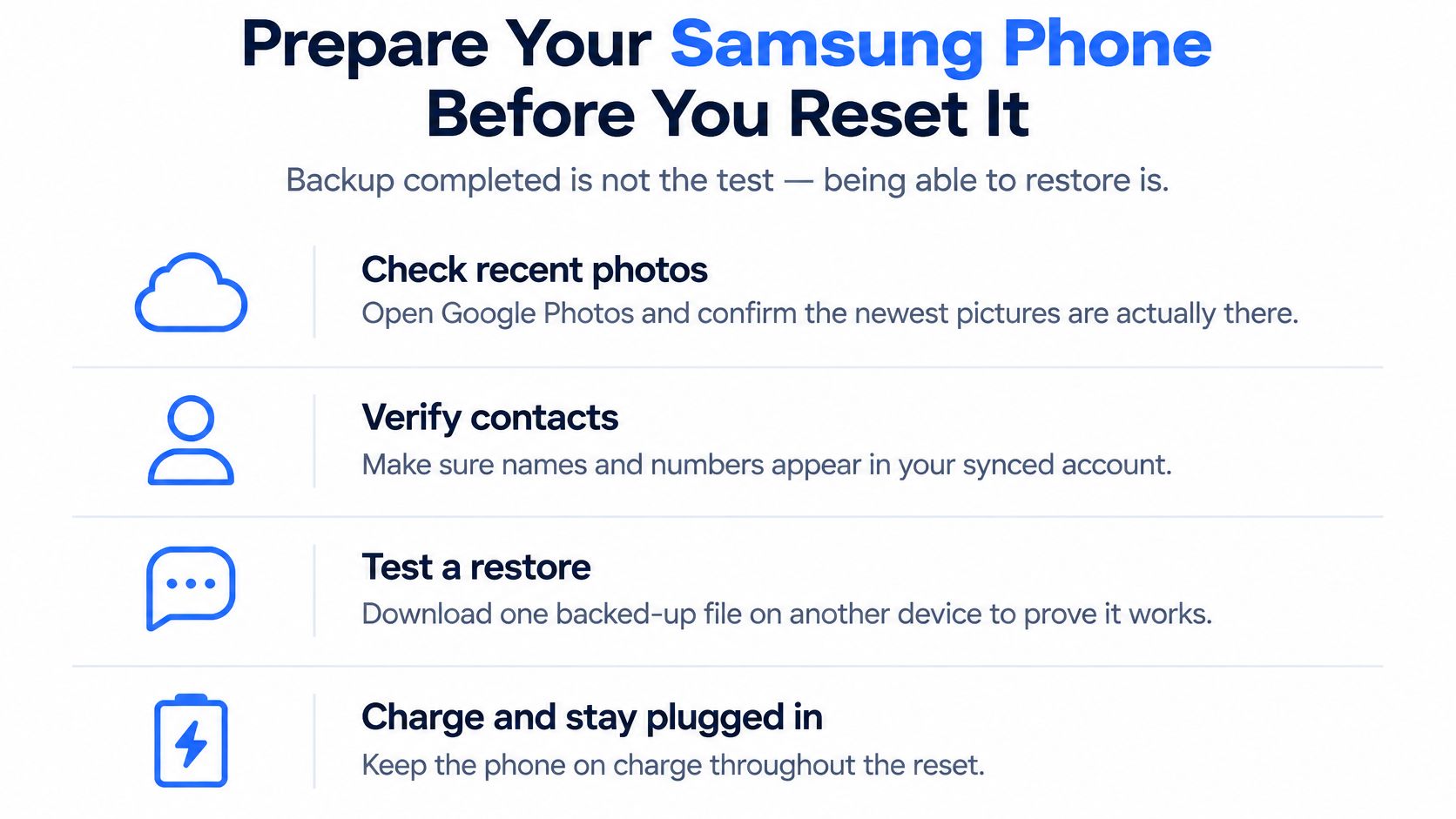
Practical rule: a backup only counts once you've restored a file from it on a different device.
The backup audit, in order
- Photos: open Google Photos or your chosen gallery and scroll to the newest pictures. If the last week is missing, the backup hasn't run.
- Contacts and calendar: sign in to Google on a laptop and check the names and dates are there, not just on the handset.
- WhatsApp: open the app, go to Settings > Chats > Chat backup and force a backup now. Note the completion time shown on screen.
- Authenticator codes: these almost never survive a reset. Export or re-enrol them on the new device before you wipe, or you'll be locked out of work and banking logins at the worst moment.
- eSIM: open Settings > Connections > SIM manager and record the details. A reset can erase the profile, so confirm your network's swap or re-download process first.
- Secure Folder and Downloads: check both by hand. Neither is reliably covered by an automatic transfer.
If the phone is going to a child or replacing an upgraded handset, set up the new user's Google account before you wipe, not after. Readers moving to a new device will find our guide to transferring data to a new phone useful for the restore side of this.
Two more checks catch people out. If Find My Mobile or Google Find My Device is switched on, turn it off, because either can complicate setup for the next owner. And keep a written note of what you've checked and where each copy lives, so the audit is recorded rather than remembered.
Choosing the Right Reset Route and What a Reset Won't Fix
Pick the route before you touch the phone. A settings reset on a handset that still boots lets you sign out, take a last backup and pass the device on. Recovery mode is for a frozen phone, a phone that will not start, or a forgotten screen-lock PIN, and you usually cannot back up once you are in it. I would use recovery only when the phone will not boot.
The key combination differs by model, so check Samsung's support pages for yours rather than guessing. If a hardware fault is the reason the phone will not start, Computer Daddy's Samsung repair guide is a more sensible next read than another wipe attempt.
The handover fails when the Google account is still signed in at the moment of reset. Samsung UK warns that Factory Reset Protection can require the previously synchronised Google account after a button-based reset, and advises removing the Google account before handing the device on. Data deletion and account removal are two separate jobs. If the menu names have shifted on your model, or the account will not sign out cleanly, the walkthrough on how to remove a Samsung account covers the current path.
Wiping the storage leaves the security link that ties the phone to your Google account.
A reset also will not remove a network lock, fix a cracked screen or a tired battery, recover data you never backed up, or delete copies sitting in Samsung and Google cloud storage. Review those cloud copies separately if you want them gone. If the screen or battery is failing, weigh a repair against a replacement before you wipe the phone for sale. A refurbished unit such as the Samsung Galaxy S20 5G in Cosmic Grey with 128GB is one route when a handset has reached the end of its useful life.
How to Factory Reset a Samsung Phone, Quick Steps
Keep the phone on charge from the first tap to the final reboot. A wipe that stops halfway can leave the Galaxy stuck between the old setup and a blank one.
Treat this as a handover sequence: check the copies, strip both accounts, then wipe. Samsung's factory reset guide states that the reset permanently deletes downloaded apps and user data, so run it only after those copies are somewhere you can open.
- Confirm the backup is usable. Open the Samsung or Google backup and check that photos, contacts, messages and authenticator codes are listed there, not only that a backup switch is on.
- Remove the Google account. Settings > Accounts and backup > Manage accounts > Google > Remove account. Wait until that account is gone from the list.
- Remove the Samsung account on the same Manage accounts screen: Samsung account, then Remove account.
- Turn off the screen lock and biometrics. Settings > Lock screen, or Biometrics and security on older One UI, so setup does not ask for a PIN the next person does not have.
- Take out the physical SIM and microSD card. On an eSIM model, move the line to the replacement phone, or arrange the transfer with the carrier, before you wipe.
- Open the reset menu. Settings > General management > Reset > Factory data reset. Older Galaxy software uses Backup and reset > Factory data reset, or Privacy > Factory data reset.
- Read the deletion list, tap Reset, then enter the current PIN, pattern or password.
- Leave it until it reboots to the language and welcome screen, with no request for a previous login.
When that welcome screen is up, power the phone off. I would not sign back into Google or Samsung on it. Box it in that signed-out state and hand it over.
Common Problems After a Samsung Factory Reset
A setup screen that demands a Google account the new owner does not have is the failure that stops a sale. Factory Reset Protection is already covered in Choosing the Right Reset Route: it blocks the next person when the previous Google account was still on the Galaxy at the moment of the wipe.
Samsung's explanation of Factory Reset Protection confirms a reset can still ask for verification of a Google account that was registered on the phone, including on a handset sold in good faith. Sign in with the Google account last used on that phone. If you cannot, only the original owner can clear it.
For buyers, run the same check in reverse
Buying privately, stop if the welcome flow asks for a login you do not have. Do not pay. Ask the seller to remove the account, then watch the phone restart to the welcome screen before money changes hands.
A factory reset only empties what the menu lists. Used Mobiles 4 U's secure data destruction process removes previous-user data as part of preparing a phone for resale, which is a different job from tapping Factory data reset once and treating the handover as finished.
What sellers should take from this: if you cannot show the phone reaching setup without you, it is not ready to sell.
Our Experience Refurbishing This Model at Used Mobiles 4 U
A factory reset is only one part of preparing a Galaxy for its next owner. It erases personal data, but a proper handover also depends on accounts being removed and the phone passing checks for condition and function. A phone that still requests the previous owner's Google account during setup can leave its next user unable to continue.
For sellers, the practical point is to remove Google and Samsung accounts before resetting, then check that the phone reaches the welcome screen without asking for the old account. For buyers, confirm the same thing before accepting the handset. The reset and the account check solve different problems.
A reset cannot restore battery health or repair a faulty component. Used Mobiles 4 U's refurbishment process includes functional testing and battery-health verification alongside the secure data wipe. Every refurbished phone goes through a structured 50-step check, with final quality control before it is listed. Devices that do not meet functional, battery or condition standards may be repaired and retested or removed from sale.
Cosmetic grade describes appearance, and the functional tests are listed separately. A visible mark can affect the grade without, by itself, describing how the phone works. An older flagship and a newer value-range Galaxy may also have different resale values, while the reset steps remain the same.
One habit worth adopting: check the phone as a new owner would. Does setup proceed without the previous owner's account?
What We Check Before Resale
- IMEI and network status: The initial device-status check can include IMEI and network-status verification.
- Battery health: Battery health is verified as part of the refurbishment check. Eligible refurbished phones have at least 85% battery health at the point of sale.
- Functional testing: The 50-step check includes functional testing to assess whether the device meets the required standards.
- Cameras and charging: These fall within functional testing; the check assesses whether the phone meets the required condition and performance standards.
- Secure data wipe: The wipe removes previous-user data as part of refurbishment.
- Cosmetic grade: The phone is graded so buyers can assess its appearance before purchase.
- Final quality control: The process includes a final check before the phone is listed.
For a Galaxy changing hands, the useful distinction is clear: the reset clears personal data, account removal helps prevent setup problems, and refurbishment checks assess the device's condition. None of those steps substitutes for the others.
Reset It Properly, Then Pass It On
Treat the factory reset as the last step of a handover. A Google or Samsung account left signed in can trigger Factory Reset Protection, so the next owner meets a lock screen on a phone that looks empty. Sell it, trade it in, or give it to a child only after that lock is cleared. If you are keeping the phone, reset it and skip the handover checks.
Hardware faults sit outside that job. A cracked screen, a weak battery or a charging port that drops the cable will still fail after the wipe, and whoever receives the phone inherits the repair. Get a price for the fault, then set it beside a working refurbished Galaxy. When the repair is close to the cost of a tested replacement, replacement usually wins, especially for a child who needs the phone working on day one.
One ready option is this Samsung Galaxy S10 in Prism White with 128GB, with ultra-wide and ultra-zoom rear cameras, DeX support and an ultrasonic fingerprint reader. It works on every network and is SIM-free.
Listing the handset yourself means photos, messages and a buyer who may still ask about accounts. The Sell Your Samsung phone service takes the Galaxy in instead. If you are replacing rather than repairing, the refurbished range is the other half of the same decision: each phone is SIM-free, securely data-wiped and clearly graded before it goes out.
I would spend the money on the replacement when the screen, battery or port is the complaint. A reset cannot make those parts new, and a private sale only moves the bill.
Used Mobiles 4 U can help you weigh that repair against a replacement, then supply a tested handset that is ready to use. Refurbished Samsungs are covered by warranty, with free UK delivery, so the next phone starts clean. Visit Used Mobiles 4 U to compare current models or get a straightforward answer on your trade-in.
Looking for a refurbished phone?
Shop professionally tested refurbished iPhones and Samsung phones with 18 month warranty, 30 day returns and free UK delivery.
Browse Refurbished Phones