


Sell Your Samsung Phone: Price, Wipe and Postage Guide

01/11/2026

14 Mins

Your old Samsung is probably sitting in a drawer next to charging cables you no longer use, still signed in, still holding photos, and losing value while you decide what to do with it. Getting a fair price isn't difficult, but the money is usually lost on small details most sellers skip.
The Short Version
Sell your Samsung phone, fully wiped and accurately described if you want the strongest final payment. A trade-in or buyback quote is usually the fastest route, while a private listing can pay more if you've got time to deal with buyers.
- Check the exact model first: Confirm storage, colour and battery condition before you price it.
- Back up before you reset: Remove Google and Samsung accounts so the next owner isn't blocked at setup.
- Match the route to your time: Trade-in suits speed, private sale suits patience.
- Photograph every fault: Describe cracks, marks and battery behaviour before anyone quotes.
- Keep your proof: Retain postage receipts, tracking and payment records.
A headline offer isn't the final payment, because most quotes can change after inspection. A cracked, locked or non-charging Samsung is still worth checking rather than leaving in a drawer, although it'll usually sell for less. The order below covers routes, value factors, wiping steps, our bench experience, postage and the final decision.
Where to Sell Your Samsung and How You Get Paid
Most sellers start by comparing headline quotes. That's understandable, but it's the wrong place to stop. The figure you bank depends on grade, battery condition and faults found on arrival, plus postage risk and how much time you're willing to spend. Two offers that look close on screen can end very differently once a technician opens the parcel.
That gap between quote and payment worries people for good reason. Alchemy research reported by Mobile News found fair valuation is the biggest trade-in concern, cited by 34% of consumers, while 18% did not realise older devices still had trade-in value and only 44% ultimately traded in a phone despite broad interest. Read those numbers as a prompt to ask better questions, not as a reason to leave the phone unused.
Samsung selling routes compared
A manufacturer or network trade-in is the simplest route if you're already buying your next phone from that provider. You answer condition questions, send the old handset, and the value is applied under that offer's terms. The trade-off is control. You accept their grading, their timescale and their revised figure if the phone doesn't match your answers.
An independent buyback works differently because you're selling the phone itself, not tying its value to a new purchase. Used Mobiles 4 U offers a Sell Your Tech service for owners who'd rather get a quote than write a listing and field messages. I'd use this route when you want cash back without haggling, but you still need to describe the phone accurately. A quote based on the wrong storage tier or an undisclosed cracked back won't survive inspection.
A private marketplace sale gives you the most control over asking price and timing. It also gives you every awkward part of the job. You'll answer questions about battery health, network lock and accessories, deal with low offers, and handle returns or disputes if the buyer disagrees with your description. For a clean, popular Galaxy with good photos, that effort can be worth it. For an older A-series phone with a worn battery, the extra money may be small compared with the hours spent.
The highest headline offer isn't always the best outcome. A conditional quote, uninsured postage or a strict inspection can leave you with less than a lower but clearer offer.
Recycling or donation suits a phone that won't power on, is badly damaged, or has faults that make resale unrealistic. You won't get cash, but you avoid storage and disposal problems. If you're unsure whether damage kills the value completely, read our guide on where to sell your broken phone before you assume it's worthless. Some damaged phones still have value for parts or refurbishment, while others don't.
To make grading concrete, a refurbished listing such as the Samsung Galaxy S20 5G – Cosmic Grey – 128GB – Like New states the exact storage, colour and condition grade alongside its tested specification. That level of detail is what buyers expect from you too. Marketing name alone isn't enough.
Handover and postage choices
- Local collection: No postage cost, but you carry cash risk, no-shows and the safety question of meeting a stranger.
- Tracked postage: Fine if agreed in the listing, but tracking alone gives you no cover if the parcel is lost.
- Insured tracked postage: Usually seller-paid, with a claim process if something goes wrong. Keep the receipt and declared value paperwork.
- A provider's prepaid mailer: Convenient and simple, but remember the quote may still change after inspection.
Pack the phone switched off, cushioned on all sides, with no loose accessories sliding against the screen. Photograph it powered on next to the packaging before you seal the box. That thirty-second habit settles most arguments about condition on dispatch.
Getting paid without getting caught out
Use bank transfer or a secure platform payment, and never send the phone before funds have cleared in a private sale. Screenshots of payments aren't proof. If a buyer pressures you to post first or move away from the platform, walk away.
Your legal position also depends on the route. GOV.UK guidance on accepting returns and giving refunds says a trader must provide a full refund when an item is faulty, not as described or does not do what it is supposed to do. That's a business sale rule, separate from any extra warranty or voluntary returns promise. A used phone doesn't need to look brand new if its condition was clearly described, but it must match the stated grade, functions and included accessories.
Private sellers aren't in the same position as a business retailer, so record the listing, photographs, messages and payment details and keep them until the sale is settled. For trade-in, read the valuation conditions carefully, because a quote may depend on inspection, account removal, acceptable damage and the device arriving within the stated timescale. If the handset fails those checks, the final offer can differ from the initial estimate.
The habit that protects you most costs nothing. Keep proof of posting and delivery for every phone you send, whatever route you choose.
What Usually Affects Value
The factor that most often cuts an offer is the screen. Sellers describe a phone as working because it lights up and responds to touch, then a buyer finds burn-in, a faint ghost image from a navigation app, or a chip on the edge of the glass. Display faults are expensive to put right, so they move the price more than light marks on the frame.
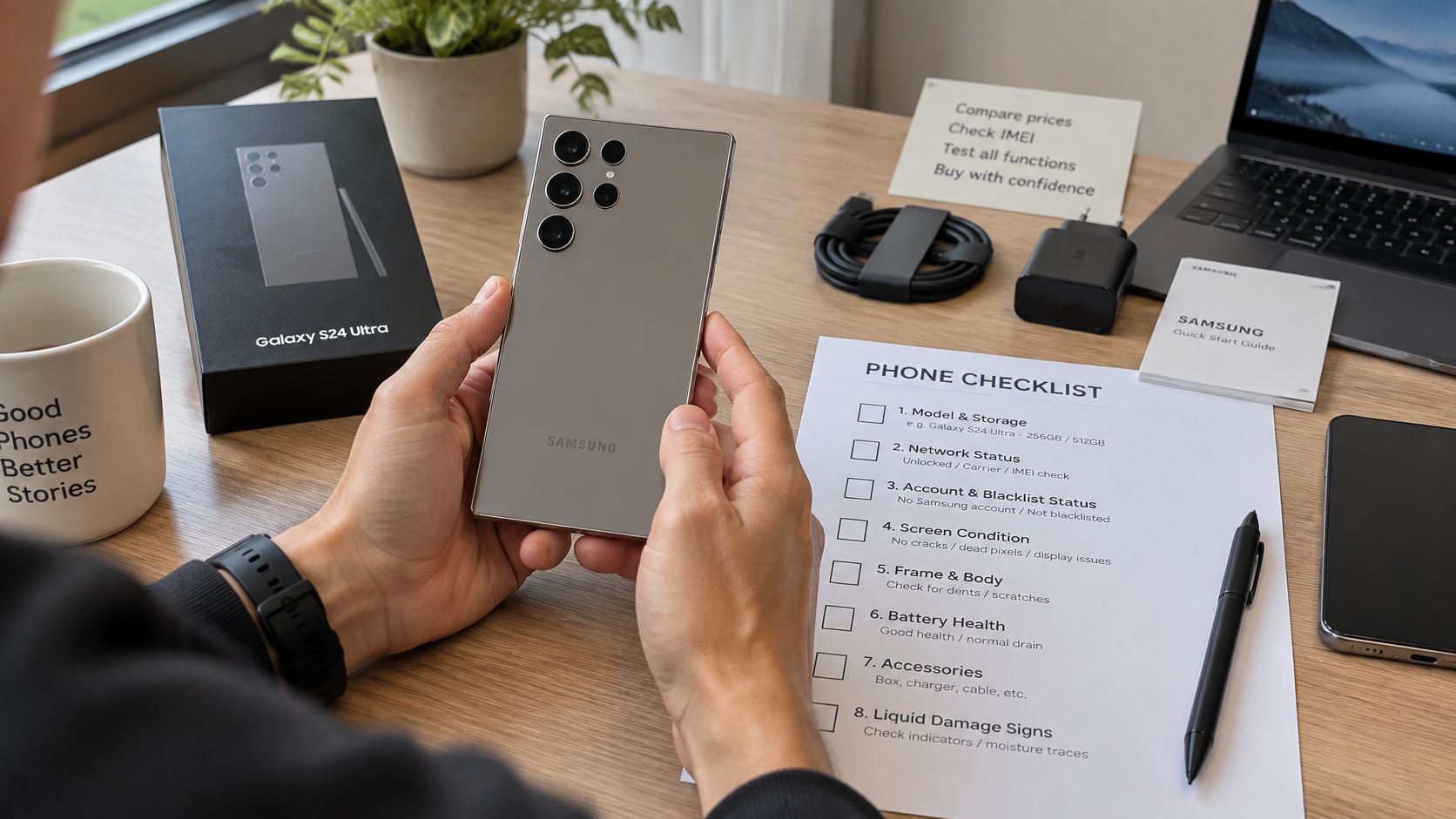
Samsung value factors and their effect on your offer
Samsung's own standard shows how specific these checks get. Samsung UK instant trade-in criteria require a fully functioning display without screen burn, ghost images, discolouration, coloured hues or image retention, no significant cracks, chips or scratches, and a phone that powers on and holds its charge without unexpected shutdowns. Its programme terms also exclude phones that are crushed, bent, liquid-damaged, missing essential parts, or modified in ways that void Knox security.
That means a working phone with a heavily damaged display may receive a lower revised valuation or fail the minimum requirements altogether. Don't describe that phone as good condition and hope. State what's wrong, price for the grade you can confidently claim, and let the buyer decide with the facts in front of them.
Identify the phone properly before you price it
Record the exact model code, storage tier and colour first. Open Settings > About phone > Status information to read the IMEI, then confirm the handset isn't reported lost or stolen through a reputable UK checking route. State clearly whether the phone is SIM-free, network-locked or financed, because each answer changes who can buy it.
Give the full IMEI only privately to a serious buyer or platform, never in a public listing. If you want a sense of how model and storage change the price band, compare against a specific model page such as our Samsung Galaxy S22 price guide rather than guessing from the Galaxy name alone.
Pricing tactics that hold up on inspection
- Compare sold listings, not asking prices: Match model, storage and condition, because unsold listings tell you what buyers rejected.
- Include what you've got: The original charger, box and S Pen, where the model uses one, support a stronger price.
- Photograph in daylight: Show the front, back, frame and a powered-on screen so burn-in and marks are visible.
- Name the faults: Camera issues, charging problems and battery behaviour belong in the description, not in a message after payment.
A clear description protects your price because it leaves the buyer less to discover. Most revised offers we explain to customers trace back to something that was visible before posting but never mentioned.
How to Prepare and Wipe Your Samsung Phone
Wiping a Samsung properly is a sequence, not a single tap. Do the steps out of order and you can lock yourself out of your backup or leave the phone asking the next owner for your Google password. Work through them in order, and don't post the phone until the final check passes.
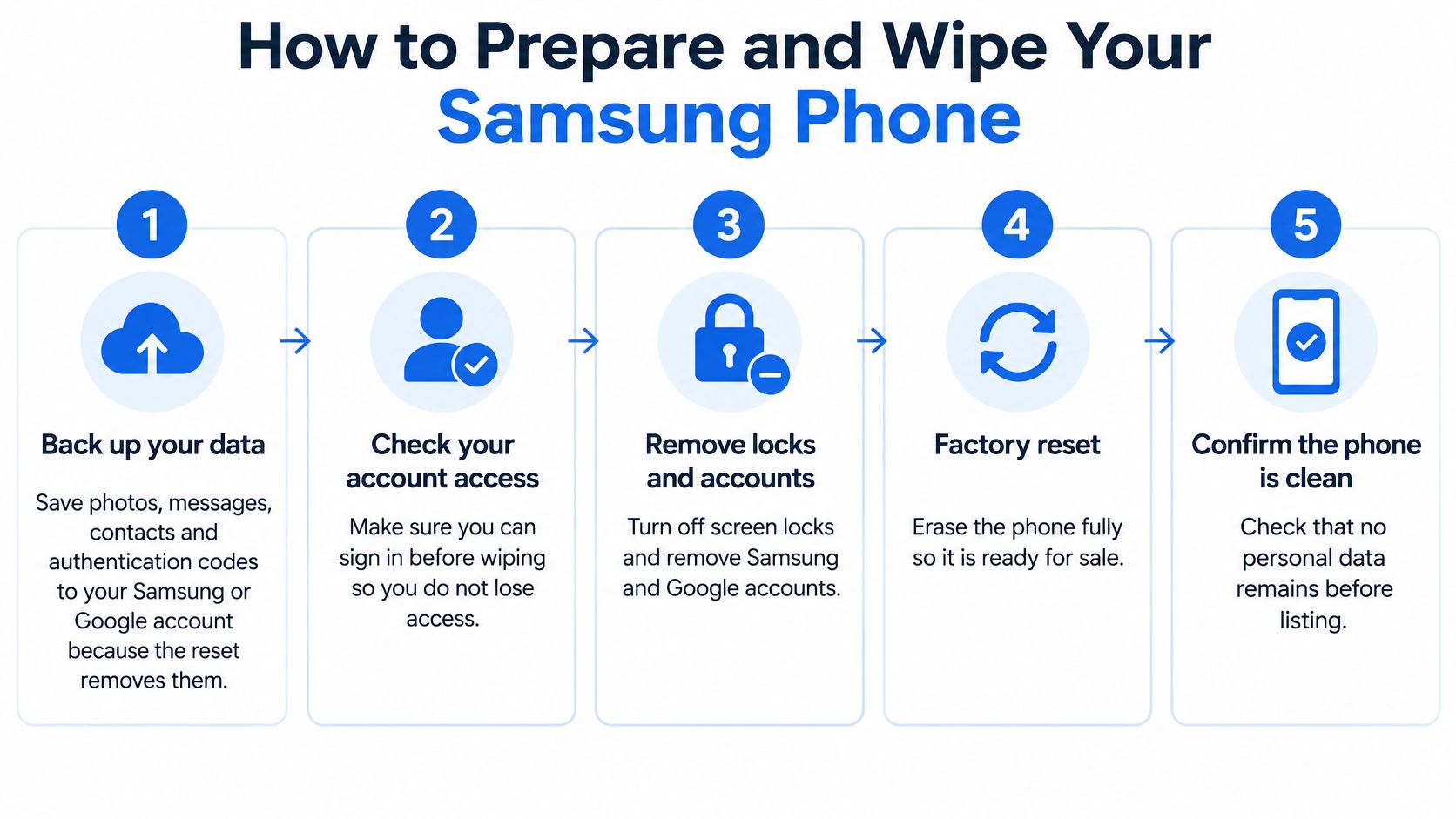
How to prepare and wipe your Samsung with quick steps
- Back up everything you want to keep. Save photos, messages, contacts and authentication codes to your Samsung or Google account, because the reset removes them from the phone. Open your new device or cloud account and confirm the photos are there before you go further.
- Check you can sign in to your accounts. Make sure you know the Google and Samsung passwords and can pass any verification prompts. An account still linked to the phone blocks the next owner at setup, and you can't remove it cleanly if you can't sign in yourself.
- Remove physical and digital cards. Take out the SIM and microSD card, delete any eSIM profile you no longer need on this handset, and remove Samsung Wallet cards. A microSD card left in the tray can carry years of photos straight to a stranger.
- Turn off the screen lock and Find My Mobile. Remove the PIN, pattern and biometrics, then switch off Find My Mobile in Settings. If you can't find it quickly, use the search bar at the top of Settings and type Find My Mobile.
- Remove your Google and Samsung accounts. Go to Settings > Accounts and backup > Manage accounts and remove each account listed. Our guide on how to remove a Samsung account walks through the Samsung side if a password prompt stops you.
- Run the factory reset. Go to Settings > General management > Reset > Factory data reset and choose the option that removes all data. This is permanent, so stop here if your backup from step one isn't confirmed.
- Check the setup screen after restart. The phone should show the initial Android setup screen with no previous account, PIN, photos or apps present. Photograph that screen as your record that the handset left you clean.
Why account removal matters more than the reset itself
A reset performed without removing the Google account can trigger Factory Reset Protection. The phone wipes, restarts, then asks for the previous owner's login during setup. From a buyer's side, that handset is unusable, and from your side it's a returned parcel and a reopened sale. Signing out first, under Settings > Accounts and backup > Manage accounts, prevents the activation block entirely.
Practical rule: If the reset phone asks for your account, PIN or password during setup, it isn't ready to sell. Sort the lock first, then post it.
What a factory reset does and doesn't guarantee
The UK National Cyber Security Centre guidance on erasing devices states that factory reset removes messages, contacts, photographs, browsing history, Wi-Fi codes, passwords and installed applications. For a typical personal phone wiped in the order above, that's the right consumer process.
The same guidance warns that built-in erasure doesn't guarantee a determined expert using specialist techniques could never recover data. If the phone held sensitive business information, client files or anything you'd worry about in expert hands, ask a professional refurbisher about secure erasure rather than relying only on a consumer reset. That distinction matters. A refurbisher's secure data wiping is a separate process from the reset you run at home, and your own account removal is still your responsibility before dispatch.
Finish with the reboot test from step seven. A clean setup screen, no account prompt and no trace of your apps means the phone is ready. Anything else means it stays with you until it's sorted.
Our Experience Refurbishing This Model at Used Mobiles 4U
One thing we regularly notice on Samsung handsets arriving for resale is that the faults sellers mention and the faults our technicians find aren't always the same list. A seller reports a cracked back, which is fair enough. Our technicians often see a loose USB-C charging port, faint AMOLED burn-in from a static app bar, a scratched camera lens, or a battery that behaves in light use but shuts down under load. None of that makes a phone unsellable. It makes honest grading essential.
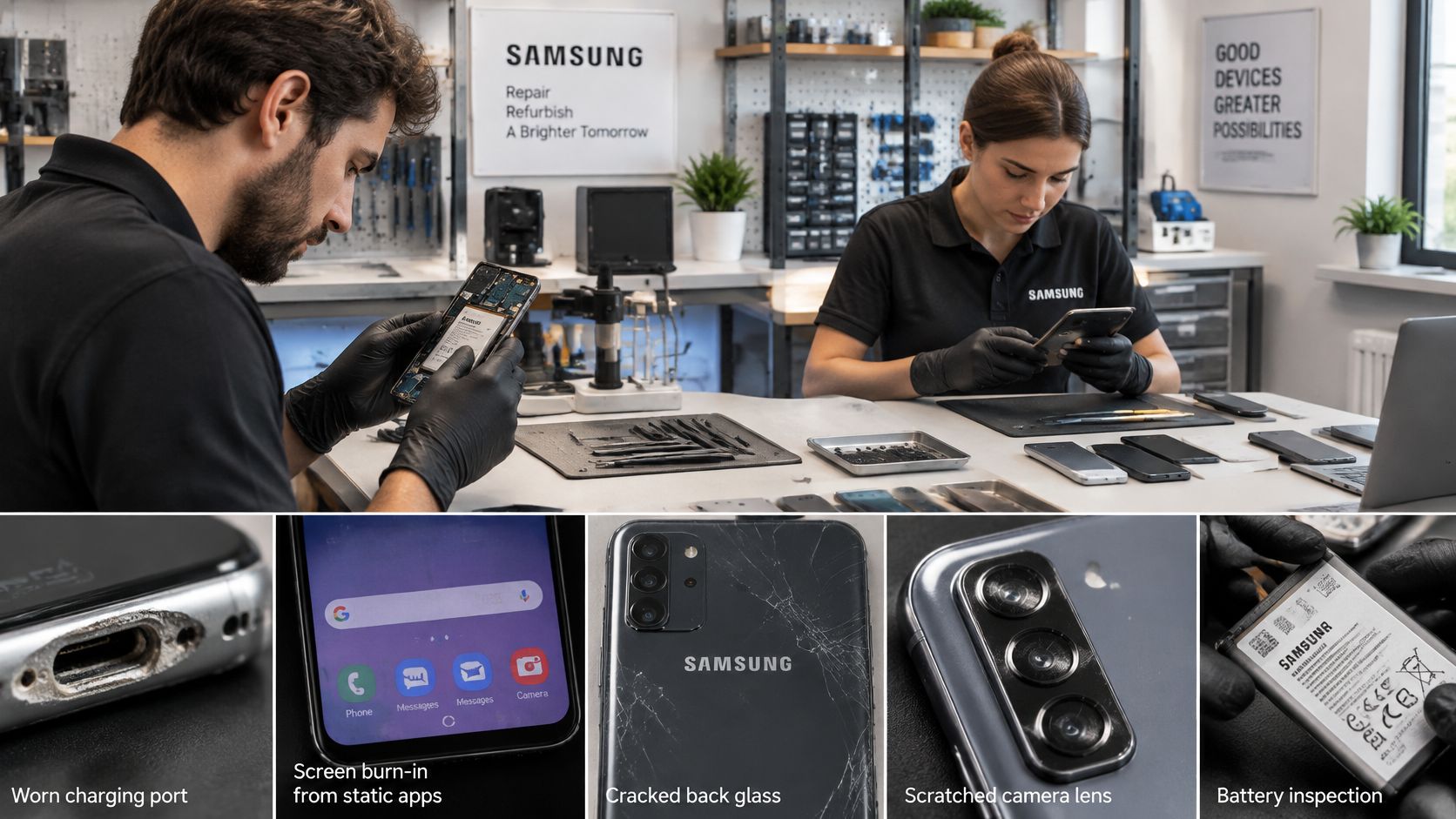
What our technicians check before resale
Every phone is tested and graded before it is listed for sale, and every phone is checked, cleaned and prepared for resale before it reaches the customer. The functional pass covers the display for burn-in and dead pixels, touch response across the whole screen, front and rear cameras, microphones, speakers, USB-C charging and data transfer, fingerprint and face recognition, Wi-Fi, Bluetooth, GPS, NFC and battery behaviour under load. Cosmetic grading happens separately, because a phone can work perfectly and still carry visible wear.
That separation of identity, network and hardware checks mirrors the NCSC guidance on buying and selling second-hand devices, which makes account credentials and complete erasure central prerequisites. A phone that still requests the seller's account after reset shouldn't be shipped until the lock is removed. You can read how that fits our wider process in our refurbishment process.
Grade differences and signs of heavy use
The gap between grades is mostly cosmetic honesty. A phone with minor marks you need to tilt under light to see sits in a different grade from one with frame dents, deep scratches and worn coating around the charging port. Heavy use also shows in softer signs. Buttons lose their click, the oleophobic coating wears where thumbs scroll, and the battery drops faster through the last portion of charge.
A common example we see is a phone with a cracked corner and a Google account still signed in. The cosmetic damage was priced in, so that part's fine. The sale stalls because the next owner can't get past setup, and the phone comes back. Two minutes removing accounts before the reset would've prevented the whole detour.
Repair or sell as-is
I would rarely advise paying for a screen replacement on a mid-range Galaxy purely to sell it. A cracked display on an older A-series phone can cost more to fix properly than the finished phone would fetch, so selling as-is with a clear description is usually the sensible route. Repair makes sense when you'll keep using the phone, or when a single cheap fault, like a worn charging cable you mistook for a port fault, is all that stands between the phone and a clean grade.
Nearby options behave differently in resale. Older A-series phones tend to attract price-sensitive buyers who care most about a working screen and a battery that lasts the day. Flagship-class handsets bring more questions about battery health, camera condition and whether every feature works, because buyers are paying more and expect more. Price and describe yours for the audience it'll get.
Decide Whether to Sell, Trade In or Keep Your Samsung
Sell your Samsung phone if it powers on, isn't blocked or blacklisted, and you can state an honest grade with photos to back it up. That's the baseline. Everything else is about matching the route to your patience.
Choose trade-in if:
- You want certainty and speed: One quote, one parcel, no buyer messages.
- You're upgrading anyway: The value folds into the purchase you're already making.
Choose private sale if:
- You want the highest possible price: You're trading your own time for the extra money.
- You can handle buyers: Questions, offers and the occasional dispute come with the listing.
Recycle or donate a phone that won't power on or carries heavy damage with no realistic resale value. Keep it if you genuinely need a backup handset for travel, work or a family member, because a spare you'll use beats a small payment you'll forget. Avoid private sale if you can't spend time answering buyers or handling disagreements after delivery.
We've sold over 25,000 phones since 2017, and we'll tell you plainly if a Samsung is worth less than you hoped so you can decide with the facts in front of you.
Written by James Waterston, 24 years in the mobile phone industry from customer service through to Sales Director of a global repair and recycling company. Now running Used Mobiles 4U for over 8 years. LinkedIn at James Waterston on LinkedIn.
If you'd rather skip listings, buyer messages and haggling, use the Sell Your Tech service to sell your Samsung phone with a clear quote based on honest grading. Visit Used Mobiles 4 U to start your quote, and we'll tell you straight what your handset is worth before you commit to posting it.
Looking for a refurbished phone?
Shop professionally tested refurbished iPhones and Samsung phones with 18 month warranty, 30 day returns and free UK delivery.
Browse Refurbished Phones