


Refurbished Lenovo ThinkPad: What to Check Before Buying

10/11/2026

14 Mins

A refurbished Lenovo ThinkPad is a strong buy for office work, study and home working, provided the exact machine type supports the Windows version you need and the battery and ports pass checks. The popular advice to just pick a well-known model name and choose the cleanest grade isn't enough, because two laptops with the same badge can have different processors, soldered memory, battery wear and support dates.
Quick Answer Before You Buy
A refurbished Lenovo ThinkPad suits office work, study, video calls and home working when you verify the exact machine, rather than trusting the family name. I would buy one for document work and browser-based jobs, and I would walk away from any listing that won't confirm Windows support and battery condition.
- Keyboard and chassis: ThinkPads are business machines, so the keyboard, hinges and case are usually built for daily use rather than occasional home use.
- Serviceable parts: On many models, memory, storage, batteries and keyboards can be serviced, which helps you fix the weak part instead of replacing the whole laptop.
- Lower cost than new: A refurbished unit can leave budget for a dock, monitor or extra storage, although the saving only counts if the specification and warranty are like for like.
- Check Windows first: Confirm the exact machine type is supported for the Windows version you'll run, not just able to install it.
- Check the battery evidence: Ask for capacity information, not a vague promise that it holds charge.
- Check wear points: Look closely at the keyboard, hinges, USB-C ports and charging socket before paying.
A model name alone never settles it. Grade, configuration, battery condition and warranty change the answer, and gaming or heavy video editing needs a different judgement altogether.
Which Specs to Look for in a Refurbished ThinkPad
Spec the job, not the logo. A ThinkPad bought for email, documents and course notes needs a different configuration from one running large spreadsheets, local development tools and back-to-back video calls, so I would set a floor that still works in three years rather than one that merely feels fine this week.
Those upgrade ceilings need a caveat beside them. Lenovo's ThinkPad T-series range page states that T-series models may provide one or two SODIMM slots supporting up to 64 GB of DDR4 or DDR5 memory, alongside one or two M.2 PCIe NVMe SSD slots with capacities up to 2 TB and USB-C with Thunderbolt 4 docking on supported models. Range capabilities are no guarantee for the unit in front of you, which is why the four-character machine type matters more than the family name.
What the numbers feel like in daily use
8 GB of RAM copes with a few documents and modest browsing. It turns tight once Teams or Zoom, a browser full of tabs, cloud sync and a spreadsheet all run together. 16 GB is the practical target for a three-to-five-year productivity life because it leaves headroom instead of forcing you to shut things down to stay responsive.
Storage fills faster than buyers expect. Windows updates, meeting app caches, downloads and photos make a 256 GB SSD feel small, so I would treat 512 GB NVMe as the sensible minimum unless almost everything lives in the cloud. If you keep large local files, compare the upgrade path with options among laptops fitted with a 1TB SSD before assuming a small drive will do.
A compatible dock is where a ThinkPad earns its keep at a desk. One USB-C or Thunderbolt cable can add external displays, wired networking and a full-size keyboard and mouse, yet a loose connector or an underpowered charger makes that setup unreliable, so wattage and port condition belong in the same check as the headline spec.
For contrast, a consumer listing such as the Lenovo IdeaPad 4G – Silver – 256GB – Very Good, in stock at £189.99, carries its storage variant in the name and its grade as a description of cosmetic wear. What a title never tells you is the processor generation, the memory ceiling or the state of the ports, so read the full configuration on any listing before the badge does the talking.
Practical rule: Buy the specification you need in three years, not the one that just survives this month's workload.
Three questions worth putting to any seller before you pay.
- Exact machine type: Get the four-character type in writing, because upgrade ceilings, port layout and Windows support can differ inside the same family.
- Installed memory and storage: Confirm what is fitted now, what is soldered in place and whether any slots are free.
- Dock and charger: Ask what is included, the charger wattage and whether the USB-C ports have been tested under load.
Grades, Wear and Battery Condition You Should Check
A cosmetic grade describes visible wear. It doesn't prove the laptop works well. A clean lid can hide a tired battery, a loose charging port or a keyboard with intermittent keys, while a scuffed base can sit on a machine that passes every functional test, so I'd separate appearance from working condition every time.
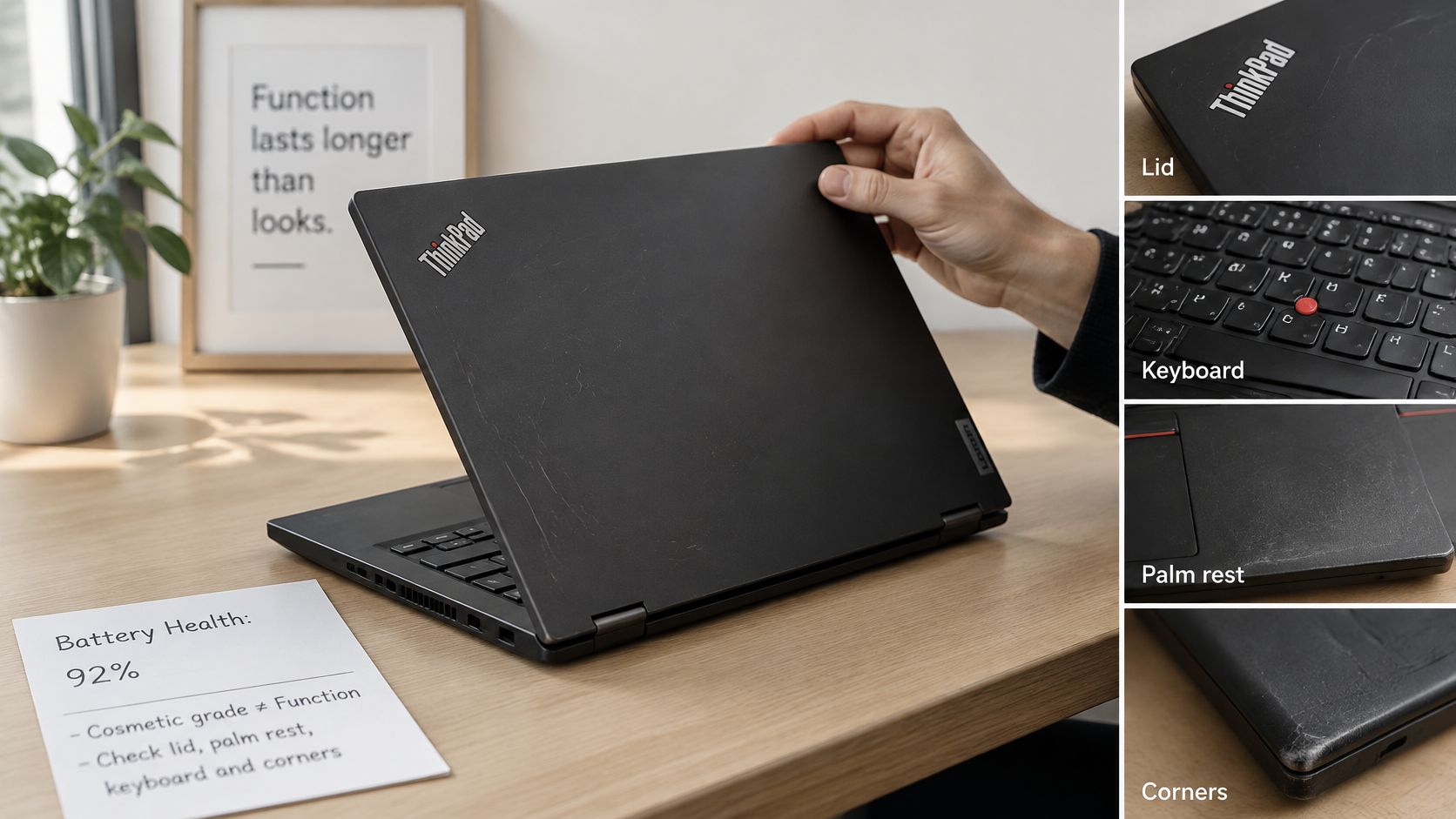
ThinkPad wear usually shows in predictable places. Frequently used keys develop shine and worn lettering, the TrackPoint cap wears smooth, palm rests polish up where hands sit, and corners pick up scuffs from bags and desks. Hinges can develop movement, which matters because the screen then wobbles when you type or move the laptop.
What to inspect in photos or in person
- Screen: Look for dead pixels, bright spots, pressure marks and backlight bleed at the edges, ideally on a plain dark and plain white background.
- Keyboard: Check for missing keys, faded legends, shine on the space bar and keys that stick or need a hard press.
- Hinges and lid: Open and close it slowly. It should hold position without creaking, dropping back or flexing at one corner.
- Ports: Look for bent pins, cracked surrounds and looseness, especially on USB-C, because that port often handles charging, data and docking.
- Base and corners: Cracks near corners or screw posts suggest a drop, which can also affect the hinge mounts inside.
When you're weighing up sellers, it helps to read around sourcing secure refurbished laptops so you can judge whether a listing explains testing and data handling clearly. A vague grade with no functional detail is weak evidence.
Reading battery condition properly
A laptop battery loses capacity with age and use. It usually doesn't fail suddenly. It just gives you less time away from the mains, which is why a machine that's fine at a desk can be a poor buy for lectures, site visits or train work.
Ask for a Windows battery report before paying. Open Command Prompt, run powercfg /batteryreport, then open the HTML file it creates and compare Design Capacity with Full Charge Capacity. A large gap means the battery stores much less than it did when new, so unplugged runtime will be shorter even if the laptop reports a full charge.
A seller who shares the battery report is giving you evidence. A seller who only gives you a grade is giving you a description of the case.
If the battery is weak, treat it as a repair question rather than a reason to guess. Ask whether the seller will replace it, what the replacement involves, and whether the warranty covers battery wear or only outright failure. Get those terms from the product page or order confirmation in writing, because battery cover differs between listings and shouldn't be assumed.
How to Check Windows 11 Support Before You Buy, Quick Steps
A ThinkPad can often be forced to install Windows 11 without being officially supported, and these steps test the actual position. That distinction matters for security updates, drivers and how long the laptop stays sensible for work or study, especially now that Lenovo's Windows 11 guidance notes Microsoft ended Windows 10 support on 14 October 2025 and says eligibility depends on the specific ThinkPad meeting the hardware requirements.
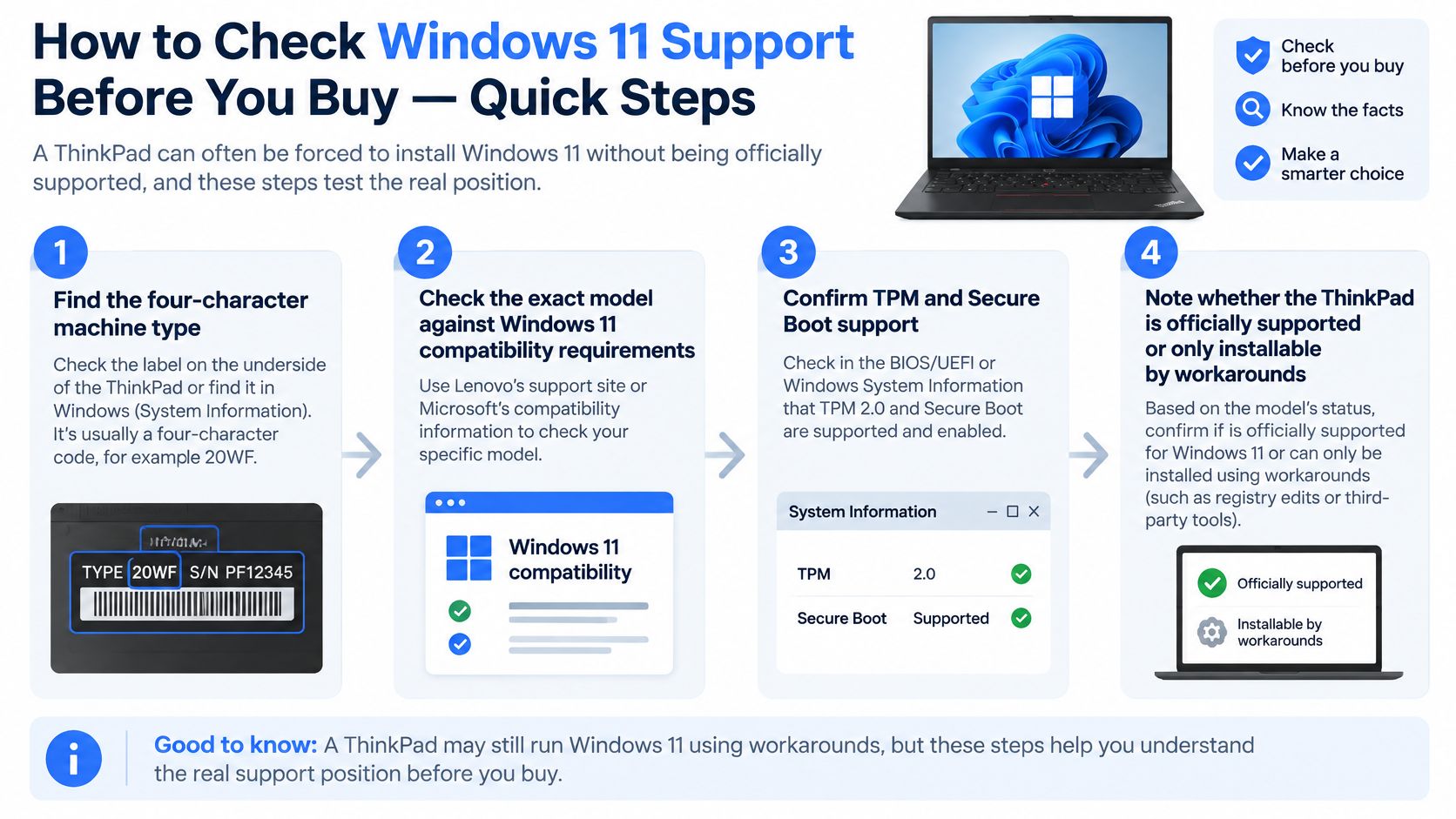
- Find the four-character machine type. Look on the base label or ask the seller to confirm it in writing. A family name such as T480 isn't enough, because configurations within that family differ.
- Check Lenovo's tested-device list. Search that exact machine type and confirm it appears as tested for Windows 11. If the seller only quotes the family name, they haven't identified the machine properly.
- Note the processor and memory. Go to Settings > System > About and record the processor, installed RAM and system type. This tells you whether the fitted configuration matches the listing.
- Confirm the TPM. Open Windows Security > Device security > Security processor details. If there's no security processor shown, ask why before you pay, because workarounds aren't the same as support.
- Check Secure Boot. Press Windows key + R, type msinfo32, and look at Secure Boot State under System Summary. Note the result rather than changing firmware settings on a machine you don't yet own.
- Verify the Windows licence. Open Settings > System > Activation and confirm Windows is activated. An installed copy that isn't properly licensed is a problem you'll inherit.
- Decide based on support, not installability. If the model isn't on the list, choose knowingly. Either accept the risk around updates, use it for Linux or offline work, or buy a newer machine.
Do these checks before paying where you can, and back up files before changing settings or reinstalling Windows on any laptop you already own. Small businesses that don't want to manage this across several machines often lean on technology support for smoother business operations so eligibility, licences and update status are checked consistently rather than laptop by laptop.
I would buy the oldest model that has documented Windows 11 support and enough performance for the job, rather than automatically buying the newest refurbished unit. Linux changes the answer though. An older ThinkPad that's a poor long-term Windows purchase can still be excellent for Linux, writing, coding or offline tasks, provided the battery and keyboard are sound.
Our Experience Refurbishing This Model at Used Mobiles 4U
A ThinkPad should be judged by its exact machine type, Windows 11 support and battery evidence before the model name or cosmetic grade enters the decision. Two laptops with the same badge can leave the bench in very different condition, because one has a documented service history and a healthy battery while the other only photographs well.
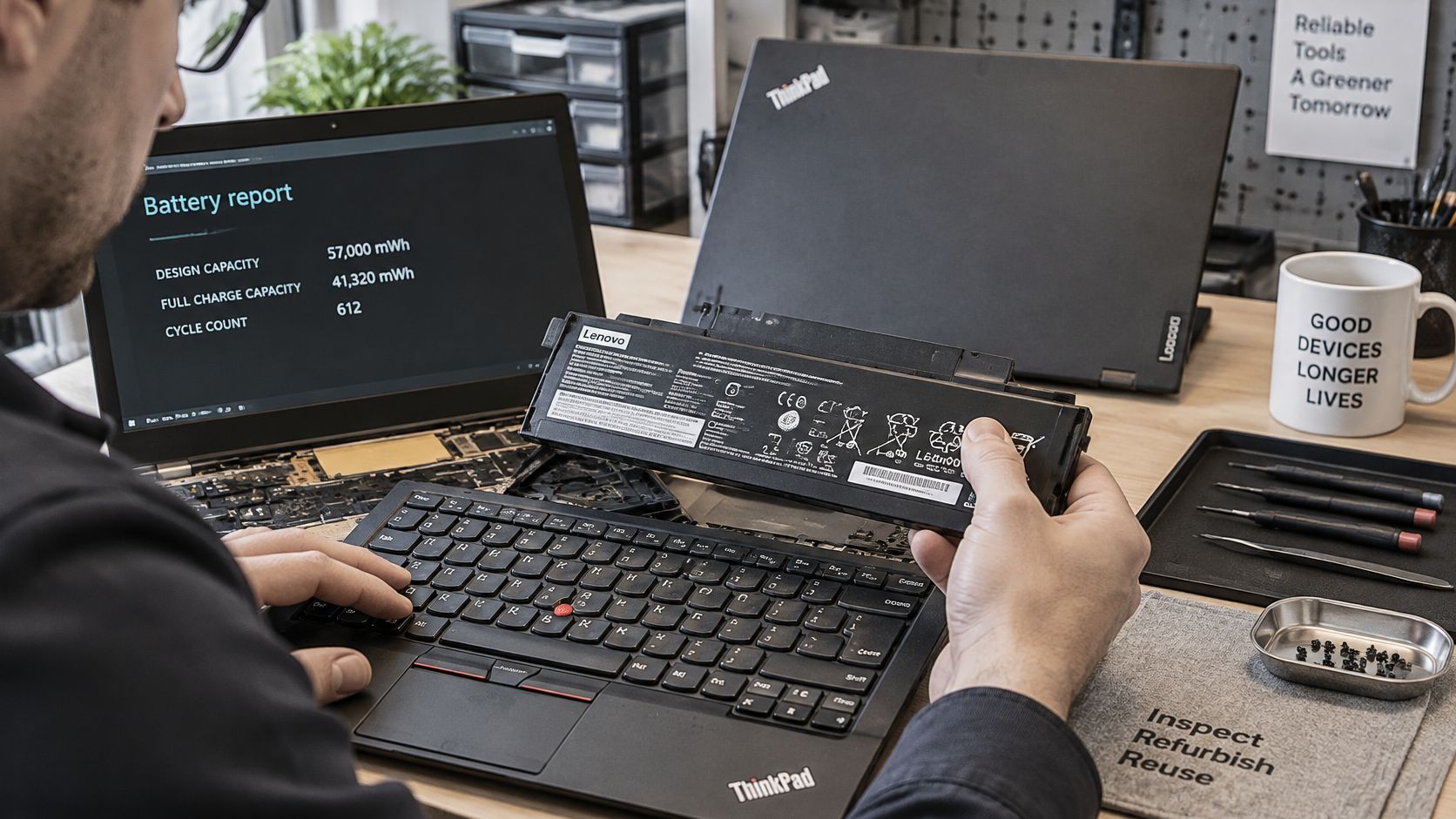
Across refurbished ThinkPads generally, the weak points are predictable. USB-C and DC-in ports can loosen after repeated docking, charging sockets can turn intermittent, fans collect dust and get noisy under load, and batteries often deliver less runtime than the listing implies. None of that shows up in a quick power-on test, so charging, ports, keyboard, webcam, Wi-Fi, display and docking all need functional checks.
For this range, Used Mobiles 4 U uses a 10 step refurb check, laid out in our 10-step refurbishment checks, and devices are securely data-wiped before resale. A clean drive is not the same thing as a properly wiped one.
Repair or retire on the bench
The logic is straightforward. Replace a battery or keyboard when the rest of the machine is sound, the part is available and the cost stays proportionate to the laptop's value. Retire a unit when the motherboard or display fails and the parts cost more than the finished machine is worth, or when several mid-priced faults stack up at once.
A typical example is a T-series from an office fleet with a clean lid and a sharp screen but a worn USB-C port. It is inexpensive to fix, easy to miss in photos, and annoying every day if it is missed, because the dock drops out when the cable moves. That kind of fault is why cosmetic grade on its own is a weak buying signal.
Bench view: A scuffed ThinkPad with tested ports and an honest battery report is a better buy than a polished one with no functional evidence.
Heavy use has visual clues if you know where to look. Palm-rest shine, faded key legends, a smooth TrackPoint cap and scuffed lid corners suggest a hard-working life, while a mint keyboard on an older fleet machine can mean it spent its life docked. I would rather have an honest machine type, confirmed Windows 11 support and a battery report than a newer-looking unit with none of those three.
The UK Government's sustainable ICT blog on workplace technology makes the wider point that keeping business technology in use for longer is now a serious policy aim, not a niche habit. Age alone does not make a business laptop worthless. A repaired, tested and data-wiped ThinkPad kept in use is a sound purchase. A cosmetically refreshed one with an untested battery and loose ports is just a second-hand laptop with better photos.
Warranty, Returns and Your Consumer Rights
Your statutory rights apply to a refurbished ThinkPad whether or not the seller offers a separate warranty. The GOV.UK guidance on accepting returns and giving refunds states that goods must be refunded if they are faulty, not as described or do not do what they are supposed to do, and that if a fault appears within six months the retailer generally has to repair or replace the item unless it can prove the fault was not present when sold. Faulty goods can also usually be rejected for a full refund within the first 30 days.
A trader's warranty adds to those rights. It doesn't replace them. That's the key difference between buying from a business and buying privately, where you don't get the same protection if the battery dies or the charging port fails.
It's the same habit you'd use to compare furniture protection plan coverage before signing, namely reading what's covered instead of trusting the headline term. For a laptop, the detail sits in the exclusions, so check the Lenovo laptop warranty terms for UK buyers against the specific listing rather than assuming cover transfers between products.
Questions to ask before you pay
- Warranty length and scope: How long does it last, and does it cover the battery, keyboard, screen and charging port or only major internal failure?
- Returns window: How many days do you have, does the laptop need to be faulty, and who pays return postage?
- Repair location: Are repairs carried out in the UK, and will you get the same machine back or a replacement?
- Battery wording: Is reduced capacity treated as wear, or is there a stated minimum standard?
- Evidence supplied: Will the order confirmation state the machine type, grade and fitted specification?
Keep the order confirmation and save a copy of the product page. If the laptop arrives with less memory, a different machine type or heavier wear than described, that listing is your reference point. Warranty terms differ by listing, so read the specific product page every time.
What Usually Affects Value and Price
Price follows the individual machine, not the badge. Grade, configuration, battery condition, warranty and stock availability all move it, which is why two listings with the same model name can sit far apart without either seller necessarily overcharging.
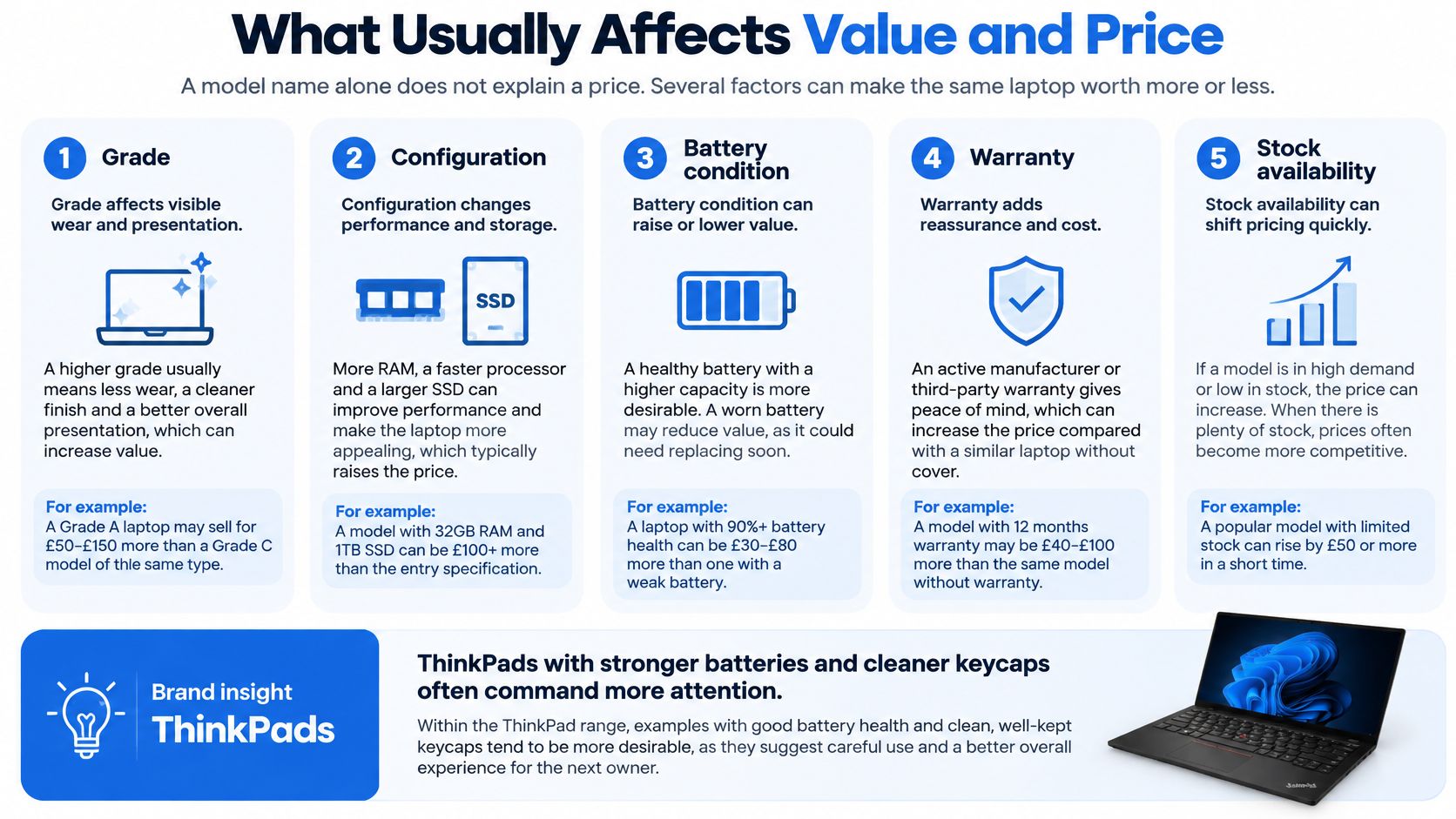
- Windows 11 support: A machine type with documented support holds value better than one that needs a workaround.
- Processor generation: Newer processors usually mean better performance per watt and a longer useful life for current software.
- Memory and storage fitted: 16 GB with a 512 GB SSD is worth more than an entry configuration you'll need to upgrade straight away.
- Cosmetic grade: Cleaner keycaps, lid and palm rest command more, even when the internals are identical.
- Documented battery condition: A shared battery report supports the price. Silence about the battery should lower what you'll pay.
- What's in the box: A correct charger, a compatible dock and the original box all add practical value.
- Warranty and returns: Longer cover with clear terms costs the seller money, so it's reflected in the price.
- Stock levels: Common fleet models get cheaper when supply is plentiful and firmer when it dries up.
One real comparison shows how to read this. Calatech's listing for a refurbished Lenovo ThinkPad E14 Gen 7, a model released in 2025, priced it at £519.99 compared with a new price of £699.99, a stated saving of £180. Before using that as a benchmark, check the processor, memory, storage, grade and warranty match the laptop you're looking at, because a headline saving against a differently specified new machine tells you very little.
I would also price in replacement timing. A cheaper ThinkPad with an older processor and no documented Windows 11 path can cost more over three years if you're forced to replace it early, whereas a dearer supported model spreads its cost over a longer life. If you're funding the change by moving on an old machine, selling a laptop you no longer need is worth pricing up first, but check live listings rather than relying on any single quoted price, including the one above.
Is a Refurbished ThinkPad Worth It for You
Yes, for the right work. A refurbished Lenovo ThinkPad is worth buying for office work, study, home working, note-taking, Linux and offline tasks when the exact model is verified and the battery and ports pass checks. It's a poor shortcut if you skip those checks and buy on the model name.
Choose a refurbished ThinkPad if:
- Your work is document and browser based: Email, spreadsheets, writing, video calls and course platforms suit these machines well.
- You type a lot: A dependable keyboard matters more over a working week than a thin chassis.
- You value serviceability: Replaceable batteries, keyboards, memory and storage on many models extend useful life.
- You'll verify before paying: You're willing to confirm the machine type, Windows support and battery report rather than trusting the grade.
Avoid it if:
- You game or edit heavy video: Most business ThinkPads rely on integrated graphics, so they'll struggle with demanding titles and long exports.
- You need Windows 11 on an unsupported model: A workaround install isn't a support commitment, and update risk sits with you.
- You won't check the battery report: Buying blind on battery condition is the most common way to overpay for a refurbished laptop.
- You need years of guaranteed support: If the model sits outside Lenovo's supported list, its remaining life as a main Windows machine is uncertain.
Repair a battery or keyboard fault when the rest of the laptop is sound and the part cost is proportionate. Replace the machine when the charging port, display or motherboard fails and the repair cost approaches what the unit is worth. I would apply that test coldly, because sinking money into a tired chassis rarely beats putting it towards a better-supported model.
If it suits your use, browse the refurbished laptops currently listed, ask for the battery report and grade before ordering, and read the warranty on that product page. If an older device is sitting in a drawer, the Sell Your Tech route is a sensible way to offset the cost, and the warranty information page sets out cover before you commit.
At Used Mobiles 4U we sell refurbished Lenovo laptops for work and home alongside professionally tested, securely data-wiped and clearly graded phones, so you can compare condition and specification before you spend. If a ThinkPad fits your work, visit Used Mobiles 4 U to check current listings, confirm the machine type and battery detail on the product page, and order with UK support behind you.
Looking for a refurbished phone?
Shop professionally tested refurbished iPhones and Samsung phones with 18 month warranty, 30 day returns and free UK delivery.
Browse Refurbished Phones