


Sell My Google Pixel for the Best Price in 2026

12/11/2026

13 Mins

British households were sitting on an average of £218 of unwanted mobile phones in 2024, yet only 11% of UK consumers had traded in a device in the previous five years, according to Virgin Media O2 research carried out by Censuswide. That is a lot of hardware doing nothing in drawers while people tell themselves their old phone isn't worth the bother.
It usually is. Second-hand and refurbished handsets made up 25% of all UK mobile-phone sales in 2023, up from 19% in 2021, according to GfK UK research reported by NielsenIQ. Buyers are there, and plenty of them would rather have a clean Pixel than a brand-new budget handset.
The catch is that the first quote you see is rarely the number you keep. Locks, battery condition and cosmetic grade all shift the final figure, and postage, fees and inspection deductions take another bite. Anyone typing Sell My Google Pixel into a search bar is really asking one question: what will land in my account?
Pick the Right Route to Sell Your Pixel
Trade-in is the route most owners take because it asks the least: answer a few questions, accept a provisional figure, post the phone. The final number is set after someone inspects it, so a tired battery or a hairline crack you stopped noticing can move the payment. If certainty matters more than squeezing out the last few pounds, this is the sensible choice.
A marketplace listing produces the strongest headline price for a phone that works and looks well kept. Take out postage, seller fees and the buyer who haggles after winning, and the gap to a trade-in narrows sharply. A private meetup removes postage and fees entirely, but only if you can find a serious buyer locally. Meet somewhere public, let them test the phone, and take payment before they leave with it.
If the handset is dead or the glass is shattered, the value sits in the parts, and where to sell your broken phone explains the recycling routes properly.
Route also decides what your buyer gets, which is why vague listings come back to bite. Citizens Advice points out that second-hand goods bought from a retailer must be of satisfactory quality, fit for purpose and as described, with a refund, repair or replacement if they fall short. Private-sale protection is narrower: the phone must match the seller's description, but a buyer generally can't demand a remedy because a fault went unmentioned.
Practical rule: if the phone works, compare your best marketplace price with a retailer quote after postage and fees. If it doesn't, do the repair and recycling arithmetic before you write a single word of listing copy.
State the exact model, storage capacity, network status, cosmetic damage, battery condition and any replaced parts in the listing. Prices vary by model, storage, grade, battery health and availability, so check live quotes on the day rather than trusting a figure from a comparison site.
Our Experience Refurbishing This Model at Used Mobiles 4 U
The Pixel is one of the more predictable phones to refurbish, and that's meant as a compliment. The faults repeat, the parts are findable and the software behaves.
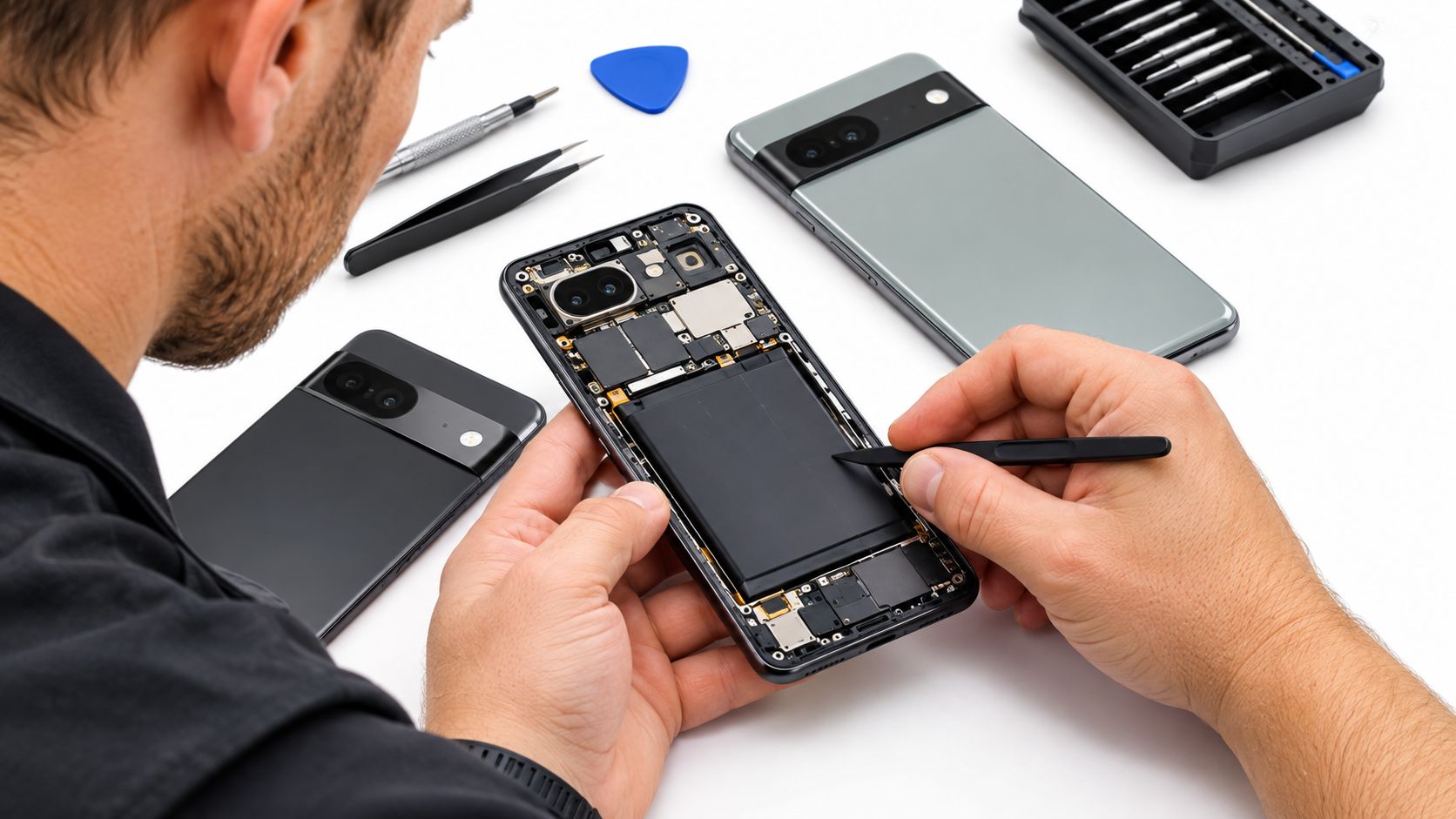
One thing we regularly notice on Pixels that reach the bench is that the battery is the first part to show its age. The screen and frame can look immaculate while the phone shuts down at 20%, and heavy use for video and navigation wears a cell faster than most owners expect. On a used Pixel, the battery reading affects the grade more than a scuff does.
Our technicians often see cracked back glass and scratched camera bars on handsets that were otherwise well looked after. That damage is exactly what separates an Excellent grade from a Good one. Head-on, both look the same. Tilt the phone into side light and the difference shows in about a second.
USB-C ports are regular visitors too. Lint packed into the connector convinces people their phone won't charge, and the fix is usually a wooden toothpick and patience rather than a new port. Speaker faults are a different story. They follow water exposure far more often than a drop, and a phone that spent an afternoon in a damp pocket can pass a quick test and fail a proper one a week later.
Bench note: a common example we see is a Pixel arriving with Factory Reset Protection still active because the previous owner wiped it without removing the Google account first. The handset is fine, but nobody can set it up until the original owner signs back in remotely, and the sale stalls for days.
When we decide whether to repair before resale, the question is simple. If a screen or battery fix costs close to what the handset would earn as used, it goes out as-is or onto the parts shelf. If the repair is a fraction of the used value, it gets done.
Choose a Google Pixel if:
- You want the Google software experience. Clean Android, prompt updates and the photo processing that makes Pixel images look the way they do.
- The camera matters more than the badge. For everyday photography, a Pixel holds its own against phones that cost considerably more.
- You keep a phone for years. Long software support means an older Pixel is still a sensible buy rather than a stopgap.
Choose a rival iPhone or Samsung if:
- Repair convenience leads your decision. Parts and service routes are better established, so a fix is easier to arrange and easier to price.
- Battery endurance is the priority. If you're away from a charger all day, weight that above camera tricks.
- You want the fastest possible resale. Bigger buyer pools sell quicker, even if the percentage you recover is no better.
On balance I'd buy the Pixel for the camera and the software, and accept the narrower repair network. If a cracked screen would ruin your week, buy the Samsung.
Check Status and Condition Before You List
Ten minutes with the phone in your hand beats any online estimate. Work through these six checks and note the answer to each one, because every answer changes either the grade or the buyer pool.
Model and storage come first because that's what a buyer scans for. Settings > About phone gives the exact model name, and the storage figure sits on the same screen. Copy it as it appears rather than as you remember buying it.
Network lock costs the most. Put a SIM from a different UK network into the phone, make a call and load a web page. If it asks for a code or refuses mobile data, it's carrier-locked, and your buyers shrink to people on that network or people willing to chase the paperwork.
The Google account must be yours and must come off before the phone leaves. A handset still signed in stops dead at setup. Battery health appears under Settings > Battery on models that report it. What you want is the percentage plus the behaviour: early shutdowns, heat while charging, a fast slide from full.
Then look at the phone properly. Hold the screen and back glass under a bright light at an angle; that's where hairline marks appear. Test face recognition, the fingerprint reader, both cameras, the speaker, the microphone, the USB-C port and wireless charging if the model has it, then note what's in the box.
Write the IMEI down before you start. If you're unsure where to find it, how to find your IMEI number covers the three places it lives. And if you plan to advertise eSIM support, check the model against this list of supported Pixel models for travel data before you promise it, because support varies by model and region.
What Usually Affects Value
These drivers matter in roughly this order. Fix the top ones before you worry about the bottom.
- Model generation and age. A newer Pixel holds value far better, and the drop between generations is steeper than the drop between storage sizes.
- Storage variant. The higher-capacity version commands more, though the premium rarely matches what it cost new.
- Network restriction or a live Google account. Either one reduces the offer or stops the sale outright. There's no workaround worth arguing about.
- Cosmetic grade. Screen marks, back glass cracks and frame wear decide whether it's Excellent or Good, and that gap is real money.
- Battery health. A worn cell lowers the grade even on a perfect body. Our phone battery health check explains what the percentage tells you.
- Working status. Face Unlock, cameras and charging all have to work. A fault found at inspection usually means a lower offer or a return.
- Box, charger, cable and repair history. Original packaging adds a little; a receipt for a genuine screen replacement adds more than people think.
- Postage, platform fees and deductions. This is the money you never see, and it's why the headline price and the net price differ.
Demand is part of it too. Google phones accounted for 4.33% of the UK mobile-phone vendor market in November 2025, based on StatCounter data reported by Uswitch. That's a smaller pool than iPhone or Samsung, so a realistic price gets you a sale and an optimistic one gets you relisting.
Our own standards are blunt for a reason: every phone goes through a structured check, only batteries at 85% health or better go into eligible refurbished stock, and SIM-free status and grade are stated up front. Describe your battery accurately and the inspection holds no surprises.
Work Out Whether Selling, Repairing or Recycling Pays
Not every Pixel should become cash. Some are worth more to you as a working phone, and some are worth more as parts than as a repaired handset somebody has to sell on.
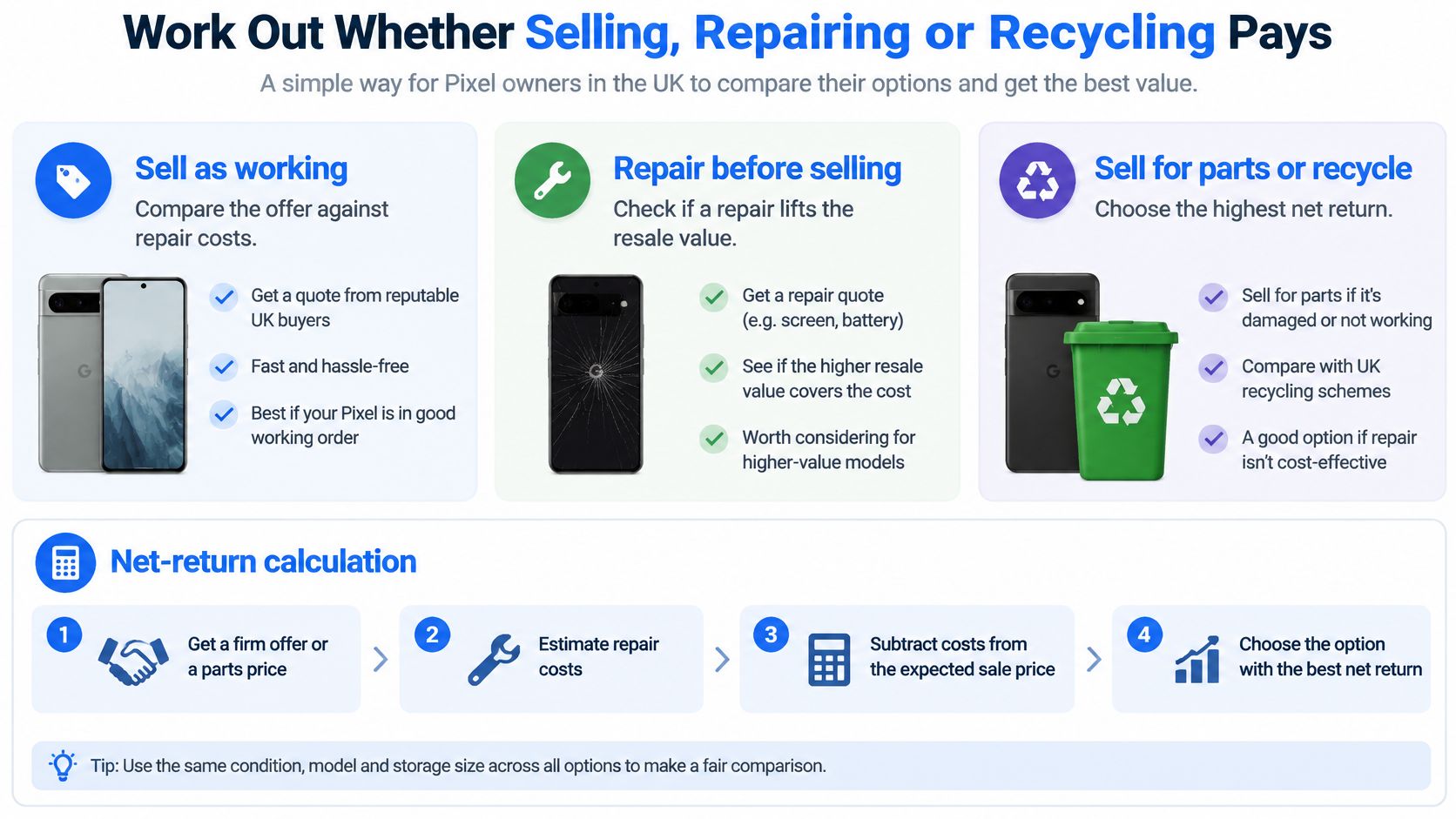
WWF's UK research on fast phones notes that handsets become "beyond economic repair" when repair costs exceed current market value, and argues that resale and repair systems need to scale up to change how people dispose of them (WWF). That's the whole decision in one line. A cracked screen, a weak battery, a locked bootloader, water damage or missing accessories can turn a phone from an asset into a cost.
The arithmetic is four steps:
- Get a firm offer, or a realistic listing price you can defend.
- Subtract postage, insurance and any platform fee.
- Subtract any repair quote you would have to accept to reach that price.
- Compare the net figures for sell-as-is, repair-then-sell and parts.
Take a worked example, with placeholders rather than real quotes. Suppose a retailer offers £90 for a Pixel with a cracked screen, a local shop quotes £110 to fit a new screen, and the same phone repaired would fetch £150 from a private buyer. Repairing clears £40 before fees and postage, so the maths only works if your repair quote is lower or your resale figure is higher than these. Put your own numbers in before you decide.
The reverse case is the one people get wrong. A Pixel with a clean screen and a tired battery is often worth repairing, because a battery swap is cheap relative to what the phone earns once it holds a charge all day. Repair costs exceeding market value is the test, not whether the phone still feels premium.
The net figure decides, not the headline. A £90 offer with free postage can beat a £130 listing that costs you £12 to send and £15 in fees.
And if the phone still does everything you need and the fault is minor, keep it. Selling a working handset at a knocked-down price to buy a new one is the most expensive option on the table.
How to Wipe and Prepare Your Pixel, Quick Steps
Before you start: a factory reset is permanent. Back up first, and confirm the backup has finished before you continue. If it hasn't, stop and come back tomorrow.
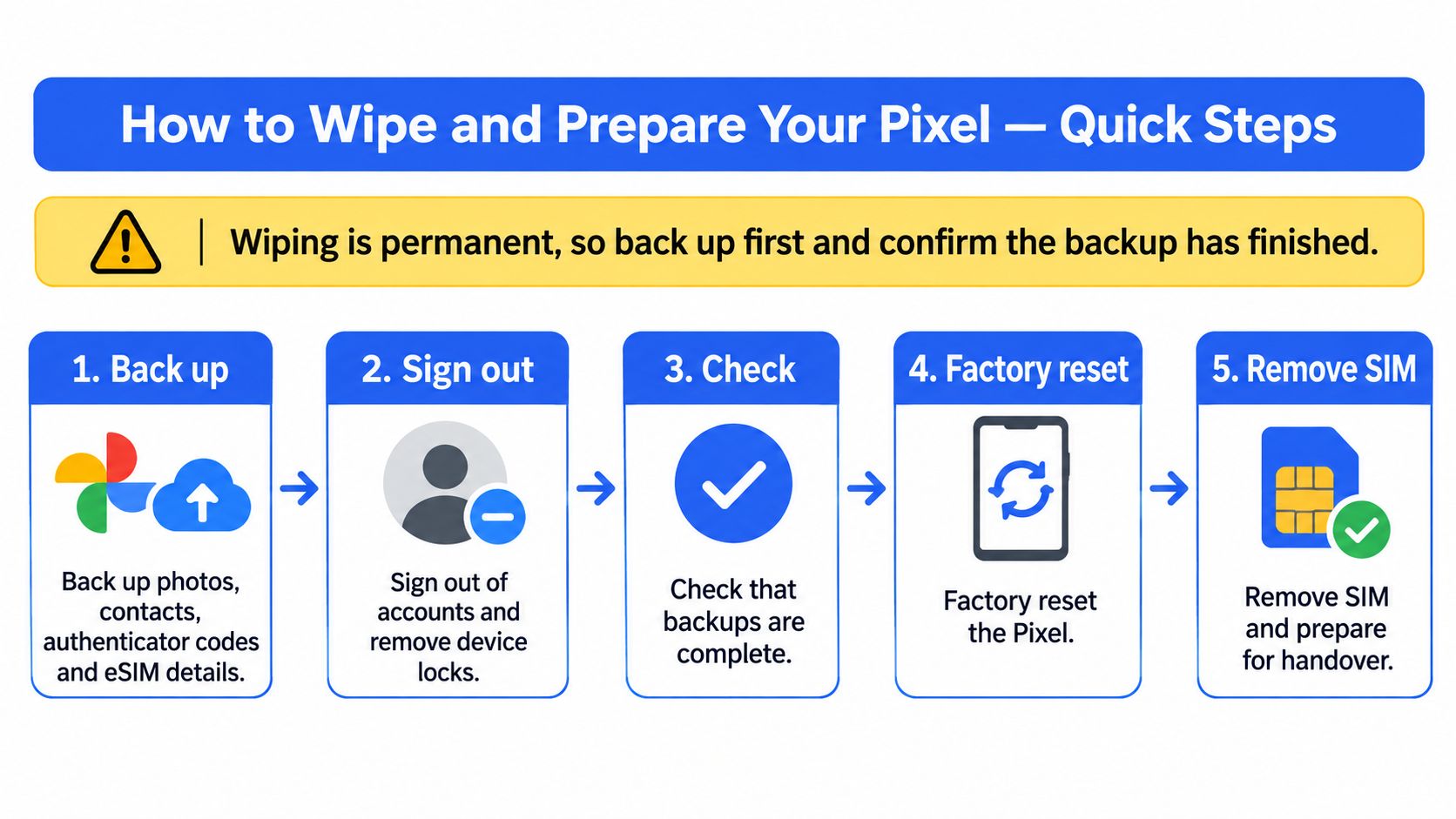
- Back up everything you'd miss. Go to Settings > System > Backup > Back up now, then open Google Photos and check it has finished syncing, not just started. The reset removes messages, contacts, photographs, browsing history, Wi-Fi credentials, passwords and installed apps, so the backup is the only copy you'll have.
- Move your two-factor codes. Anything that sends a verification text to your number needs to move to another phone or an authenticator app first. Once the SIM comes out, you can't receive those codes, and account recovery without them is slow and sometimes impossible.
- Turn off Find My Device and remove the Google account. Go to Settings > Passwords & accounts and remove your account. This is what disables Android Factory Reset Protection, and the National Cyber Security Centre guidance on buying and selling second-hand devices warns that skipping it can prevent the recipient from using the phone at all.
- Deal with the SIM and the eSIM. Take the physical SIM out. If you use an eSIM, erase or transfer it through your carrier rather than leaving it attached to a phone you no longer own.
- Run the built-in reset. Settings > System > Reset options > Erase all data (factory reset) is the correct route, and the NCSC identifies factory reset as the appropriate consumer wipe method. Deleting files by hand leaves traces and misses app data. Our factory reset guide for Google Pixel walks through each screen if you want to see them before you commit.
- Restart and verify. Power the phone back on and follow the setup screens until you reach the point where a Google account is requested. If it asks for your credentials, the account wasn't properly removed and you'll need to sign in and start again.
Finish with a sales record you can produce if anyone asks: IMEI, model, storage capacity, network status and a note confirming the reset. Photograph the powered-off handset and every accessory before dispatch.
The most frequent failure isn't technical. It's wiping first and discovering afterwards that two-factor authentication, an eSIM or a cloud folder never made it across, which delays payment or drags you into account recovery while a buyer waits.
Post Your Pixel Safely Without Losing the Sale
Pack like the courier is going to drop it, because sometimes they do. Phone in a padded box, bubble wrap on all sides, nothing loose rattling against the screen. Unless the charger and cable are part of the deal, leave them out of the box.
Photograph everything before it goes in: the powered-off phone, the IMEI under Settings > About phone, and each accessory. Keep those images with the sales record from the wipe.
Use a tracked, signed-for service with insurance at the agreed value, and keep proof of posting. Cheap courier cover that excludes phones is worse than useless. Confirm the buyer's payment has cleared before you hand anything over.
Two scams to refuse outright: a request to refund an overpayment, and a payment that gets reversed after dispatch. Both rely on you moving the phone before the money is settled. Add postage and insurance to your net-return sum, because the cheapest label isn't the cheapest outcome.
If you're selling to a retailer, check whether a prepaid label is included and what happens if the phone arrives graded differently from what you described.
A phone with a cracked screen that wasn't padded properly turns a straightforward sale into a deduction and a dispute. Ten seconds of bubble wrap prevents both.
Decide Whether to Sell Your Pixel Now
Selling is worth it when the phone powers on, wipes cleanly, has no network lock or leftover account, and still has a buyer. That's most Pixels from the last few generations.
Choose selling now if:
- You're upgrading anyway and the old phone will only lose value sitting in a drawer.
- The handset works, the screen is intact and the grade is fair to good.
- You can describe the condition accurately and you're happy to post it.
Keep it, or recycle it, if:
- A screen or battery repair costs close to what the phone would fetch.
- It no longer meets your needs but still has a use as a spare or a handset for someone else.
- You can't complete the reset or the account removal, because a locked phone isn't sellable.
This suits owners who want cash for a phone they no longer use and can be straight about its condition. It doesn't suit anyone hoping for top price without the time spent on listings, photos and postage. If that's you, our Sell Your Tech service gives you a quote without the listing work, and the backup and wipe steps above still apply before anything goes in the post.
If you'd rather skip the marketplace haggling, Used Mobiles 4 U runs a Sell Your Tech service that quotes your Pixel directly, with no listing to write and no buyer to chase. Every device we trade in is checked, securely data-wiped and resold as a SIM-free, clearly graded refurbished phone, backed by an 18-month device warranty and 30-day returns on eligible orders. Start with a quote at Used Mobiles 4 U and see what your handset is worth before you decide.
Written by James Waterston, 24 years in the mobile phone industry from customer service through to Sales Director of a global repair and recycling company. Now running Used Mobiles 4 U for over 8 years. LinkedIn
Looking for a refurbished phone?
Shop professionally tested refurbished iPhones and Samsung phones with 18 month warranty, 30 day returns and free UK delivery.
Browse Refurbished Phones