


What Is Activation Lock and How to Check a Used iPhone

19/11/2026

33 Mins

The phone looks perfect on first inspection: clean glass, a healthy battery and a fresh Hello screen after the reset the seller ran in front of you. Then, a step past choosing Wi-Fi, it stops and asks for an Apple Account you have never seen. That screen is Activation Lock, and it decides whether the handset is yours to use.
Activation Lock is Apple's security feature, switched on through Find My, that ties an iPhone to its owner's Apple Account so nobody else can finish setup after a reset. A wiped phone still asks for the previous owner's password before it will activate. The block is an ownership record sitting on Apple's servers, not the handset, so a new screen, a different SIM or a fresh install changes nothing. A factory reset proves nothing on its own either.
The check that catches it takes a couple of minutes and costs nothing. Run setup yourself and watch whether the phone completes or stops at the account prompt.
What Is Activation Lock? The Short Version
Activation Lock switches on the moment the owner enables Find My, and from that point the handset is bound to their Apple Account. Erase it, restore it, reset it as often as you like: the association survives, because the phone asks Apple's activation server for permission every time it tries to set up. A thief with a wiped phone gets a very expensive paperweight.
The UK theft figures explain why this matters on these shores. Apple's written evidence to a UK parliamentary committee records that the Metropolitan Police reported around 64,000 smartphones stolen in London in 2023, with roughly 80% identified as Apple devices. The same document notes Apple telling the committee in 2025 that more than 90% of UK users had Find My enabled, so Activation Lock is potentially protecting the large majority of Apple handsets in the country.
For a buyer, the consequence is blunt. A phone showing an Activation Lock message can't be set up, can't be used and isn't ready for resale. Apple also won't accept a locked device for repair, replacement or trade-in, so the lock blocks every route forward at once.
Three checks settle it before payment:
- The seller's side. Find My must be off and the phone erased, in front of you if possible.
- Your side. Reach a full setup screen on your own network, not theirs.
- The walk-away point. Any request for someone else's Apple Account, at any stage, ends the deal.
How Activation Lock Works and What the Setup Screen Shows
The lock is enforced by Apple's activation server, not by anything stored on the handset. Once Find My is on, the device is associated with the owner's account, and each time it boots into setup it contacts Apple and requests an activation certificate. Apple's Find My overview spells out the rule: if the server identifies the device as locked, activation needs the original Apple Account credentials, or on supported unsupervised devices the passcode last used on it.
Think of Activation Lock as a guest list held at the door rather than a lock on the door. Wiping the phone changes the room behind it. The name on the list stays.
The sequence you'll watch is short. Power on, choose a language, join a Wi-Fi network, then a pause of a few seconds while the handset talks to Apple. Everything after that pause is the answer.
Reading the Screen in Front of You
The last two rows are where buyers get caught, because a setup flow looks identical for several screens in a row. Reaching language and Wi-Fi without an account prompt is encouraging, not conclusive. Finish the remaining screens before any money moves.
The Test That Catches It
Ask the seller to erase the phone while you watch, or do it yourself with their passcode, then run setup on your own mobile hotspot rather than their home Wi-Fi. Watch what happens after the network step. If setup moves on to data and privacy and offers to set up as a new iPhone or transfer from another device, no other Apple Account is attached. If it names a partial email address you don't recognise, or asks for a password that isn't yours, put the phone down and walk.
I'd treat that pause after Wi-Fi as the whole inspection. Everything else, the scratches, the battery reading, the box and the receipt, is decoration next to it.
How Activation Lock Differs From Other Locks
Buyers use one phrase for five different problems. "The phone's locked" can mean a passcode, a network restriction, a company enrolment, Apple's ownership record, or the extra screens that guard account changes. Only one of those belongs to the seller's Apple Account, and only that one stops the phone being used at all.
The network lock is the one most often muddled with Activation Lock, because both leave a perfectly good handset looking useless. A network-locked device bought from us may be released through your current provider, though that can't be guaranteed in every case. Different problem, different person holding the key.
Mobile device management catches out buyers of ex-corporate and ex-school stock. The National Cyber Security Centre advises organisations to keep Activation Lock keys in their device management system so administrators can release hardware later. If a phone still carries that enrolment, the person who sold it to you cannot free it, however genuine their story sounds.
Biometrics change none of this. Face ID or Touch ID gets an owner back into a phone in use, but neither releases ownership, and support varies by model, as this note on Touch ID availability on iPhone 14 explains. A forgotten passcode is its own puzzle, covered in our guide to a forgotten iPhone passcode.
Ask one question before anything else: which lock is this, and who controls it? The seller can release their own Apple Account and nothing more. A network block belongs to the provider. A company enrolment belongs to the administrator.
How to Release Activation Lock, Quick Steps
Back up first. The erase in step four wipes every photo, message and app on the phone. Once it runs, nothing comes back from the handset itself.
- Back up the iPhone. Settings > [your name] > iCloud > iCloud Backup > Back Up Now, or use a cable and a computer if you prefer a local copy. Everything the next few steps destroy lives in that backup.
- Confirm Find My is on and tied to you. Settings > [your name] > Find My > Find My iPhone. If it's already off, the phone may have been released before you started, and it's worth knowing why.
- Sign out of your Apple Account. Settings > [your name] > Sign Out, entering the account password when asked. Apple's UK instructions put the sign-out before the erase, and the order matters (Apple support). Type that password straight into Settings, never into a link that arrives by email or text, and if one does turn up, read this guide to how to spot phishing emails before you touch it.
- Erase the phone. General > Transfer or Reset iPhone > Erase All Content and Settings. With Find My enabled, finishing the erase turns off Find My and Activation Lock together, so the device leaves your account cleanly.
- Keep it powered and online while the erase finishes and the phone restarts. Pulling the plug mid-wipe is how a simple job turns into a long one.
- If the phone is lost or already gone, sign in at iCloud.com, open Find Devices, erase the device, then select Remove This Device. Apple states the lock is removed immediately at that removal step, though erasing alone doesn't do it.
- Hand it over at a clean setup screen. Don't sign in with your own details "just to check", and don't let a buyer's account near the phone until the sale is settled.
If you're moving to a new handset and want the old one gone properly, our walkthrough on trading your old phone in and wiping your data runs the same sequence with the sale in mind.
Our Experience Refurbishing This Model at Used Mobiles 4U
Most locked iPhones that reach our bench arrive from private sales and marketplace listings rather than shops. The seller did what felt responsible and ran Erase All Content and Settings, then handed over a handset that still asks for their Apple Account, because they never signed out of iCloud first. A reset looks like a finished job from the outside, which is exactly why we verify activation status during setup rather than trusting a wiped screen (Apple support).
Nothing on the repair bench changes an account state. A new screen, a fresh battery, a charging port and a software restore fix faults; Activation Lock isn't a fault. On supported iPhones there's a second wrinkle, because a part taken from another Activation-Locked or Lost Mode device can be restricted during calibration, so a phone with an unclear history can cause problems even after the lock itself is sorted (Apple's Find My privacy data).
A locked phone is not a repair job. It's a rejected unit, and the only correct outcome is a return to the seller.
What the Bench Actually Checks
- Identity and status. Every handset goes through the CheckMend register via our MobiCode diagnostics before it's listed for sale.
- Activation at setup. The 50 Step Refurb Check covers device identity and status, then display and touch, cameras and supported biometrics, audio and controls, and charging and connectivity.
- Battery and data. Battery health is measured, eligible phones carry a minimum 85% at the point of sale, and previous-user data is removed in a dedicated wipe step, which our guide to the refurbished iPhone data wipe sets out.
- Grade last. Cosmetic grading happens after the technical work, never instead of it.
That ordering matters more than the grade label. A Like New handset can still be tied to somebody's account, and a scuffed one can be completely clear. Wear on the frame and several previous owners are a nudge to ask for paperwork, not proof of anything either way. Android has its own version of this in Factory Reset Protection, so the setup test is worth running on a used Samsung or Motorola for the same reason.
A common example we see is a buyer who receives a spotless phone, resets it at home to be sure, and then meets a stranger's Apple Account details on the screen. The reset didn't cause the problem. It just showed it.
What Buyers Usually Ask Us
The questions don't change much, and the answers are shorter than people expect.
- Does a factory reset clear the lock? No. The activation server checks the account during setup, so the wipe removes data and nothing else.
- Does a receipt prove the phone is clear? No. Paperwork tells you where it came from, not whether the account link was released. Only the on-device test proves that.
- Can a bypass service remove it? No legitimate one can, and any service offering it is selling you a stolen or unreleasable phone. Apple's UK buying guidance is blunt about the message itself: don't buy a handset showing "iPhone Locked to Owner" (Apple support).
- What if the seller can't be reached? Ask them to remove the device from their account remotely while you're on the phone with them, and don't complete the purchase until the setup screen is clear. Their account can be released from anywhere; your money can't be recovered from a stranger.
- Does SIM-free mean it's ready? Only that no network is blocking it. These are separate locks, and a SIM-free phone can still be unusable.
- What if the owner has died, or it came from an employer or school? Paperwork helps, but it doesn't release the lock. An organisation-owned device has to be cleared by its administrator, so wait for written confirmation before paying.
- Do buyers keep their rights? Yes. UK consumer law still applies, but a legal right doesn't make a locked phone usable, so the test has to happen before the money leaves your account.
If you're locked out of a device that is yours, recovery is a separate trade from ownership release. For laptops the same patience applies, and you can browse MacBook Pro file recovery steps to see how a specialist approaches a stubborn machine.
Expect a clean setup screen. Not a promise, not a receipt, not a story.
Check Activation Lock Before You Buy
A used iPhone is worth buying when the setup test reaches the normal activation flow without asking for anyone else's Apple Account, and the seller confirms in writing that the device was removed from Find My. That's the whole standard. Everything else is negotiable.
It suits buyers who want a SIM-free phone and are willing to spend two minutes running the check, plus sellers organised enough to sign out and erase before handover. Avoid any privately sold phone where the seller can't be present or reachable, anything displaying "iPhone Locked to Owner", and any offer of a bypass. Apple's platform support documentation is clear that the linked account credentials are needed to turn off Find My, erase the device or reactivate it, even after a remote erase (Apple platform support), so no receipt or IMEI check replaces the on-device test.
If you'd rather not gamble on a stranger's listing, buying from a refurbisher changes the arithmetic. Everything we sell is SIM-free with no contract or tie-in, eligible devices carry an 18-month device warranty, and current stock includes an iPhone 11 Pro Max in Midnight Green with 256GB in Like New grade, with no carrier restrictions and Face ID for Apple Pay. Our second-hand iPhone buying checklist covers the rest of the inspection, from battery health to charging.
Written by James Waterston, 24 years in the mobile phone industry from customer service through to Sales Director of a global repair and recycling company, now running Used Mobiles 4U for over 8 years. Connect on LinkedIn.
Every phone we sell leaves the bench SIM-free, securely data-wiped and checked at setup, so the first screen you see is yours. If you'd rather compare grades, storage and battery health than gamble on a marketplace listing, Used Mobiles 4 U lists current stock with warranty, UK support and returns behind it. Run the setup test on whatever you buy, ours included, and buy with your eyes open.
Activation Lock is Apple's protection, switched on by Find My, that ties an iPhone to its owner's Apple Account so that nobody else can set it up after a reset. Apple introduced it in 2013, and it does exactly what the name promises: a wiped iPhone still asks for the previous owner's password before setup will finish.
Picture the phone already home. It's spotless, the battery is healthy, it accepts a SIM and boots to a clean Hello screen, and then somewhere past the Wi-Fi step it asks for an Apple Account that isn't yours. That isn't a fault a new screen or a fresh install will fix. It's an ownership record sitting on Apple's servers, and it decides whether the phone is yours to use.
The check that catches it takes a couple of minutes and costs nothing. It's the single most useful thing you can do before handing over money for a used iPhone.
What Is Activation Lock? The Short Version
Activation Lock switches on the moment the owner enables Find My, and from that point the handset is bound to their Apple Account. Erase it, restore it, reset it as often as you like: the association survives, because the phone asks Apple's activation server for permission every time it tries to set up. A thief with a wiped phone gets a very expensive paperweight.
The UK theft figures explain why this matters on these shores. Apple's written evidence to a UK parliamentary committee records that the Metropolitan Police reported around 64,000 smartphones stolen in London in 2023, with roughly 80% identified as Apple devices. The same document notes Apple telling the committee in 2025 that more than 90% of UK users had Find My enabled, so Activation Lock is potentially protecting the large majority of Apple handsets in the country.
For a buyer, the consequence is blunt. A phone showing an Activation Lock message can't be set up, can't be used and isn't ready for resale. Apple also won't accept a locked device for repair, replacement or trade-in, so the lock blocks every route forward at once.
Three checks settle it before payment:
- The seller's side. Find My must be off and the phone erased, in front of you if possible.
- Your side. Reach a full setup screen on your own network, not theirs.
- The walk-away point. Any request for someone else's Apple Account, at any stage, ends the deal.
How Activation Lock Works and What the Setup Screen Shows
The lock is enforced by Apple's activation server, not by anything stored on the handset. Once Find My is on, the device is associated with the owner's account, and each time it boots into setup it contacts Apple and requests an activation certificate. Apple's Find My overview spells out the rule: if the server identifies the device as locked, activation needs the original Apple Account credentials, or on supported unsupervised devices the passcode last used on it.
Think of Activation Lock as a guest list held at the door rather than a lock on the door. Wiping the phone changes the room behind it. The name on the list stays.
The sequence you'll watch is short. Power on, choose a language, join a Wi-Fi network, then a pause of a few seconds while the handset talks to Apple. Everything after that pause is the answer.
Reading the Screen in Front of You
The last two rows are where buyers get caught, because a setup flow looks identical for several screens in a row. Reaching language and Wi-Fi without an account prompt is encouraging, not conclusive. Finish the remaining screens before any money moves.
The Test That Catches It
Ask the seller to erase the phone while you watch, or do it yourself with their passcode, then run setup on your own mobile hotspot rather than their home Wi-Fi. Watch what happens after the network step. If setup moves on to data and privacy and offers to set up as a new iPhone or transfer from another device, no other Apple Account is attached. If it names a partial email address you don't recognise, or asks for a password that isn't yours, put the phone down and walk.
I'd treat that pause after Wi-Fi as the whole inspection. Everything else, the scratches, the battery reading, the box and the receipt, is decoration next to it.
How Activation Lock Differs From Other Locks
Buyers use one phrase for five different problems. "The phone's locked" can mean a passcode, a network restriction, a company enrolment, Apple's ownership record, or the extra screens that guard account changes. Only one of those belongs to the seller's Apple Account, and only that one stops the phone being used at all.
The network lock is the one most often muddled with Activation Lock, because both leave a perfectly good handset looking useless. A network-locked device bought from us may be released through your current provider, though that can't be guaranteed in every case. Different problem, different person holding the key.
Mobile device management catches out buyers of ex-corporate and ex-school stock. The National Cyber Security Centre advises organisations to keep Activation Lock keys in their device management system so administrators can release hardware later. If a phone still carries that enrolment, the person who sold it to you cannot free it, however genuine their story sounds.
Biometrics change none of this. Face ID or Touch ID gets an owner back into a phone in use, but neither releases ownership, and support varies by model, as this note on Touch ID availability on iPhone 14 explains. A forgotten passcode is its own puzzle, covered in our guide to a forgotten iPhone passcode.
Ask one question before anything else: which lock is this, and who controls it? The seller can release their own Apple Account and nothing more. A network block belongs to the provider. A company enrolment belongs to the administrator.
How to Release Activation Lock, Quick Steps
Back up first. The erase in step four wipes every photo, message and app on the phone. Once it runs, nothing comes back from the handset itself.
- Back up the iPhone. Settings > [your name] > iCloud > iCloud Backup > Back Up Now, or use a cable and a computer if you prefer a local copy. Everything the next few steps destroy lives in that backup.
- Confirm Find My is on and tied to you. Settings > [your name] > Find My > Find My iPhone. If it's already off, the phone may have been released before you started, and it's worth knowing why.
- Sign out of your Apple Account. Settings > [your name] > Sign Out, entering the account password when asked. Apple's UK instructions put the sign-out before the erase, and the order matters (Apple support). Type that password straight into Settings, never into a link that arrives by email or text, and if one does turn up, read this guide to how to spot phishing emails before you touch it.
- Erase the phone. General > Transfer or Reset iPhone > Erase All Content and Settings. With Find My enabled, finishing the erase turns off Find My and Activation Lock together, so the device leaves your account cleanly.
- Keep it powered and online while the erase finishes and the phone restarts. Pulling the plug mid-wipe is how a simple job turns into a long one.
- If the phone is lost or already gone, sign in at iCloud.com, open Find Devices, erase the device, then select Remove This Device. Apple states the lock is removed immediately at that removal step, though erasing alone doesn't do it.
- Hand it over at a clean setup screen. Don't sign in with your own details "just to check", and don't let a buyer's account near the phone until the sale is settled.
If you're moving to a new handset and want the old one gone properly, our walkthrough on trading your old phone in and wiping your data runs the same sequence with the sale in mind.
Our Experience Refurbishing This Model at Used Mobiles 4U
Most locked iPhones that reach our bench arrive from private sales and marketplace listings rather than shops. The seller did what felt responsible and ran Erase All Content and Settings, then handed over a handset that still asks for their Apple Account, because they never signed out of iCloud first. A reset looks like a finished job from the outside, which is exactly why we verify activation status during setup rather than trusting a wiped screen (Apple support).
Nothing on the repair bench changes an account state. A new screen, a fresh battery, a charging port and a software restore fix faults; Activation Lock isn't a fault. On supported iPhones there's a second wrinkle, because a part taken from another Activation-Locked or Lost Mode device can be restricted during calibration, so a phone with an unclear history can cause problems even after the lock itself is sorted (Apple's Find My privacy data).
A locked phone is not a repair job. It's a rejected unit, and the only correct outcome is a return to the seller.
What the Bench Actually Checks
- Identity and status. Every handset goes through the CheckMend register via our MobiCode diagnostics before it's listed for sale.
- Activation at setup. The 50 Step Refurb Check covers device identity and status, then display and touch, cameras and supported biometrics, audio and controls, and charging and connectivity.
- Battery and data. Battery health is measured, eligible phones carry a minimum 85% at the point of sale, and previous-user data is removed in a dedicated wipe step, which our guide to the refurbished iPhone data wipe sets out.
- Grade last. Cosmetic grading happens after the technical work, never instead of it.
That ordering matters more than the grade label. A Like New handset can still be tied to somebody's account, and a scuffed one can be completely clear. Wear on the frame and several previous owners are a nudge to ask for paperwork, not proof of anything either way. Android has its own version of this in Factory Reset Protection, so the setup test is worth running on a used Samsung or Motorola for the same reason.
A common example we see is a buyer who receives a spotless phone, resets it at home to be sure, and then meets a stranger's Apple Account details on the screen. The reset didn't cause the problem. It just showed it.
What Buyers Usually Ask Us
The questions don't change much, and the answers are shorter than people expect.
- Does a factory reset clear the lock? No. The activation server checks the account during setup, so the wipe removes data and nothing else.
- Does a receipt prove the phone is clear? No. Paperwork tells you where it came from, not whether the account link was released. Only the on-device test proves that.
- Can a bypass service remove it? No legitimate one can, and any service offering it is selling you a stolen or unreleasable phone. Apple's UK buying guidance is blunt about the message itself: don't buy a handset showing "iPhone Locked to Owner" (Apple support).
- What if the seller can't be reached? Ask them to remove the device from their account remotely while you're on the phone with them, and don't complete the purchase until the setup screen is clear. Their account can be released from anywhere; your money can't be recovered from a stranger.
- Does SIM-free mean it's ready? Only that no network is blocking it. These are separate locks, and a SIM-free phone can still be unusable.
- What if the owner has died, or it came from an employer or school? Paperwork helps, but it doesn't release the lock. An organisation-owned device has to be cleared by its administrator, so wait for written confirmation before paying.
- Do buyers keep their rights? Yes. UK consumer law still applies, but a legal right doesn't make a locked phone usable, so the test has to happen before the money leaves your account.
If you're locked out of a device that belongs to you, recovery is a separate trade from ownership release. For laptops the same patience applies, and you can browse MacBook Pro file recovery steps to see how a specialist approaches a stubborn machine.
Expect a clean setup screen. Not a promise, not a receipt, not a story.
Check Activation Lock Before You Buy
A used iPhone is worth buying when the setup test reaches the normal activation flow without asking for anyone else's Apple Account, and the seller confirms in writing that the device was removed from Find My. That's the whole standard. Everything else is negotiable.
It suits buyers who want a SIM-free phone and are willing to spend two minutes running the check, plus sellers organised enough to sign out and erase before handover. Avoid any privately sold phone where the seller can't be present or reachable, anything displaying "iPhone Locked to Owner", and any offer of a bypass. Apple's platform support documentation is clear that the linked account credentials are needed to turn off Find My, erase the device or reactivate it, even after a remote erase (Apple platform support), so no receipt or IMEI check replaces the on-device test.
If you'd rather not gamble on a stranger's listing, buying from a refurbisher changes the arithmetic. Everything we sell is SIM-free with no contract or tie-in, eligible devices carry an 18-month device warranty, and current stock includes an iPhone 11 Pro Max in Midnight Green with 256GB in Like New grade, with no carrier restrictions and Face ID for Apple Pay. Our second-hand iPhone buying checklist covers the rest of the inspection, from battery health to charging.
Written by James Waterston, 24 years in the mobile phone industry from customer service through to Sales Director of a global repair and recycling company, now running Used Mobiles 4U for over 8 years. Connect on LinkedIn.
Every phone we sell leaves the bench SIM-free, securely data-wiped and checked at setup, so the first screen you see is yours. If you'd rather compare grades, storage and battery health than gamble on a marketplace listing, Used Mobiles 4 U lists current stock with warranty, UK support and returns behind it. Run the setup test on whatever you buy, ours included, and buy with your eyes open.
Activation Lock is Apple's protection, switched on by Find My, that ties an iPhone to its owner's Apple Account so that nobody else can set it up after a reset. Apple introduced it in 2013, and it does exactly what the name promises: a wiped iPhone still asks for the previous owner's password before setup will finish.
Picture the phone already home. It's spotless, the battery is healthy, it accepts a SIM and boots to a clean Hello screen, and then somewhere past the Wi-Fi step it asks for an Apple Account that isn't yours. That isn't a fault a new screen or a fresh install will fix. It's an ownership record sitting on Apple's servers, and it decides whether the phone is yours to use.
The check that catches it takes a couple of minutes and costs nothing. It's the single most useful thing you can do before handing over money for a used iPhone.
What Is Activation Lock? The Short Version
Activation Lock switches on the moment the owner enables Find My, and from that point the handset is bound to their Apple Account. Erase it, restore it, reset it as often as you like: the association survives, because the phone asks Apple's activation server for permission every time it tries to set up. A thief with a wiped phone gets a very expensive paperweight.
The UK theft figures explain why this matters on these shores. Apple's written evidence to a UK parliamentary committee records that the Metropolitan Police reported around 64,000 smartphones stolen in London in 2023, with roughly 80% identified as Apple devices. The same document notes Apple telling the committee in 2025 that more than 90% of UK users had Find My enabled, so Activation Lock is potentially protecting the large majority of Apple handsets in the country.
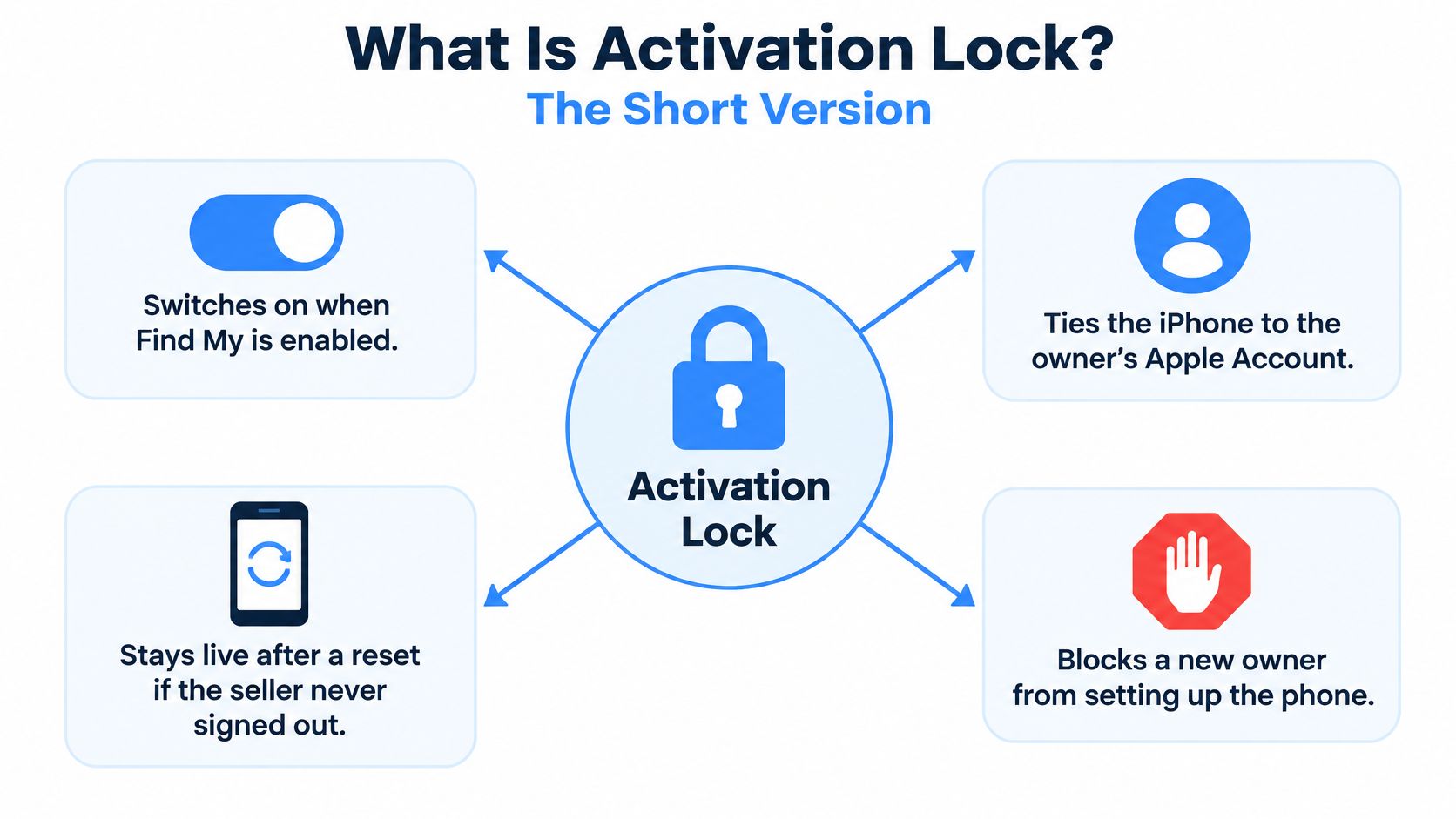
For a buyer, the consequence is blunt. A phone showing an Activation Lock message can't be set up, can't be used and isn't ready for resale. Apple also won't accept a locked device for repair, replacement or trade-in, so the lock blocks every route forward at once.
Three checks settle it before payment:
- The seller's side. Find My must be off and the phone erased, in front of you if possible.
- Your side. Reach a full setup screen on your own network, not theirs.
- The walk-away point. Any request for someone else's Apple Account, at any stage, ends the deal.
How Activation Lock Works and What the Setup Screen Shows
The lock is enforced by Apple's activation server, not by anything stored on the handset. Once Find My is on, the device is associated with the owner's account, and each time it boots into setup it contacts Apple and requests an activation certificate. Apple's Find My overview spells out the rule: if the server identifies the device as locked, activation needs the original Apple Account credentials, or on supported unsupervised devices the passcode last used on it.
Think of Activation Lock as a guest list held at the door rather than a lock on the door. Wiping the phone changes the room behind it. The name on the list stays.
The sequence you'll watch is short. Power on, choose a language, join a Wi-Fi network, then a pause of a few seconds while the handset talks to Apple. Everything after that pause is the answer.
Reading the Screen in Front of You
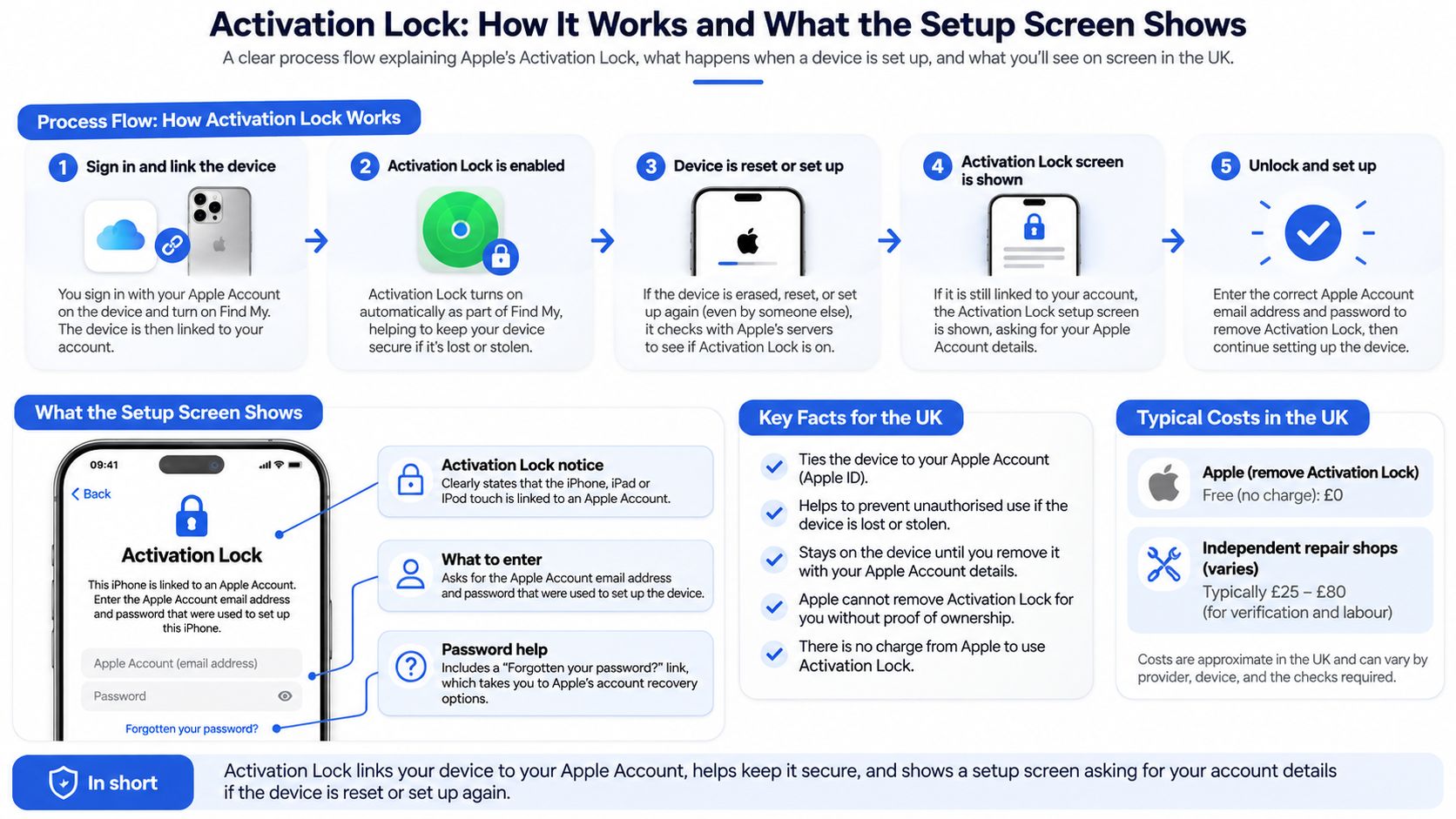
The last two rows are where buyers get caught, because a setup flow looks identical for several screens in a row. Reaching language and Wi-Fi without an account prompt is encouraging, not conclusive. Finish the remaining screens before any money moves.
The Test That Catches It
Ask the seller to erase the phone while you watch, or do it yourself with their passcode, then run setup on your own mobile hotspot rather than their home Wi-Fi. Watch what happens after the network step. If setup moves on to data and privacy and offers to set up as a new iPhone or transfer from another device, no other Apple Account is attached. If it names a partial email address you don't recognise, or asks for a password that isn't yours, put the phone down and walk.
I'd treat that pause after Wi-Fi as the whole inspection. Everything else, the scratches, the battery reading, the box and the receipt, is decoration next to it.
How Activation Lock Differs From Other Locks
Buyers use one phrase for five different problems. "The phone's locked" can mean a passcode, a network restriction, a company enrolment, Apple's ownership record, or the extra screens that guard account changes. Only one of those belongs to the seller's Apple Account, and only that one stops the phone being used at all.
The network lock is the one most often muddled with Activation Lock, because both leave a perfectly good handset looking useless. A network-locked device bought from us may be released through your current provider, though that can't be guaranteed in every case. Different problem, different person holding the key.
Mobile device management catches out buyers of ex-corporate and ex-school stock. The National Cyber Security Centre advises organisations to keep Activation Lock keys in their device management system so administrators can release hardware later. If a phone still carries that enrolment, the person who sold it to you cannot free it, however genuine their story sounds.
Biometrics change none of this. Face ID or Touch ID gets an owner back into a phone in use, but neither releases ownership, and support varies by model, as this note on Touch ID availability on iPhone 14 explains. A forgotten passcode is its own puzzle, covered in our guide to a forgotten iPhone passcode.
Ask one question before anything else: which lock is this, and who controls it? The seller can release their own Apple Account and nothing more. A network block belongs to the provider. A company enrolment belongs to the administrator.
How to Release Activation Lock, Quick Steps
Back up first. The erase in step four wipes every photo, message and app on the phone. Once it runs, nothing comes back from the handset itself.
- Back up the iPhone. Settings > [your name] > iCloud > iCloud Backup > Back Up Now, or use a cable and a computer if you prefer a local copy. Everything the next few steps destroy lives in that backup.
- Confirm Find My is on and tied to you. Settings > [your name] > Find My > Find My iPhone. If it's already off, the phone may have been released before you started, and it's worth knowing why.
- Sign out of your Apple Account. Settings > [your name] > Sign Out, entering the account password when asked. Apple's UK instructions put the sign-out before the erase, and the order matters (Apple support). Type that password straight into Settings, never into a link that arrives by email or text, and if one does turn up, read this guide to how to spot phishing emails before you touch it.
- Erase the phone. General > Transfer or Reset iPhone > Erase All Content and Settings. With Find My enabled, finishing the erase turns off Find My and Activation Lock together, so the device leaves your account cleanly.
- Keep it powered and online while the erase finishes and the phone restarts. Pulling the plug mid-wipe is how a simple job turns into a long one.
- If the phone is lost or already gone, sign in at iCloud.com, open Find Devices, erase the device, then select Remove This Device. Apple states the lock is removed immediately at that removal step, though erasing alone doesn't do it.
- Hand it over at a clean setup screen. Don't sign in with your own details "just to check", and don't let a buyer's account near the phone until the sale is settled.
If you're moving to a new handset and want the old one gone properly, our walkthrough on trading your old phone in and wiping your data runs the same sequence with the sale in mind.
Our Experience Refurbishing This Model at Used Mobiles 4U
Most locked iPhones that reach our bench arrive from private sales and marketplace listings rather than shops. The seller did what felt responsible and ran Erase All Content and Settings, then handed over a handset that still asks for their Apple Account, because they never signed out of iCloud first. A reset looks like a finished job from the outside, which is exactly why we verify activation status during setup rather than trusting a wiped screen (Apple support).
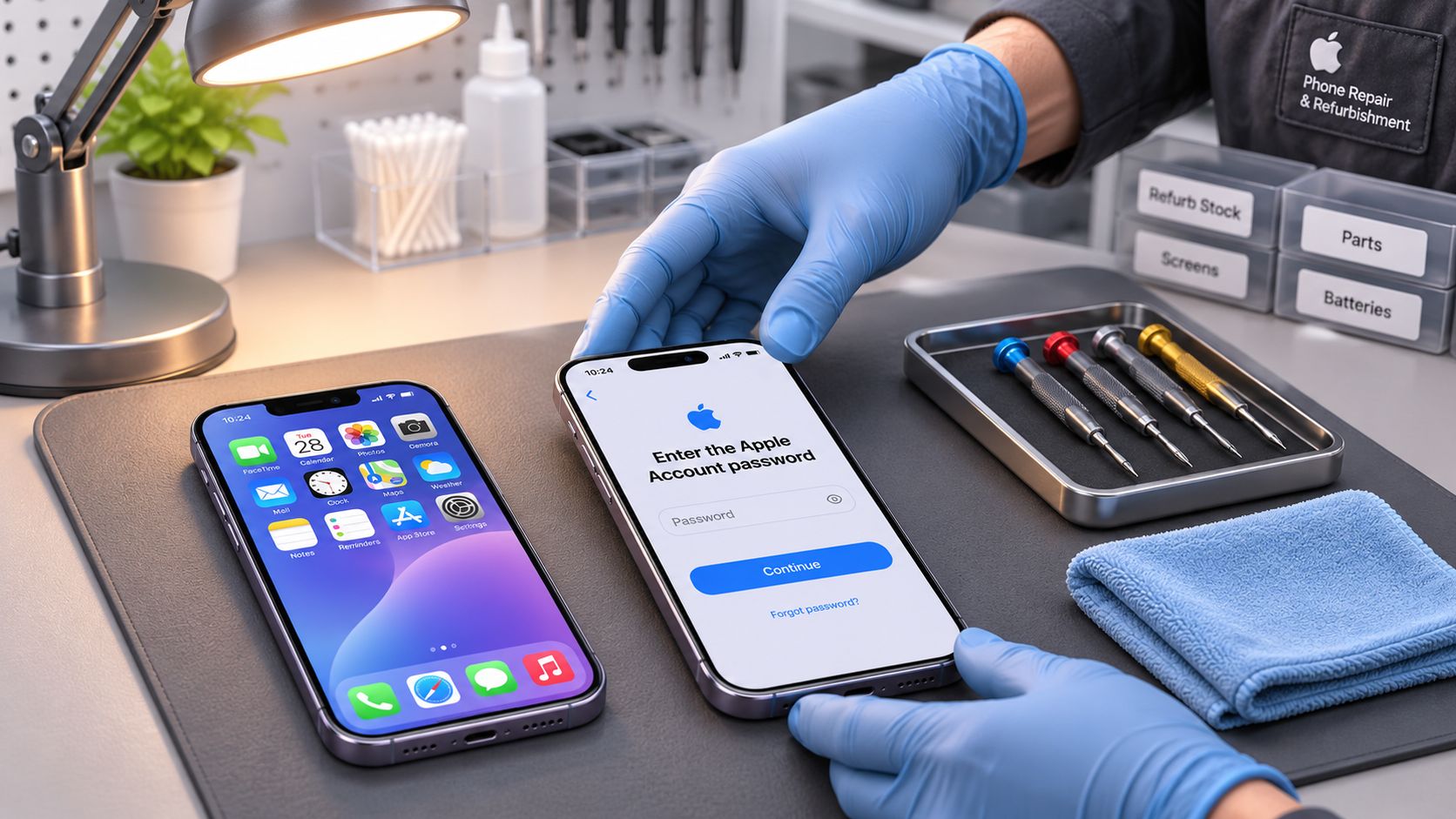
Nothing on the repair bench changes an account state. A new screen, a fresh battery, a charging port and a software restore fix faults; Activation Lock isn't a fault. On supported iPhones there's a second wrinkle, because a part taken from another Activation-Locked or Lost Mode device can be restricted during calibration, so a phone with an unclear history can cause problems even after the lock itself is sorted (Apple's Find My privacy data).
A locked phone is not a repair job. It's a rejected unit, and the only correct outcome is a return to the seller.
What the Bench Actually Checks
- Identity and status. Every handset goes through the CheckMend register via our MobiCode diagnostics before it's listed for sale.
- Activation at setup. The 50 Step Refurb Check covers device identity and status, then display and touch, cameras and supported biometrics, audio and controls, and charging and connectivity.
- Battery and data. Battery health is measured, eligible phones carry a minimum 85% at the point of sale, and previous-user data is removed in a dedicated wipe step, which our guide to the refurbished iPhone data wipe sets out.
- Grade last. Cosmetic grading happens after the technical work, never instead of it.
That ordering matters more than the grade label. A Like New handset can still be tied to somebody's account, and a scuffed one can be completely clear. Wear on the frame and several previous owners are a nudge to ask for paperwork, not proof of anything either way. Android has its own version of this in Factory Reset Protection, so the setup test is worth running on a used Samsung or Motorola for the same reason.
A common example we see is a buyer who receives a spotless phone, resets it at home to be sure, and then meets a stranger's Apple Account details on the screen. The reset didn't cause the problem. It just showed it.
What Buyers Usually Ask Us
The questions don't change much, and the answers are shorter than people expect.
- Does a factory reset clear the lock? No. The activation server checks the account during setup, so the wipe removes data and nothing else.
- Does a receipt prove the phone is clear? No. Paperwork tells you where it came from, not whether the account link was released. Only the on-device test proves that.
- Can a bypass service remove it? No legitimate one can, and any service offering it is selling you a stolen or unreleasable phone. Apple's UK buying guidance is blunt about the message itself: don't buy a handset showing "iPhone Locked to Owner" (Apple support).
- What if the seller can't be reached? Ask them to remove the device from their account remotely while you're on the phone with them, and don't complete the purchase until the setup screen is clear. Their account can be released from anywhere; your money can't be recovered from a stranger.
- Does SIM-free mean it's ready? Only that no network is blocking it. These are separate locks, and a SIM-free phone can still be unusable.
- What if the owner has died, or it came from an employer or school? Paperwork helps, but it doesn't release the lock. An organisation-owned device has to be cleared by its administrator, so wait for written confirmation before paying.
- Do buyers keep their rights? Yes. UK consumer law still applies, but a legal right doesn't make a locked phone usable, so the test has to happen before the money leaves your account.
If you're locked out of a device that belongs to you, recovery is a separate trade from ownership release. For laptops the same patience applies, and you can browse MacBook Pro file recovery steps to see how a specialist approaches a stubborn machine.
Expect a clean setup screen. Not a promise, not a receipt, not a story.
Check Activation Lock Before You Buy
A used iPhone is worth buying when the setup test reaches the normal activation flow without asking for anyone else's Apple Account, and the seller confirms in writing that the device was removed from Find My. That's the whole standard. Everything else is negotiable.
It suits buyers who want a SIM-free phone and are willing to spend two minutes running the check, plus sellers organised enough to sign out and erase before handover. Avoid any privately sold phone where the seller can't be present or reachable, anything displaying "iPhone Locked to Owner", and any offer of a bypass. Apple's platform support documentation is clear that the linked account credentials are needed to turn off Find My, erase the device or reactivate it, even after a remote erase (Apple platform support), so no receipt or IMEI check replaces the on-device test.
If you'd rather not gamble on a stranger's listing, buying from a refurbisher changes the arithmetic. Everything we sell is SIM-free with no contract or tie-in, eligible devices carry an 18-month device warranty, and current stock includes an iPhone 11 Pro Max in Midnight Green with 256GB in Like New grade, free of carrier restrictions, with Face ID for Apple Pay. Our second-hand iPhone buying checklist covers the rest of the inspection, from battery health to charging.
Written by James Waterston, 24 years in the mobile phone industry from customer service through to Sales Director of a global repair and recycling company, now running Used Mobiles 4U for over 8 years. Connect on LinkedIn.
Every phone we sell leaves the bench SIM-free, securely data-wiped and checked at setup, so the first screen you see is yours. If you'd rather compare grades, storage and battery health than gamble on a marketplace listing, Used Mobiles 4 U lists current stock with warranty, UK support and returns behind it. Run the setup test on whatever you buy, ours included, and buy with your eyes open.
Looking for a refurbished phone?
Shop professionally tested refurbished iPhones and Samsung phones with 18 month warranty, 30 day returns and free UK delivery.
Browse Refurbished Phones