


Sell My Laptop for Money in the UK

31/10/2026

13 Mins

If it powers on, holds charge, has an intact screen and can be wiped cleanly, you can usually sell your laptop for money. If it's locked to an account, won't power on or has a swollen battery, treat it as a parts or specialist job until you've had it assessed.
The Short Version Before You List
Material Focus estimated from a survey of 3,001 UK householders from 7 to 29 July 2022 that approximately 11.7 million laptops could potentially be sold or recycled, that the average UK household could raise about £200 by selling unwanted technology, and that estimated laptop resale values ranged from £274 to £420 in the Material Focus findings. Those are research estimates, not live offers. Your figure will move with model, age, specifications, condition, battery health, accessories and a secure wipe.
A common example we see is a booting laptop written off as scrap only because the correct charger was sitting in a drawer. Find the charger first. It changes both the buyer's first impression and what you can prove in photos.
Decision Rules
- Sell now: It boots to setup, the screen is intact, the keyboard works and you have the charger.
- Fix first: The fault is clearly diagnosed and the repair quote is clearly smaller than the gap between a faulty and working sale.
- Stop for specialist handling: It won't power on, stays activation locked, has case damage or has a swollen battery.
- Donate instead: It works, but the likely cash isn't worth the listing, messages and handover.
Where a UK laptop sale usually makes sense
Pick the route by timing as much as price. If you need money this week, a trade-in quote beats a higher private asking price that sits unsold. If you can wait and handle buyers calmly, a private listing gives you more control.
How to Sell My Laptop for Money, Quick Steps
Don't start with the advert. Start with proof of what you've got and a clean break from your accounts and files. Buyers pay more readily when the machine reaches a setup screen and the listing matches what they can test.
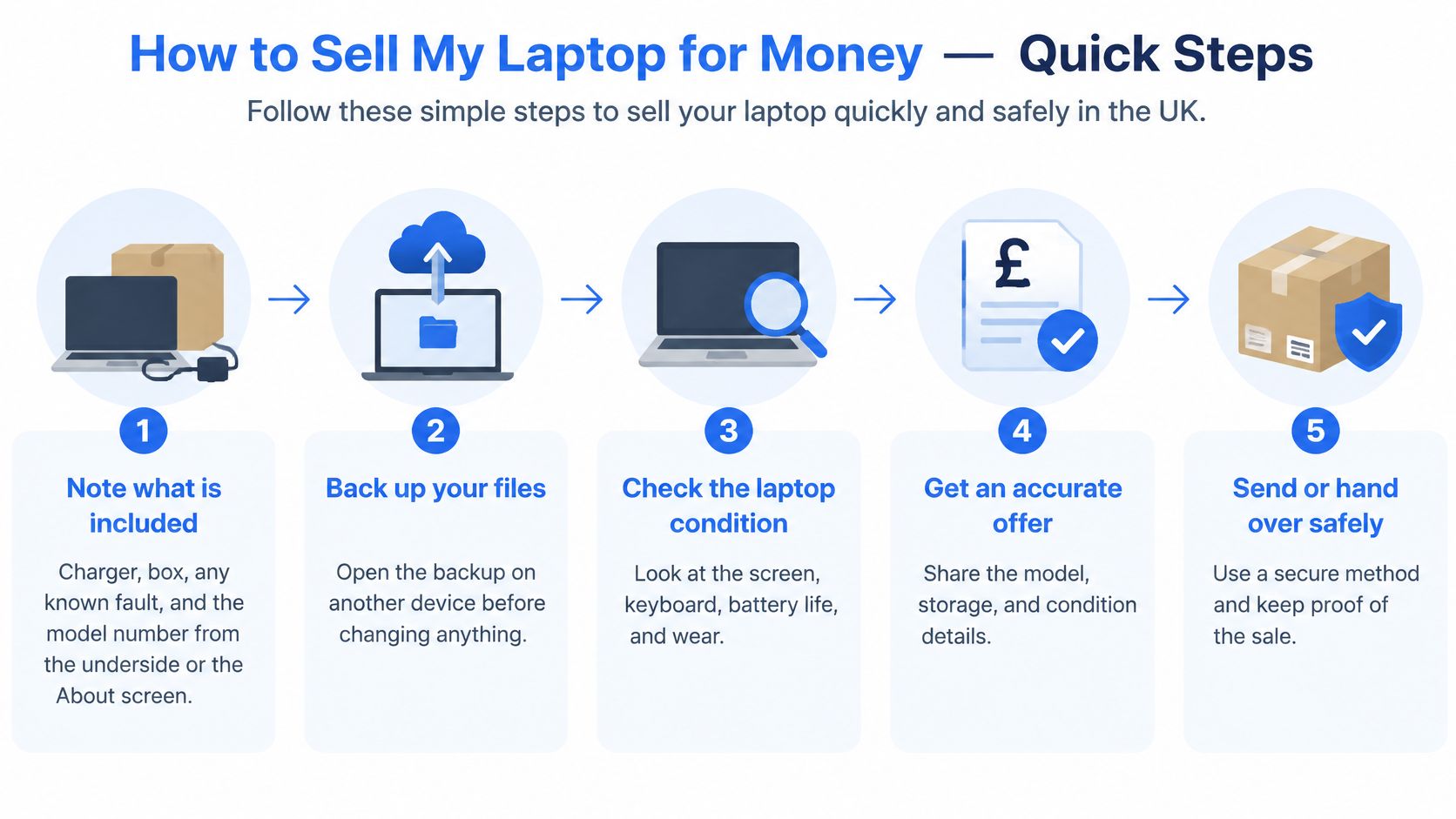
Bench rule: Signing out isn't wiping. Deleting folders isn't wiping either.
Before You Touch Reset
Data loss warning: A full reset is meant to remove your files. Back up first, open the backup on another device and check photos, documents and downloads are there. If you can't open the backup, you don't have a usable backup yet.
- Note what's included. Record the charger, box, known faults and model number from the underside label or the About screen. This stops you guessing later when a buyer asks basic questions.
- Back up and verify it. Copy files to an external drive or cloud storage, then open a sample of documents and photos from that copy. A reset can't recover data you never copied properly.
- Remove accounts and locks. Sign out of iCloud, Microsoft, Google and password managers, and turn off Find My or Activation Lock where provided. On a Mac, check System Settings > Apple Account. On Windows, check Settings > Accounts. A locked laptop is a problem for the next owner, however clean it looks.
- Check encryption. Look for BitLocker on Windows or FileVault on a Mac. Encryption matters because a reset on an encrypted device normally deletes the keys that make stored data readable.
- Run the maker's full reset. On Windows, use Settings > System > Recovery > Reset this PC. On a Mac, use System Settings > General > Transfer or Reset > Erase All Content and Settings, checking wording against your current macOS version. Never choose an option to keep personal files when the laptop is leaving your ownership.
- Boot to the welcome screen and stop. Don't create a new user account for the buyer. The setup screen proves the reset finished and lets the buyer set it up as theirs.
- Photograph it in daylight. Show the powered screen, keyboard, ports, corners, lid and charger. Include close shots of dents, cracks, shiny keys or a marked palm rest rather than hiding them at an angle.
- Write the listing from checkable facts. State the processor, RAM, SSD size, operating system, battery behaviour, charger status and faults such as a sticky key or cracked lid. Keep the serial number, photos and any offer for your own records.
The National Cyber Security Centre sanitisation guidance says factory-reset procedures on encrypted devices normally delete the encryption keys, making stored data unreadable with minimal risk, but no reset can guarantee absolute recovery resistance in every circumstance. That's the honest distinction. For everyday home use, a proper encrypted reset after account removal is the normal route. If the laptop held sensitive work, financial or health information, use the manufacturer's device-specific secure sanitisation or specialist help rather than treating a quick reset as a promise.
If you'd rather not manage messages and meet-ups, our sell your tech route is there for an assessment based on the device you describe. Still do the backup and account removal first. No buyer should receive a laptop that's still tied to you.
Fix a Fault Before You Accept a Low Offer
Age alone is a poor reason to scrap a laptop. Recent UK research found laptops reaching repair facilities averaged 7.6 years old, while analysis of more than 10,000 repair-café records found roughly half of devices were fixed and another 28% were considered potentially repairable, in the UK repair and reuse study. That doesn't mean every old machine deserves money spent on it. It means you should diagnose before you discount.
Use a simple repair calculation. Get a realistic quote, compare it with the gap between selling faulty and selling working, and stop if parts, labour or data risk swallow the whole gap. A repair that only moves money from your pocket to the buyer isn't a win.
Faults That Can Change the Outcome
A slow laptop clogged with startup software may respond to a clean reinstall. Malware removal, extra memory, or replacing a failing SSD or worn battery can also help where the quote is modest and the rest of the machine is sound. Check battery behaviour properly before pricing, and use our MacBook battery health guidance where it applies to your model.
A common example we see is a laptop called dead because it had no charge lead, then booting normally once the correct charger was tried. Test with the right lead before you describe it as no power.
Sell now or sort the fault first
A swollen battery is a safety stop, not a home repair to force through for a better listing. Don't keep charging it, don't press a bulging case flat and don't post it as though it were ordinary wear.
If it powers on, holds charge, has an intact screen and can be wiped, describe it accurately and offer it for reuse. That's usually a better first step than accepting the lowest faulty offer out of frustration.
Our Experience Refurbishing This Model at Used Mobiles 4U
One thing we regularly notice is that two devices with the same name feel completely different once memory, storage and battery wear are checked. The badge gets a buyer interested. The bench checks decide whether it's an everyday machine, a discounted workhorse or something that shouldn't be sold as working.

Our technicians often see sticky keys, tired charge ports, cloudy screens and batteries that still show a percentage but sag quickly under load. A battery icon alone tells you very little. We'd rather see the machine run away from the mains, charge from the supplied lead and stay stable while setup screens and basic functions are checked.
What We'd Check on the Bench
- Start and setup: Does it boot cleanly and reach the welcome screen without errors or a previous owner's account?
- Power: Does it charge reliably, hold charge and run without cutting out when moved or unplugged?
- Storage: Is the SSD responsive and realistically usable, or does it crawl and throw warnings that point to failure?
- Controls and screen: Do the keyboard, trackpad, ports, speakers, camera and display work without dead areas or flicker?
- Accounts and data: Have accounts been removed and storage wiped by an appropriate method for that device?
We also say plainly that no wipe should be presented as perfect in every case. Secure preparation means using the right reset or sanitisation route for the storage and being clear about what was done. That honesty matters more than confident wording in an advert.
Grade differences should be visible to the buyer. Light marks are not the same as a dented corner, worn palms or a heavily marked lid. A device that fails testing should be repaired and retested, or kept off sale rather than listed as working and left for the buyer to discover.
A clean lid can hide a swollen battery pack. Cosmetics never replace a power and battery check.
That's why battery condition belongs in every serious listing. State whether it holds a useful charge, mainly works plugged in, or has any swelling or case lift. Don't make the buyer infer it from a photo.
For buyers who want a tested and graded device rather than an untested private purchase, our phone refurbishment is the closest comparison we can speak to with confidence. For example, the iPhone 14 Plus – 128GB – Black – Like New is a refurbished, fully tested, SIM-free handset graded Like New, with an 18-month device warranty, 12-month battery cover and 30-day returns. The principle transfers to any used tech purchase. Clear grading, testing, UK support and warranty and returns terms on the eligible listing should come after the advice, not replace it.
I would always choose a plainly graded machine with honest battery notes over a polished advert that avoids the checks. The second one usually creates the return, dispute or bad review.
What Usually Affects Value
Buyers don't pay for a long specification dump. They pay for a laptop that feels usable on the first evening, charges properly and won't surprise them during setup. These are the points that usually move an offer.
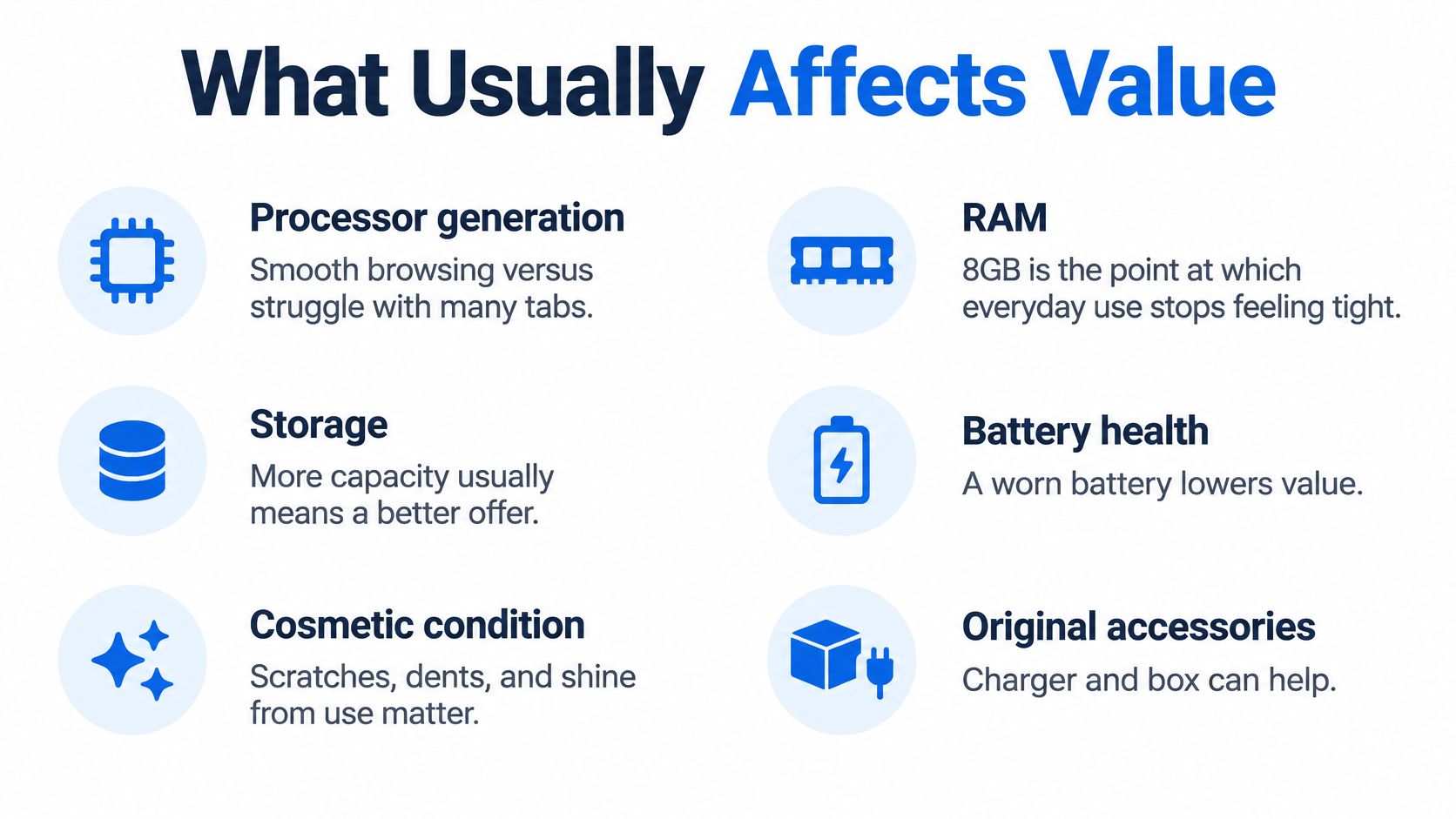
- Processor generation: In real life, this is smooth browsing and video calls versus a machine that struggles with many tabs open.
- RAM: 8GB is the point at which everyday use stops feeling cramped on many older machines. 4GB is a hard limit for a buyer who expects modern browsing and office apps to stay comfortable.
- SSD capacity: A small drive fills quickly and can make a sound laptop look faulty. Storage size should be prominent, which is why larger-drive demand is easy to understand when comparing laptops with a 1TB SSD.
- Screen condition: Cracks, pressure marks, flicker and dead pixels change the machine from ready to use into a repair decision.
- Battery condition: Ordinary wear means shorter unplugged time. Swelling means stop and get specialist handling.
- Correct charger: A missing or mismatched charger creates doubt and an immediate cost for the buyer.
- Operating-system support: A laptop that can run a supported system is easier to sell than one stuck on old software.
- Keyboard layout and condition: Missing keys, sticky keys or a layout the buyer didn't expect should be photographed and stated.
- Activation lock: If the buyer can't set it up in their own name, it isn't a normal working sale.
- Cosmetic grade: Dents, lid marks, shiny keys and palm wear affect confidence even when performance is fine.
Offers move with grade, storage, battery behaviour, cosmetics and demand, so don't treat any general range as a price list. Photograph the powered desktop or setup screen. It reassures the buyer that they're not looking at a parts shell.
The listing should read like the checks a technician would make, not like an advert.
Don't describe a battery as new unless it's been tested and you can support the claim. Don't hide a cracked display, failing keyboard, swollen battery, account lock or missing charger until collection.
A private seller should describe the machine accurately and disclose known faults, while a business seller has broader responsibilities for satisfactory quality, fitness for purpose and description under the GOV.UK consumer protection guidance. Keep evidence of condition, serial number, accessories and payment. A clear listing protects both sides.
Start your advert with two plain lines: model, processor, RAM and storage first, then charger yes or no and the single worst fault. Buyers can decide quickly, and you'll get fewer wasted messages.
Pricing, Payment and Safe Handover
Set your asking price from grade-matched laptops that have sold with the same processor, RAM, storage and battery behaviour. Don't price from the original receipt. A clean, wiped and charged machine can sit at the top of the sold range only if your photos prove the condition.
Show faults as a clear discount rather than hiding them and hoping the buyer won't test properly. Small businesses doing wider tech budgeting sometimes compare resale income against new software projects too, and UK app budgets for SMEs from Gegan gives useful context for that separate decision. For the laptop itself, condition and completeness still set the price.
Payment Rules That Avoid Most Trouble
- Wait for cleared funds: Accept the sale only after payment has cleared in your account. Never hand over the laptop before that point.
- Avoid risky payment requests: Be wary of cheques, unfamiliar payment apps, overpayment and buyers asking for a deposit arrangement that doesn't make sense.
- Meet safely: Choose a public place, bring someone with you and keep communication in the marketplace where possible.
- Post carefully: Use tracked and insured shipping, photograph the laptop packed and sealed, and keep the receipt.
- Keep records: Retain the serial number, listing, photos and buyer details until the sale is closed.
A buyer who wants the laptop sent before payment clears should be treated as a scam until proven otherwise. Walk away rather than negotiating around that point.
Trade-in and buyback routes remove most meeting and payment risk, but expect a quote based on tested grade rather than a hopeful private price. If you're unsure what proper data removal involves, read our explanation of data destruction before the laptop leaves you.
Choose to Sell, Repair or Recycle Your Laptop
My verdict is simple. Sell my laptop for money is a sensible plan when the machine powers on, the screen is intact, it can be wiped properly and every fault can be described without guesswork. That's a reusable laptop, not cupboard clutter.
Repair first only when the quote is plainly smaller than the gap between a faulty sale and a working sale. A modest SSD, battery, memory or software fix can make sense. Spending the full value gap to chase a nicer advert doesn't.
Choose specialist recycling if it won't power on after basic checks, stays activation locked or has a swollen battery. At that point, safety and honest disposal matter more than squeezing out a speculative listing.
Government departments recorded 21,988 laptops as resold in 2024 to 2025, and the Greening Government ICT annual report says equipment should be reused where possible and recycled only when reuse is not viable. A clear advert helps a working machine stay in use rather than being treated as scrap too early.
Who This Suits and Who Should Pause
Selling suits someone with a complete, wiped, everyday laptop who wants cash more than cupboard space. It also suits a seller who can photograph wear accurately and wait for the right route rather than accepting the first low offer.
Avoid a private listing if you won't meet safely, wait for cleared payment or disclose faults. That approach creates disputes and can leave you with a return you could have prevented through better photos and plainer wording.
If admin is the problem, look at our sell your tech page and let the team assess whether the laptop is suitable as a resale device, with no offer quoted here. If you're buying a replacement phone, choose a graded refurbished handset with clear photos, battery expectations and UK support rather than an untested private listing.
Written by James Waterston, 24 years in the mobile phone industry from customer service through to Sales Director of a global repair and recycling company. Now running Used Mobiles 4U for over 8 years.
James Waterston on LinkedIn
If your wiped laptop is ready to move on, or you're replacing it with a tested refurbished phone, visit Used Mobiles 4 U for clearly graded devices, secure data wiping and UK support. Start with an honest description of the model, battery and faults, and we'll help you choose the sensible next step.
Looking for a refurbished phone?
Shop professionally tested refurbished iPhones and Samsung phones with 18 month warranty, 30 day returns and free UK delivery.
Browse Refurbished Phones