


How to Sell Your Broken Laptop: Value, Data and Postage

05/11/2026

15 Mins

A broken laptop usually sells, whole or for parts, but only after the drive is wiped and every known fault is disclosed in writing. Skip either step and you risk losing the money, the buyer, or your personal data.
That runs against what most owners assume. A dead screen or a laptop that will not charge feels worthless, so it goes in a drawer. A 2022 survey of 3,000 UK householders estimated homes were holding 11.7 million unused laptops and 9.17 million unused tablets, figures reported in Letsrecycle coverage of UK households hoarding electrical items. Some of those machines are scrap. Plenty are not. The difference is rarely the word broken. It is whether a buyer can identify the model, price the fault, and trust that no second fault is hiding underneath.
The Short Version
- Sort by fault first: Decide if it sells whole, sells for parts, or goes for recycling.
- Wipe before you list: A laptop that will not boot can still hold recoverable files.
- Disclose everything: Undisclosed faults found on testing are where offers collapse.
- Never post a swollen battery: Stop and get specialist advice instead.
If you want to sell your broken laptop for a fair price, treat it as a fault and data decision first. The listing comes last.
Sorting Your Broken Laptop by Fault Before You List It
Buyers do not pay for broken. They pay for a known model with a known fault and enough working parts to justify collection and testing. Your first job is to put the laptop into one of three routes, sell whole, sell for parts, or recycle, before you write a word of the listing.
Start with the facts a buyer needs to price it. Write down the exact model identifier, CPU generation, RAM capacity, storage type and capacity, screen size, and whether the correct charger is included. Photograph the serial label on the base. If a warranty might still apply to a Lenovo machine, check the position before you sell, since our Lenovo laptop warranty UK guide explains what to confirm first.
Run the checks in a fixed order
If it powers on, test it properly rather than guessing. Work through charging, battery detection, keyboard, trackpad, display, each USB port, Wi-Fi, webcam, speakers, fan noise, and BIOS or firmware access. Note what works as carefully as what fails, because working parts are the value.
Then separate swappable modules from board level faults. A battery, keyboard, display, DC jack, RAM stick, or drive can usually be replaced, so a single failure there often leaves a saleable machine. Liquid damage, corrosion on the board, or a complete no power condition is different. Those faults spread, they are harder to quote, and buyers price them as parts at best.
A swollen lithium ion battery changes everything. Do not post it, do not press the lid shut to make it fit a box, and do not leave it charging. Isolate it away from anything flammable and get specialist guidance. Under UK WEEE rules, electrical waste goes to approved authorised treatment facilities or approved exporters, and the UK government WEEE statistics and guidance sets out that authorised route rather than ordinary waste.
When recycling beats selling
Recycle rather than sell when you can see liquid corrosion, the battery is swollen, or the likely parts price will not cover collection, testing, data erasure, and return risk. There is no shame in that call. Chasing a small offer on a corroded machine usually ends in a return and wasted postage both ways.
A broken laptop should not go in the normal household bin, and Berkshire Computers guidance on computer recycling in the UK makes the point that recycling centres process materials and are not automatically responsible for securely deleting your files. Wiping stays your job, whichever route you choose.
Practical rule: if you cannot describe the fault in one plain sentence, you are not ready to list it.
Finish with a one line fault list you can paste into any listing or quote form. For example, powers on, screen cracked, keyboard and Wi-Fi working, battery holds charge poorly, charger included, drive wiped. That single line does more for your price than any sales wording.
How to Wipe a Broken Laptop Before Sale, Quick Steps
Treat the storage drive as recoverable even if the laptop will not boot. A dead screen, a failed keyboard, or a board that will not power up tells you nothing about the drive. Someone with a cheap adapter can often read it in minutes, including saved passwords, documents, photos, and browser sessions.
The Information Commissioner's Office disposal and deletion guidance states that a faulty device may still contain accessible personal data and that deleting files or using a factory reset may be insufficient. It recommends secure wiping, degaussing, or hardware destruction, plus destruction logs and evidence from third parties. That is the standard to aim for, adapted to a home sale.
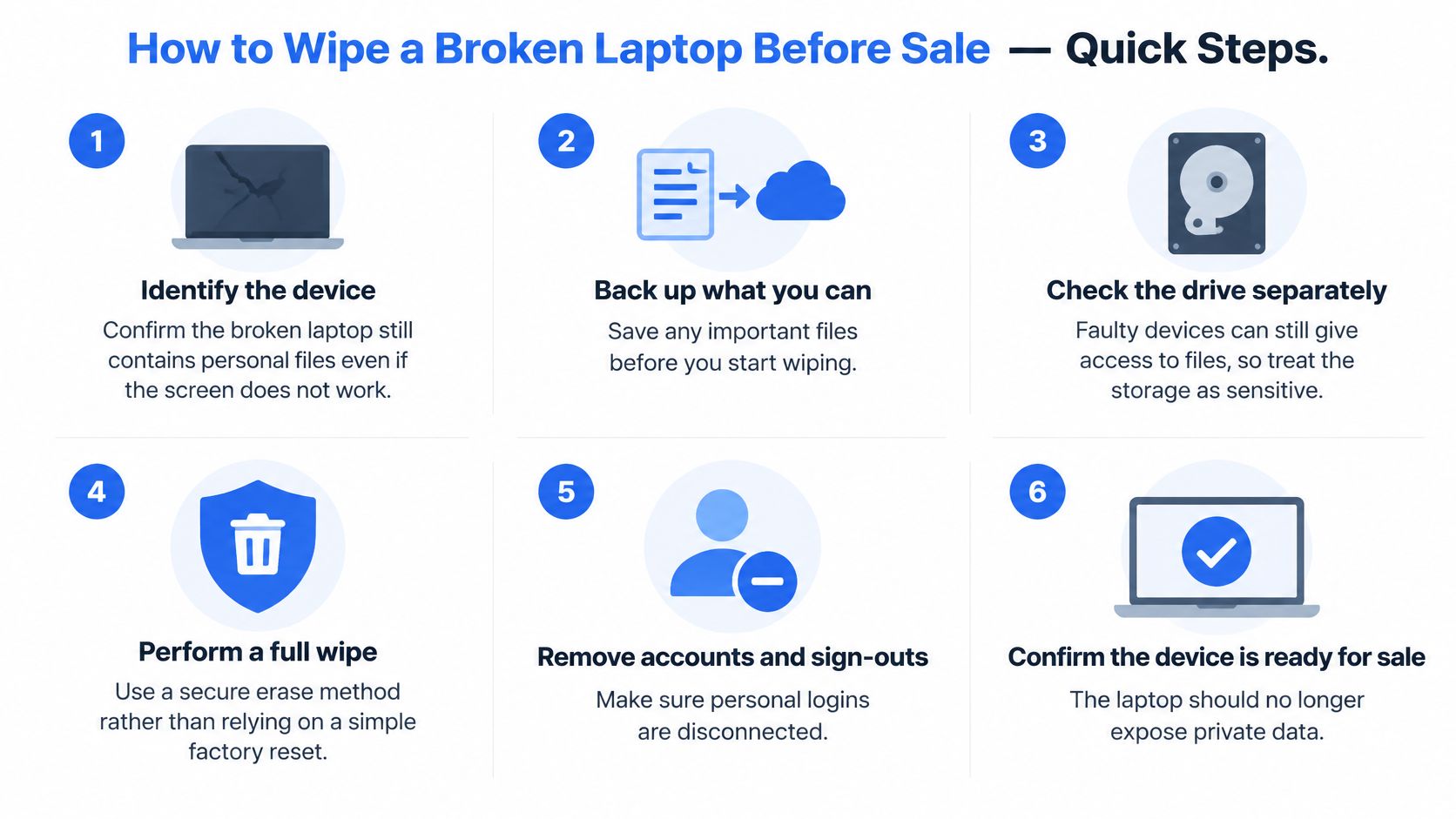
The six steps in order
- Back up what you need first. Copy files to an external drive or a cloud account you control, then open a few to confirm they work. A secure wipe cannot be undone, so check before you start.
- Sign out of every account. Sign out of Microsoft, Apple, Google, and password manager accounts, and remove activation or device locks. On a Mac, turn off Find My Mac under System Settings, then your name, then iCloud.
- Reset it if it still boots. On Windows use Settings > System > Recovery > Reset this PC > Remove everything. On a Mac use System Settings > General > Transfer or Reset > Erase All Content and Settings.
- Use the right erase for the drive type. Identify whether the laptop uses an HDD, SATA SSD, or NVMe SSD. Verified overwriting can suit an HDD, while modern SSDs need the manufacturer's Secure Erase or Sanitize command, because ordinary overwriting may not address remapped flash cells.
- Handle a non booting laptop separately. Remove the drive and connect it to another computer with a compatible adapter, then erase it there. If you cannot remove it safely, use a specialist data destruction provider rather than handing over an untouched drive.
- Write down the evidence. Record the device serial number, drive serial number, transfer date, method used, and recipient details. Ask for a destruction or wiping certificate if a third party does the work.
If the drive held bank, health, employment, or business information, I would skip resale of the drive altogether. Physical destruction through a specialist costs you a little value and removes the argument entirely. Owners clearing a relative's house face the same problem with unknown devices, and these data security tips for estate sellers cover the same cautious approach to equipment you did not use yourself.
Deleting a folder removes the label, not the contents. Buyers and recovery tools both know that.
Our own explainer on what data destruction involves sets out the difference between wiping a drive for reuse and destroying it outright. Devices we resell are securely data wiped before resale, and the same discipline should apply to a private sale.
A documented wipe also protects your price. It tells the buyer the drive can be tested and reused without legal or personal risk attached, and it stops a sale unravelling later because an account lock is still active. Confirm your backup, then wipe once, properly.
What Usually Affects Value
A buyer works backwards. They take the value of the working parts, or the value of the repaired machine, then subtract collection, testing, data erasure, and the risk that you missed a fault. That is why two identical laptops with the same cracked screen can attract very different offers. One is a priced risk. The other is a guess, and guesses get discounted hard.
Repair costs are the yardstick buyers use to decide between fixing a machine and stripping it. A Which? report on laptop repair costs based on a survey of more than 16,000 people found the average laptop repair cost was typically between £67 and £87. Use these ranges as context for how a buyer thinks, not as a promise of what anyone will pay you.
Look at the spread, not just the low figure. A motherboard fault quoted anywhere from £51 to £164 tells a buyer the outcome is uncertain, so they protect themselves with a lower offer. A screen at £45 to £130 is easier to price, which is why a booting laptop with a cracked panel often sells better than a tidier machine that will not power on at all. If you want a second view on how repair quotes are built up before you decide, this guide to laptop repair pricing breaks the cost elements down in plain terms.
What moves an offer up or down
- Age and generation: Newer models have live demand for screens, keyboards, and boards.
- RAM and SSD size: These decide how useful the machine stays for a second owner.
- Powers on or not: A booting laptop can be tested quickly, which lowers the buyer's risk.
- Charger and accessories included: A correct charger proves charging works and saves the buyer money.
- Cosmetic grade: Dents, worn palm rests, and missing key caps all trim the price.
- Battery condition: A weak battery is a haggling point, a swollen one ends the sale.
- Screen state: Cracked, dead, and flickering panels are priced differently, so say which.
- Drive present and wiped: A missing or locked drive removes value and adds work.
- Faults disclosed up front: Honesty keeps the first offer alive after testing.
Before you accept anything, estimate the parts value yourself. Add up what the working screen, RAM, storage, keyboard, and charger are realistically worth, then subtract postage and fees. That gives you a floor. An offer under that floor is not an insult to argue with, it is the wrong buyer.
Choosing Between Trade-In, Parts and Private Sale
Start with the fault, then check the drive. That order settles the route faster than any price comparison. A laptop with a dead panel and a wiped, working board has three interested buyers. One that will not post and still holds your accounts on its original drive has one route worth taking seriously, and it is not the trade-in desk.
Parts buyers take machines that never boot, because a good panel, RAM and casing still have a home. A single failed module in an otherwise intact chassis prices cleanly for the same reason: the offer follows the parts, not the badge. Trade-in sells certainty instead of hardware. You know the terms before the parcel leaves, and nobody messages you three days later about a hinge.
Private sale pays best when you can switch the machine on in front of a buyer and answer questions on the spot. Include the charger, because a buyer who cannot test charging assumes the worst and bids accordingly. I would not list a non-booting laptop privately, since the questions you cannot answer cost more than the price difference.
Data decides as much as the fault does. A private sale puts your drive in a stranger's hands, so a wipe record matters before the listing goes live. Sending the machine to a buyer who wipes devices before resale moves that risk to their side of the table.
Recycle only when no parts value survives postage and fees.
Whichever route you take, put the model identifier, RAM and storage in the first line and offer your wipe record unprompted. Ask two or three buyers for a written figure and their grading criteria before anything leaves the house. Most disputes start because the seller read "faulty" one way and the buyer's test bench read it another. The same holds for handsets, which is why the checks behind where to sell your broken phone follow the same logic.
When a laptop is beyond economic repair, plenty of owners run on a phone for a few weeks rather than buy twice. A Samsung Galaxy S10 – Prism Black – 128GB – Like New supports Samsung DeX, which puts a desktop-style workspace on a monitor for email and documents while you decide on a replacement. Treat it as a stopgap, not a substitute for heavy work.
Packing and Posting a Laptop With Faults
The fault you disclosed is rarely the one that ends in a dispute. Transit damage does: a hinge cracked on a drop, a charger plug pressed through the lid, a screen that left intact and arrived cracked. Packing is part of the sale, so treat it as a step you can get wrong rather than a formality after the money is agreed.
The records you need are already covered before listing: dated photos of the serial label, all four sides, the screen open and closed, every area of damage, plus a fault note inside the parcel that repeats the listing wording. Battery safety is settled before the box comes out, and a swollen case, a lifted trackpad or a base that will not sit flat is a specialist job rather than a courier job.
What the packaging has to do is stop the machine moving and stop anything pressing on the lid. Use a rigid outer with padding on all six faces, and give the screen corners and hinge more than the rest, because that is where a dropped parcel loads. Wrap the charger separately, coil the cable so the plug cannot sit against the lid, and fill every gap that lets the laptop shift. Advice on how to choose boxes for breakable items applies here, since a screen fails the same way glassware does, from a point load in a soft box.
Bench advice: if the laptop slides when you tip the sealed box, it is not packed yet.
Then the paperwork and the money. Send it tracked and insured to the value you declared, and keep proof of posting until payment clears. Agree the return process in writing before the parcel leaves: who inspects on arrival, what evidence they supply, and who pays return postage. A buyer 200 miles away holding a vague promise from you has nothing to work with, and neither do you.
Before you seal the box:
- Photos taken: Serial label, damage, and accessories all recorded.
- Faults written down: Same wording in the listing and in the parcel.
- Battery checked: Not swollen, contacts protected, safe to post.
- Box padded: Rigid outer, corners and hinge protected, charger separate.
- Service chosen: Tracked, insured, and matched to the declared value.
- Receipt saved: Proof of posting stored with your photos and wipe record.
Our Experience Refurbishing This Model at Used Mobiles 4 U
Older MacBook Air machines show why fault type, not age alone, decides the outcome. A keyboard or trackpad often wears out long before the logic board fails. Keys go shiny and unresponsive, trackpad clicks lose their feel, and the owner assumes the whole machine is finished. Often it is not. A keyboard swap can move a laptop from parts only back to a saleable, usable computer.
A tired battery that still boots the machine is a disclosure and a known replacement cost. A swollen battery is a different category. It lifts the trackpad, bows the base, and should never be shipped or stored as normal stock. That is a safety job, not a refurbishment job.
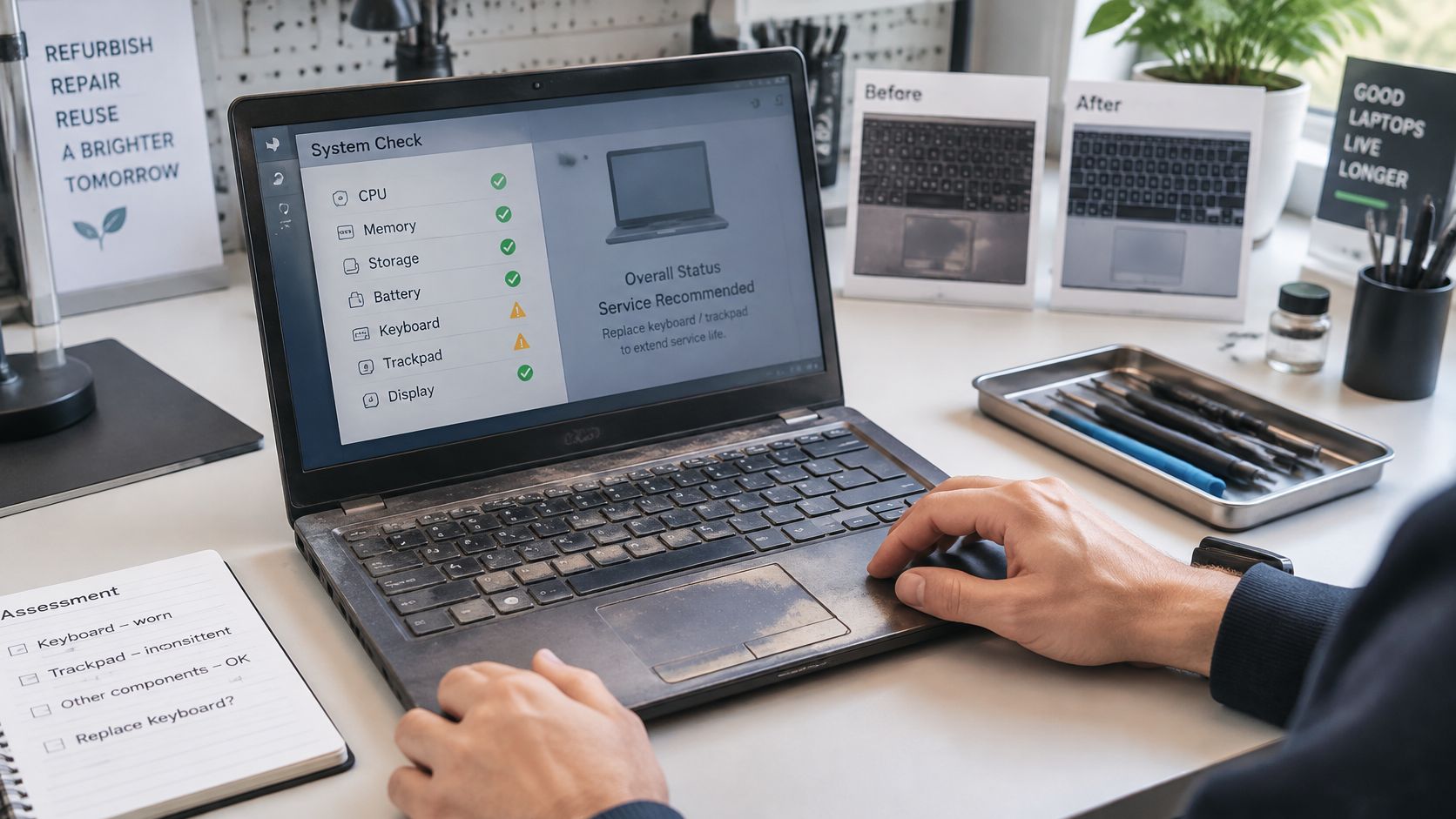
Cracked and dead screens are the other regular arrival. The repair or replace call usually comes down to whether the panel cost suits the machine's age and storage. On a well specified unit it can make sense. On a low storage machine with a worn battery as well, the honest answer is parts.
The usual repair candidates are keyboards, batteries and screens. Drives are different. A healthy drive should be wiped and retested rather than swapped without reason, because keeping it keeps a refurbished machine affordable. Our refurbishment process covers how those checks are sequenced before anything is listed.
Grade is cosmetic, function is not
Cosmetic grade affects price, and buyers should expect clear grading with honest photos. It does not decide whether a unit gets tested. The functional questions are charging, battery, keyboard, display, ports, Wi-Fi, webcam and speakers, plus whether the wipe is complete and no account lock remains. A scratched lid is a discount. A faulty port is a repair decision.
Signs of heavy use include worn key legends, a loose hinge, fan noise under light load, and a charging port that only works at an angle. None of those automatically kills a machine, but together they tell you how it has lived.
For context, the listing for Apple MacBook Air 13" (2013) – i5, 128GB – Silver – Good describes a 2013 machine with a 13 inch screen and 128GB storage. That specification is what limits its second life, not the badge. Storage decides how useful an older laptop stays, so check it before you judge a repair bill.
If a machine cannot be described accurately after those checks, it belongs in parts or recycling, not a dressed-up listing. That protects the next owner and, bluntly, it protects the seller from a return. Used Mobiles 4 U sells refurbished MacBooks and Lenovo laptops, and the standard is the same: if the fault list and the wipe record do not agree, the machine is not ready for a listing.
Choose Your Route Before You List Your Laptop
Settle the fault and the data before you write a listing. Price is the last question, not the first. A machine is sellable whole when it powers on with a fault a buyer can price, the drive has been wiped and you can document the wipe, and the listing discloses every fault in writing. If any one of those is missing, close the gap before listing or take a different route.
Run the checks in this order. Safety first: a swollen battery stops the sale, because safety comes before any possible payout. Data second: if the drive cannot be wiped, the laptop does not leave your house as a working unit. Fault economics third: a single cheap fault on a machine you would otherwise keep can be worth repairing. Once battery, screen and fan faults stack up, the repair bill starts to approach what the machine is worth as a usable device. That is the point to stop spending and route it to parts or recycling.
Selling suits owners with a reasonably recent laptop, one isolated fault, the correct charger, and the ability to pack it safely. It is the wrong choice if you hold sensitive data on a drive you cannot erase, or if you need a swollen battery moved quickly and safely rather than sold. The right route is the one the machine has already earned, not the one that looks easiest to list.
If you would rather skip the listing work, Used Mobiles 4 U offers a Sell Your Tech service. Start with the fault list either way. That one line decides whether the sale holds up or turns into an argument after delivery.
Ready to sell your broken laptop without guessing what it is worth? Send us the model, specification, and your one line fault list, and we will give you an honest view on whether it should sell whole, sell for parts, or go for recycling. Visit Used Mobiles 4 U to ask about Sell Your Tech, or browse our tested refurbished laptops and phones if you need a replacement first.
Looking for a refurbished phone?
Shop professionally tested refurbished iPhones and Samsung phones with 18 month warranty, 30 day returns and free UK delivery.
Browse Refurbished Phones