


Lenovo Laptop Battery Not Charging: How to Fix It Yourself

11/11/2026

11 Mins
A Lenovo laptop battery not charging message is usually a power-path problem before it is a battery problem. When the screen says plugged in, not charging, check what feeds the machine and what limits it before pricing a pack: wall power, the correct adapter, the port and connector, and any charge cap in Lenovo Vantage or Windows.
Run those in order and keep notes on what changes. If a different socket lights the indicator, the outlet or strip was the fault. If the LED stays dark with a known-good adapter, suspicion moves to the port or board. Only when power is confirmed and no limit is set does the battery itself earn replacement money.
The Short Version Before You Replace the Battery
A Lenovo laptop battery not charging is more often a charger, socket, port or charge-limit problem than a failed cell. Run the checks from cheapest to dearest, and only price a replacement pack once the free ones are ruled out. That order is the whole point of this article: the parts most guides replace last are the ones that fail first.
Lenovo's UK guidance sets out the same sequence. Power delivery comes first, then the charging indicator and port, then battery health readings in Lenovo Vantage or Windows, and only then the pack itself. The eight-step check further down follows that order exactly, so work through it before you spend anything.
One case sits outside that sequence. For a pack that has been left flat for a long time, Lenovo's UK battery troubleshooting guidance advises leaving the adapter connected, and treats a battery that cannot reach full charge within 24 hours as a case for replacement or support. A battery that feels hot should cool to room temperature before you try again.
The other exception is a pack that is swollen, cracked or too hot to handle. Stop charging, power down and get it looked at before running another test. Every other reading goes through the symptom table, which pairs what your screen shows with its most likely cause and the first action to try.
What Each Charging Symptom Usually Points To
The cheapest explanations come first. Adapter, socket and port faults are far more common than a failed cell, and a charge limit can look identical to a dead battery from the outside. Match the reading on your screen to a row, run the first action, and only move down the table once that cause is ruled out.
The three readings that fool most owners
A laptop that stops at 55–60% is the classic false alarm, and it's the row I'd check first because it costs nothing to fix. Lenovo identifies Conservation Mode or a custom charge threshold in Lenovo Vantage as common causes, and the mode exists precisely to avoid filling the pack on every cycle, so a 60% ceiling can be intentional rather than a fault (Lenovo support). On compatible models, open the battery settings in Lenovo Vantage and switch Conservation Mode or the custom threshold off if you need a full charge.
Stopping between 95% and 100% is usually a pause. With Conservation Mode off, Lenovo notes that charging may not restart while the battery sits in that band, and the machine waits until the level falls below it (Lenovo support). Let it drop, plug back in, and watch what happens.
Warmth is the third misreading. A slightly warm machine that pauses charging is protecting the pack, and charging resumes once it cools. The distinction that matters is warm versus hot: heat you can feel through the chassis counts as hot, and that belongs in the same stop-everything category as a swollen pack.
Two more rows get blamed on the battery when they shouldn't. A plug that only charges at one angle is a worn port or a failing cable, and a battery swap changes nothing. A pack that charges to full then drains within minutes is the only row where the battery itself is the first suspect, and even then the Vantage health readout should confirm it before you spend anything.
Charging faults aren't unique to Lenovo, and the same isolation logic runs through myhalo laptop charging troubleshooting if you want a second pass at the same problem. If the machine ends up with the retailer or Lenovo support, a record of what you tested is worth more than a description of the symptom.
How to Check a Lenovo Laptop Battery Not Charging in Eight Quick Steps
The battery is the last thing this list touches. Charger, port and charge-threshold faults produce the same dead-battery symptom and cost nothing to rule out, so work through these checks in the order given. The whole run takes about fifteen minutes, needs no tools and leaves your files alone. Save anything open and back up before the shutdown step, because a power change interrupted mid-way can cost you data as well as time.
The flow below shows the five checks that clear most cases:
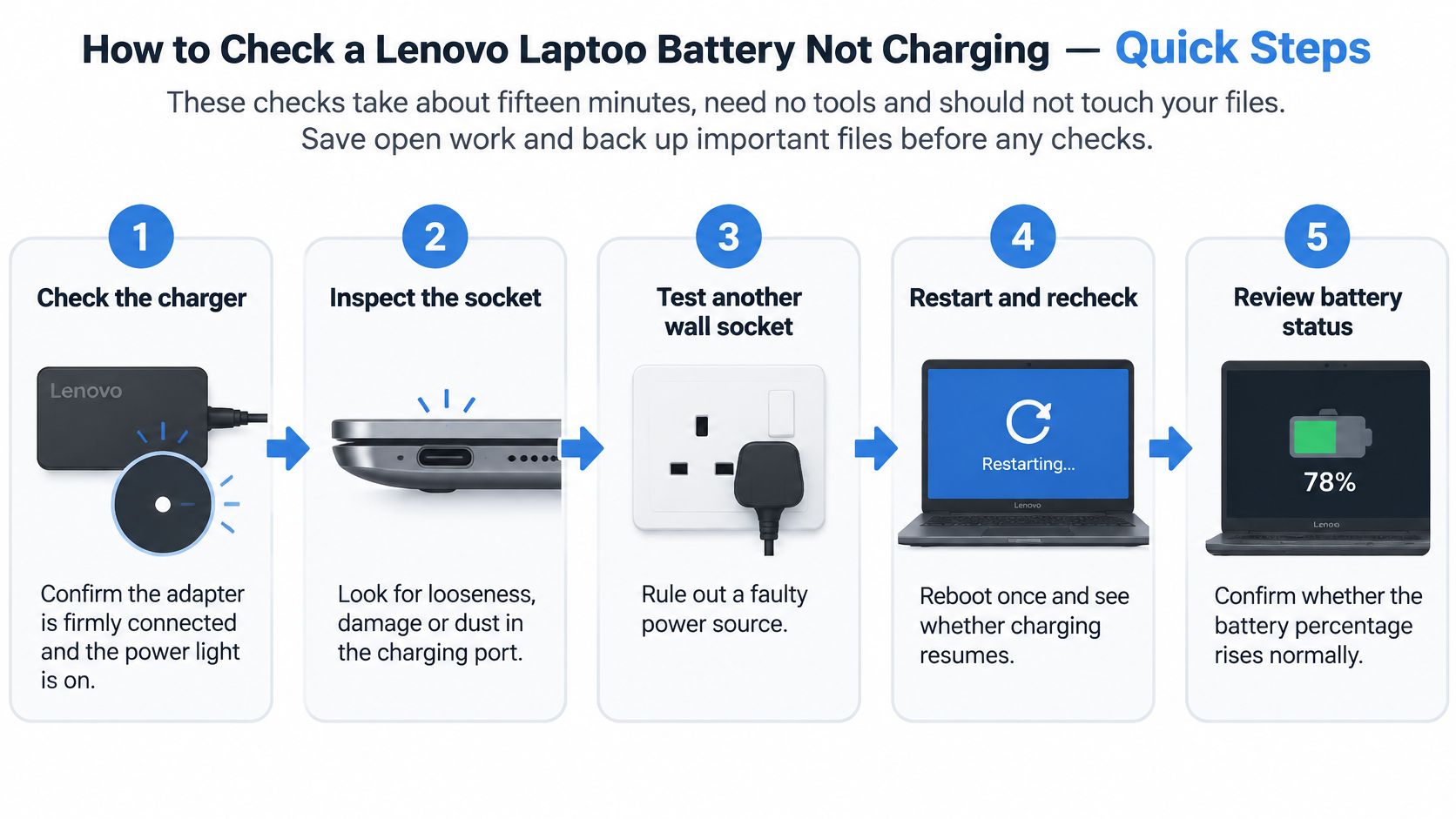
- Adapter into the wall, not a strip. Plug the Lenovo AC adapter straight into a wall socket and check the light on the brick. A switched-off extension or a blown plug fuse produces the same dead-battery symptom, and it is the cheapest fix on this list.
- Inspect the run. Look along the cable, the plug, the USB-C or barrel tip and the laptop's port for bends, debris and scorch marks. Then flex the lead near both ends while the laptop is connected: a charge light that flickers as you move the cable puts the fault in the lead or the port.
- Record the percentage. Note what the Windows battery icon reads before you change anything. Every later step gets judged against that number, and "it was on 43 and now it's on 51" is a result you can act on.
- Read Lenovo Vantage. Open Vantage and go to Device > My Device Settings > Battery. You want two things off this screen: the health status field and any charge threshold. A limit set here appears as a setting you can change rather than a symptom, and this is the only screen that tells you which of the two you're looking at.
- Lift the limit and watch. If Conservation Mode or a custom threshold is on, switch it off, leave the laptop connected and give it ten minutes. A percentage that starts climbing closes the case at zero cost.
- Hard reset. Shut down, unplug everything, hold the power button for about 30 seconds, reconnect the adapter and start up. Residual power in the embedded controller can hold charging off even with a healthy pack and a good adapter.
- Try a known-good adapter. Borrow or buy a Lenovo adapter of the same wattage and tip and repeat the test. A brick whose light still comes on can still fail under load, and a laptop that charges on a second adapter convicts the first one for far less than the price of a battery.
- Rule the battery in last. If a second adapter, a clean port and a reset still leave the percentage stuck, the pack or its charging circuit is what remains. That is the point where the diagnosis has earned the cost of a replacement, and not before.
Most current Lenovo laptops run sealed packs, so only remove the battery where your model's manual marks it as user-removable. On anything sealed, the eight steps above are the full extent of safe DIY diagnosis. Lenovo's own staged troubleshooting procedure for ThinkPad models follows the same order, and it is worth reading before you escalate. Lenovo doesn't publish a success rate for these steps, so treat any percentage you see quoted online as guesswork.
The same sequence works on Lenovo tablets, which share the charging logic and often the same USB-C hardware, as we cover in our guide to a Lenovo tablet not charging.
Our Experience Refurbishing This Model at Used Mobiles 4 U
A Lenovo that will not charge often still has a usable pack fitted. Condemn the battery last. The adapter, the DC-in port and a charge limit fail more often, and each of those is cheaper to prove than a new cell.
Leave the laptop closed until the power side has been checked.
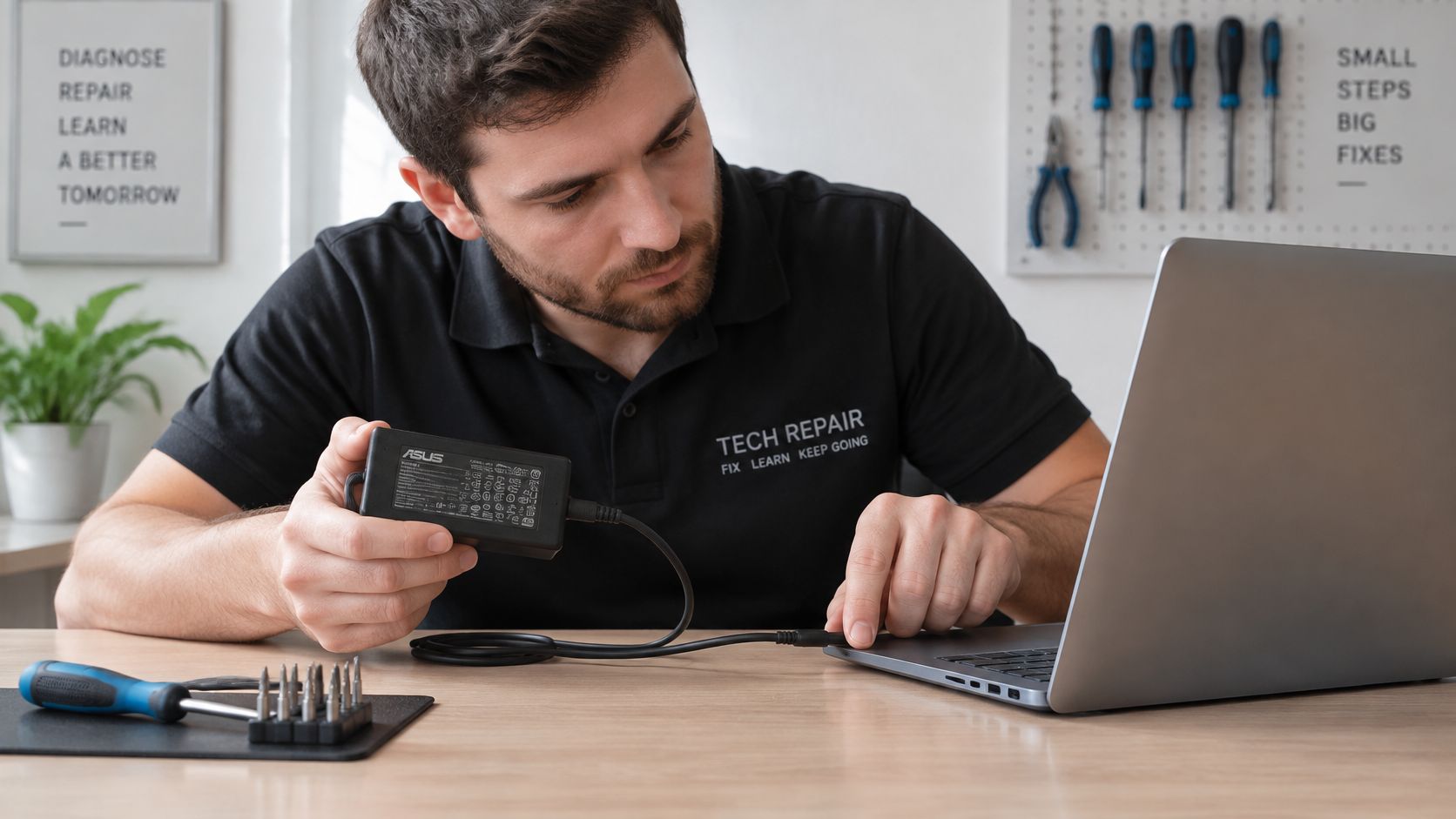
Read the health figure only after the plug and the socket have had a fair test. A barrel jack that makes contact at one angle is a port repair, not a battery job. The same applies when the jack rocks in its housing or the surround is cracked. Lenovo reports battery health in bands from Good down to Poor (Lenovo support). That band is a starting point. It is not, on its own, a reason to order a pack.
Cosmetic grade and battery condition are different things, and that split catches buyers. A clean case can hide a tired cell. A scuffed chassis can still carry a healthy one, so the photos will not settle the charging fault. Polished palm rests, a loose DC jack and worn hinges show how hard the machine has been used. None of those marks stops charging by itself. Together they tell you the machine has had a hard life, which is a reason to check the port carefully before you spend on a battery.
I would repair the port or change the adapter when the fault sits there, and leave the pack alone. Replace the battery only when the health band and the capacity data both support it, not because a support script landed on that page first.
Use that same order on any used Lenovo, including one from a refurbisher. Used Mobiles 4 U sells refurbished Lenovo laptops for work and home. One listing in that range is the Lenovo IdeaPad 4G – Silver – 256GB – Excellent. The listing name is what you can take from the page. Still prove the adapter and the port on the machine in front of you before you decide the battery is the fault.
What Buyers Usually Ask Us About Charging Problems
Buyers ask about rights and charge limits long before they ask which pack to order. Get those answers first. A new battery is the expensive step, and it is usually the wrong one until the adapter, the port and any charge threshold have been ruled out.
Plugged in, not charging can be normal. A charge limit, or a pause once the pack is near full, produces that message. Open Lenovo Vantage and read the threshold before you treat it as a fault. I would check the adapter and the socket in the same sitting. A limit is a setting you can change, and a loose jack costs less than a battery.
A charge threshold is not wear. A charge limit is a setting. Battery wear shows up in health and capacity readings.
A swollen pack stays closed. Opening a lithium pack is the part of this job that can seriously hurt you. Fit a replacement only after the adapter, the port and the threshold checks are done, and only if the pack is not swollen.
A laptop that fails soon after you buy it is a claim against the retailer. This is general information, not advice on a specific claim. The Consumer Rights Act 2015 gives a 30-day short-term right to reject faulty goods for a refund, and later faults can still qualify for repair or replacement when the goods do not conform to the contract (Citizens Advice). You generally need to accept only one repair or replacement before a price reduction, or rejection and a refund. Claims made later can be harder, because you may have to show the fault was not misuse or accidental damage.
Statutory rights against the retailer still apply when a guarantee is in place. The retailer is who you claim against. A manufacturer's guarantee does not replace that route.
Practical rule: keep the proof of purchase, photograph the charger and the battery screens, and contact the seller early rather than in the last week of cover.
Eligible devices we sell carry an 18-month device warranty and 12-month battery cover, so a fault is better logged on day three than day three hundred. Our Lenovo laptop warranty page sets out how a claim runs.
Repair or Replace, and How to Stay Safe
Replace the battery only when the adapter, the socket and any charge limit are ruled out and the pack still won't reach full charge after a night on mains. Everything before that point is cheaper, and it's where the fault usually turns out to be.
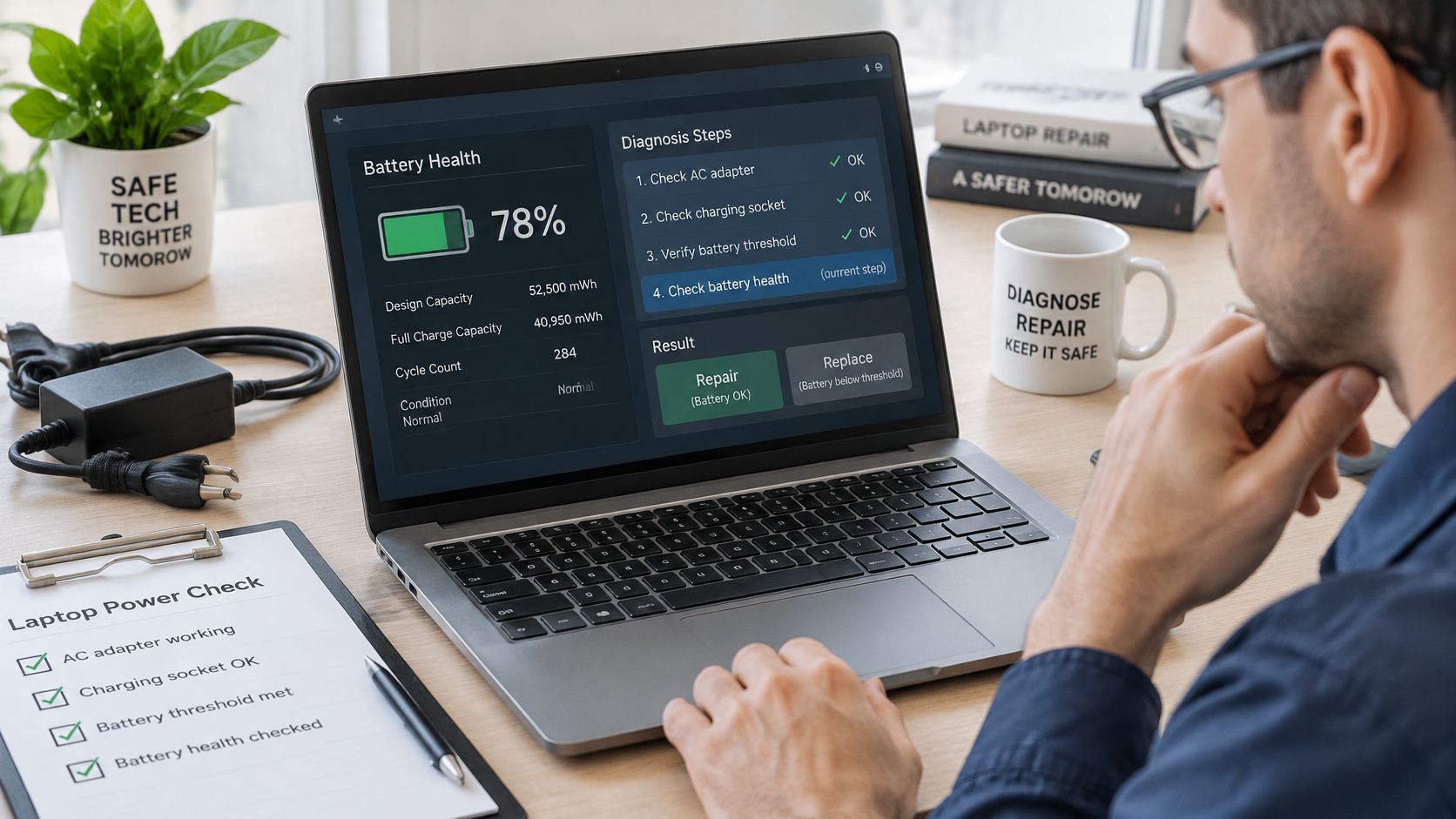
What the battery report tells you
The Windows battery report and the adapter wattage check are already set out under Our Experience Refurbishing This Model at Used Mobiles 4 U. Run both before you price a new pack. A wide gap between design capacity and full-charge capacity means the cells have worn. Packs in that state often still cover a normal working day, so capacity loss on its own is a weak reason to buy a battery.
If the report looks poor, do one recovery pass rather than a string of deep discharges. Lenovo support says thermal and embedded-controller protection can hold charging off, and that for supported models the recovery routine is to use the laptop below 20% and then charge to 100%. Let the machine cool, shut it down fully, then try that single cycle on the correct wall adapter. Repeating the flatten just stresses a tired cell.
Safety rules before any battery work
- Never puncture, pry open or bypass a swollen pack. A damaged lithium cell is a fire risk.
- Stop charging on any sign of swelling, heat, smell or a cracked casing. Power down and get it assessed.
- Don't deep-cycle a suspect battery as a habit. One recovery cycle is a test. Doing it again and again shortens the pack further.
- Back up before any repair or firmware work. A machine that loses power mid-update can lose data as well as time.
While you decide
Keep the laptop on mains with a conservation limit set for daily use, stand it on a hard surface rather than a duvet or cushion, and leave the vents clear. Heat ages a pack faster than anything else. The same laptop on soft furnishings runs hotter than it does on a desk.
If the machine only misbehaves when it's warm, cool it, clear the vents and retest before you decide on a battery.
Who this suits and who should stop
Running Vantage and a battery report is within reach for most owners, and it's the cheapest hour you'll spend on a Lenovo laptop battery not charging. Stop and get professional help if the pack is swollen, hot or cracked, if you've no backup of the files on it, or if opening the chassis needs tools and confidence you don't have.
A laptop past a sensible repair can still be sold on through our sell your broken laptop service. Weigh that against the cost of parts on a chassis that has already had its day.
If the checks above have taken you as far as they can and the pack really is finished, Used Mobiles 4 U supplies tested refurbished Lenovo laptops for work and home, each graded clearly so you know what's arriving before you pay. We also buy back faulty and unwanted tech, so a machine with a tired battery isn't dead money. Visit Used Mobiles 4 U to see current stock and weigh it against the cost of a repair.
Looking for a refurbished phone?
Shop professionally tested refurbished iPhones and Samsung phones with 18 month warranty, 30 day returns and free UK delivery.
Browse Refurbished Phones