


MacBook Trade in Value UK: What Yours Is Worth in 2026

09/11/2026

11 Mins

Check your MacBook trade in value in the UK, what lowers the offer, and whether trade-in, private sale or repair makes sense.
Don't chase the highest headline maximum. Your MacBook trade in value depends on the exact model, chip, memory, storage, battery condition and cosmetic grade, and the final figure is only confirmed after inspection.
The Short Version
There's no single price for a MacBook Pro or MacBook Air. Two machines with the same name can differ by year, storage and battery wear enough to sit in completely different price bands.
- Exact model first: Quote the model year, chip, memory and storage, not just the product family.
- Clean and working wins: Cosmetically clean Macs with higher storage sit near the top of published ranges.
- Faults reduce, rarely erase: An older or faulty Mac usually still has some residual value.
- Maximums are ceilings: Advertised top figures apply to specific high-specification machines in strong condition.
- Estimates are conditional: The offer can change if the Mac doesn't match your description on arrival.
Use the example figures below to see how condition and storage move a price, then work through the estimate steps before you agree to post anything.
What Your MacBook Is Worth in the UK
Start with one concrete configuration, because averages hide the deductions that matter. The example below uses one published UK trade-in table for a 2026 14-inch MacBook Pro with M5 Pro and 48GB RAM.
What Those Numbers Tell You
That UK trade-in table for this MacBook Pro configuration lists £1,550 in excellent condition, £1,317 in fair condition and £775 when faulty at 1TB. Fair condition keeps about 85% of the excellent offer, a drop of £233, while faulty condition keeps 50%, a drop of £775.
That's the first lesson. Honest wear costs money, but a functional fault usually costs much more. A scuffed lid and a dead port aren't equivalent problems, and you shouldn't describe them as if they are.
Storage is the second lever. At excellent condition, moving from 1TB to 2TB adds £250, and moving to 4TB adds £750 over 1TB. Buyers pay for storage they can't add later, so check your actual SSD size rather than guessing from memory.
Treat this as one example for one configuration, not a promise for every MacBook. Apple's own figures also move by category and specification, so use Apple's UK trade-in page, which advertises UK Mac estimates from £50 to £1,610 and a MacBook Pro maximum of £1,035, as a reference point rather than your expected payment.
Practical rule: Compare exact model, storage tier and condition category. "MacBook Pro" on its own tells a buyer almost nothing.
The grade you can support is the biggest factor under your control. Establish it properly before requesting quotes.
How to Estimate Your MacBook's Value, Quick Steps
A useful estimate takes about twenty minutes with the Mac on your desk and its charger nearby. Work in two stages, identifiers first, then function and cosmetics separately.
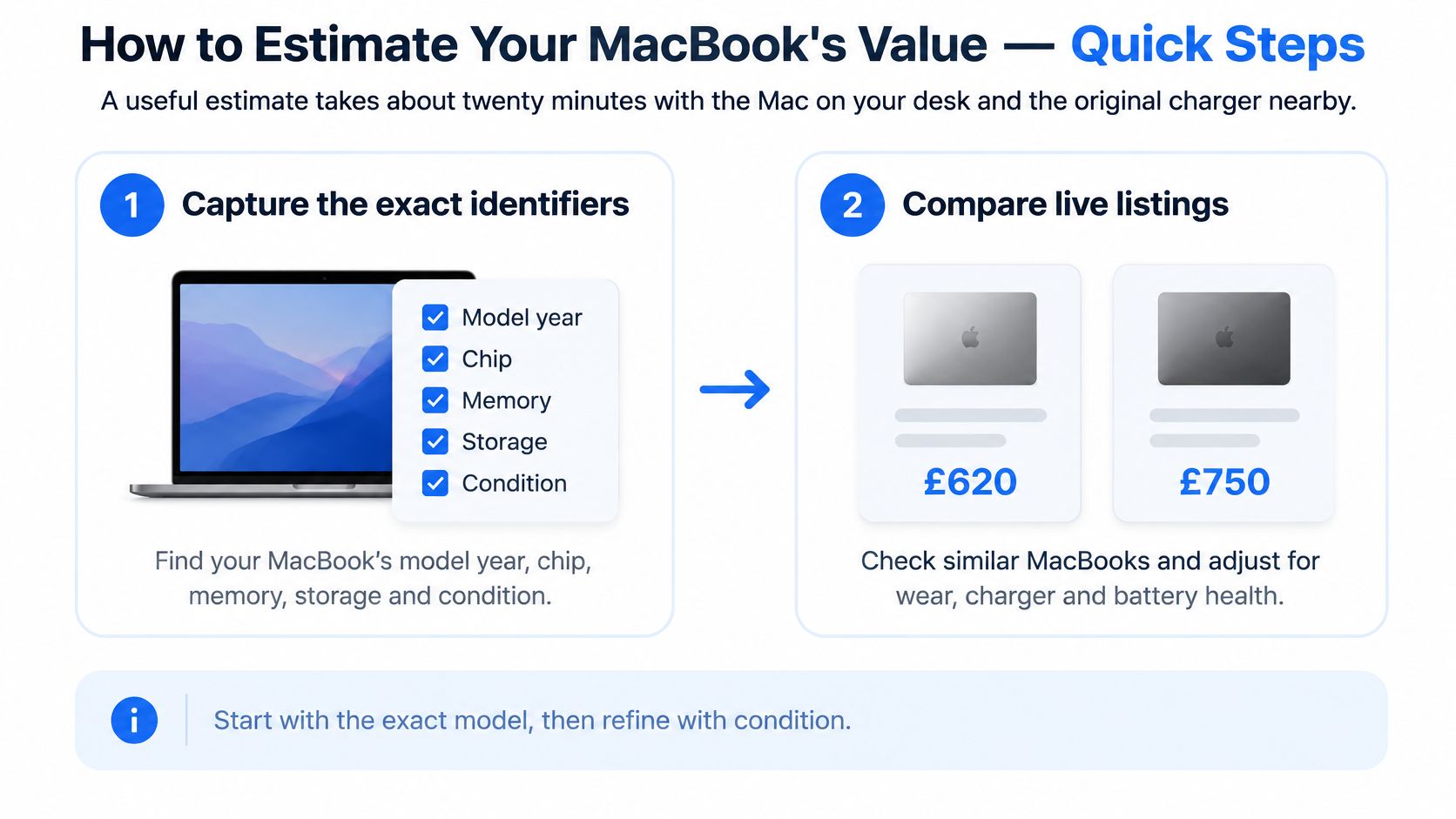
- Find the exact model: Choose Apple menu > About This Mac. Note the model year, chip, memory, storage and serial number, because every serious quote needs them.
- Record battery figures: Open Apple menu > System Settings > Battery > Battery Health. Then hold Option, choose Apple menu > System Information > Power, and record cycle count and maximum capacity. Our guide to checking MacBook battery health walks through the screens.
- Test functions on the charger: Try every key row, trackpad click, port, speaker, camera and Wi-Fi. Confirm it charges while you're using it, not only while it's asleep.
- Check Activation Lock: Open System Settings > [your name] > iCloud > Find My Mac. It needs to be off before transfer, because a locked Mac may be refused.
- Grade cosmetics carefully: Note dents, scratches, screen marks, hinge wear and shiny or missing key caps. Photograph each side, the keyboard, the display and the serial number screen.
- List accessories: Write down the charger wattage, cable type and whether you've got the box. Don't assume a phone charger is an acceptable substitute.
- Get comparable quotes: Send two or three buyers the same written description and photographs. If you also research thrift finds for resale, use the same discipline, exact item first, condition second, headline price last.
Apple states that values vary by condition, year, configuration and country or region of original sale on its UK MacBook Air buying page, and the final amount depends on the received device matching the estimate. That is why your notes matter.
Back up with Time Machine before any erase or reset, and don't wipe the Mac until the route and quote are agreed.
Battery, Ports and Faults That Lower the Offer
The headline figure on a trade-in questionnaire assumes a clean machine. Most of the gap between that figure and the final offer comes from a short list of checks, so use this table to decide what to disclose, fix or accept before posting.
Battery condition should stand apart from cosmetic grade. A tidy Mac can still need battery work, and a worn case doesn't prove the battery is poor. Report the two separately, because a buyer grading them together will usually take the lower of the two. Apple's UK MacBook Pro page sits alongside trade-in guidance identifying working keys, trackpad, display and enclosure, no obvious liquid contact, and the power adapter where applicable, as eligibility checks.
Keep the original charger with the machine. A missing adapter creates a real replacement cost for the next owner, so expecting no deduction isn't realistic.
For a machine that's already faulty, our page on how to sell your broken laptop explains the disclosure basics. Specification detail shapes grading too: a listing such as Apple MacBook Pro 13" (2020) – i5, 256GB – Silver – Like New gives the screen size, chip family, storage, colour and grade, rather than relying on the model name alone.
If you're unsure whether something counts, describe it precisely. Choosing the most favourable questionnaire answer only delays the deduction until inspection, and a lower quote that survives inspection beats a higher one that gets revised on arrival.
When to Trade In and When to Wait
A Mac generally loses value as it ages, and the fall can feel sharper once a newer chip becomes the obvious replacement. Waiting rarely improves a quote. It mainly gives the battery, hinge, screen and keyboard more time to develop the faults buyers price down.
Check a quote every few months if you're undecided, and always before buying a replacement. Our guide to how long MacBooks last helps judge whether yours still has useful life for your work or study, which is separate from what a buyer will pay today.
Act sooner if you notice these triggers:
- Battery slipping noticeably: Shorter unplugged use can move the battery grade before the case shows age.
- Hinge or screen damage: Cracks and loose hinges tend to worsen with normal opening and closing.
- Keyboard starting to fail: Repeated, missed or sticky keys turn a cosmetic discussion into a functional one.
Line up the replacement before posting your only computer. Trade-in credit may be tied to a purchase, while a private buyer pays after they're satisfied, so timing affects your cash flow as well as convenience.
Ask three questions. Do you need the money soon? Does the Mac still suit your work? Would one sensible repair change its grade enough to matter?
Our Experience Refurbishing This Model at Used Mobiles 4 U
On the bench, wear shows on keyboards, palm rests and hinges long before it shows in daily performance. A Mac can feel quick at a desk while its keys are polished smooth, its corners are dented and its hinge has started to creak.

Battery and Common Faults
We grade the recorded cycle count and maximum capacity, because the year printed on the bottom case tells you little on its own. Charging habits, heat and long periods plugged in under load mean two Macs of the same age can return very different battery figures when tested side by side.
The faults that move a quote most are the ones owners rarely report. Liquid indicators can trigger without the owner knowing, and former business machines need checking for management or firmware locks before anything else. Those findings decide whether a machine is suitable for resale at all, so they come before cosmetic grading.
Every machine goes through a 50-step check, and repair only proceeds where the fix fits the finished value of that exact model and specification. Where the numbers don't work, the machine leaves the resale line for parts recovery or responsible recycling.
Grades and Repair Decisions
Grading is where a provisional quote becomes a real one. The description sets the estimate; the inspection sets the offer.
A quote stays provisional until someone has inspected the actual Mac, not the description you hoped was close enough.
Apple asks condition questions to produce an estimate, then checks the machine after arrival. If condition doesn't match the description, Apple sends an email explaining the next steps. Weighing that final figure against replacement pricing on Apple's UK MacBook Air page is a quick sanity check before you accept a revised offer.
At the same budget, we'd compare an Air and a Pro by workload, ports, screen and storage rather than badge alone. For ordinary study and office work, the lighter machine is often the better buy. For sustained heavier work, the Pro specification can justify its premium, provided battery and keyboard condition are sound. The same comparison applies to the refurbished MacBook Air and MacBook Pro laptops we sell for work, study and everyday use, where the grade on a specific machine tells you more than the model name on the lid.
What We Commonly See
- Palm rest shine: Heavy use appears around the trackpad and space bar first, even when the rest of the case looks clean.
- Corner damage: Small dents suggest drops, so the hinge and screen get a closer check before grading.
- Charger mismatch: Low-power or damaged adapters complicate charging tests and resale.
Our repair-or-remove rule is simple. Repair when the fix restores reliable use and fits the machine's value. Recover usable parts or send it for responsible recycling when it doesn't. Every machine that does go back on sale is securely data-wiped first.
Is Trade-In Worth It for Your MacBook?
A lower offer can be the better result when it is the one still standing after inspection. Judge a route by certainty, effort, payment timing and who is responsible for erasure, then read the headline figure last.
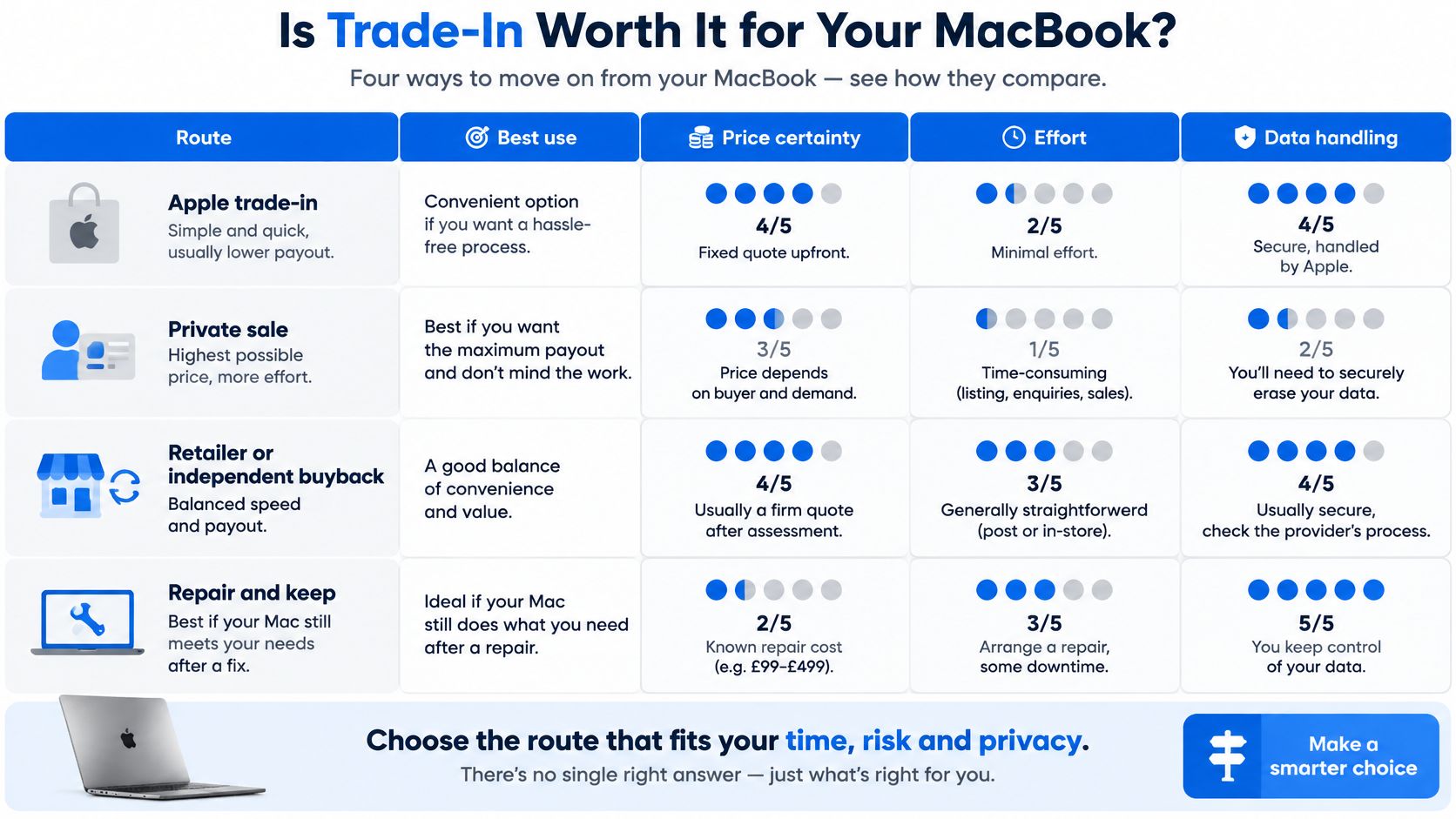
Apple's UK business trade-in page advertises Mac estimates from £45 to £1,375, with headline maximums of £895 for MacBook Pro and £620 for MacBook Air. Use that as the business-route ceiling for eligible configurations. Apple's consumer UK page can show a higher MacBook Pro ceiling because it quotes a different route and configuration set, so match the page to the way you plan to trade.
Post-arrival inspection is where storage size, battery condition and declared faults stop being estimates and start becoming deductions. A slightly lower quote from a defined buyback can beat a higher private listing once messages, no-shows and a second erasure check are priced in.
Our laptop trade-in guidance for UK owners is useful if you're comparing a defined buyback route with selling privately. Used Mobiles 4 U offers a Sell Your Tech service, devices are securely data-wiped before resale, and the business also sells refurbished MacBooks, Lenovo laptops and tablets.
Choose the Route That Fits
Choose trade-in if:
- You want simplicity: You value a defined process over managing a sale.
- You're buying Apple anyway: Credit towards the replacement suits your plans.
- You want handling settled: Secure erasure and onward processing matter to you.
Choose private sale if:
- It's recent and clean: The Mac works fully and photographs well.
- You've got time: You can handle messages, questions, viewings and payment risk.
- The premium is real: The expected gain justifies the extra work.
Choose repair and keep if:
- One fault causes the problem: A battery or keyboard issue is the main barrier.
- It still suits you: Performance, storage and screen size meet your needs.
- The repair is proportionate: The cost makes sense against replacement.
For most owners with a working, clean Mac and limited time, I'd choose trade-in or a defined buyback. Sell privately only when the machine is recent enough to reward the effort. Avoid posting a Mac with a swollen battery or serious liquid damage until you've had professional advice, and don't use any route if you're not prepared to declare faults accurately.
Your MacBook trade in value is worth calculating properly, and the right result is the one that survives inspection without surprises. Check your machine through Sell Your Tech or browse refurbished MacBooks if you're deciding on the replacement at the same time.
If your MacBook is ready to move on, get an accurate description together and check its value through our Sell Your Tech service, or compare tested refurbished MacBooks for work, study and everyday use. Visit Used Mobiles 4 U to start with the exact model and condition, rather than relying on a headline maximum.
Looking for a refurbished phone?
Shop professionally tested refurbished iPhones and Samsung phones with 18 month warranty, 30 day returns and free UK delivery.
Browse Refurbished Phones